|



antonius1
-
Posts
21 -
Joined
-
Last visited
Content Type
Profiles
Forums
Events
Downloads
Store
Articles
Everything posted by antonius1
-
Hi Tom, thank you for your efforts to solve the problem. For the next months, i will stay with XP. I configured my cab not to use the InGame-menu, and so i can use PinballX without any further issues. Kind regards from bavaria Antonius
-
Hello Tom, thank you for the new version. Unfortunately the new version has the same behaviour as the previous versions. If i don't use InGame, every thing works fine. But pressing InGame-button does not open the InGame-menu. The table and backglass disappears for about 0.5 seconds, and then reappear. After once pressing InGame-button, exiting a table via QuitEmulator crashes PinballX. If i don't use the InGame-button, everything works perfect, even exiting a table via QuitEmulator-button. Here is my current logfile. The other configuration files are attached at my last posting. Regards from Bavaria Antonius log.txt
-
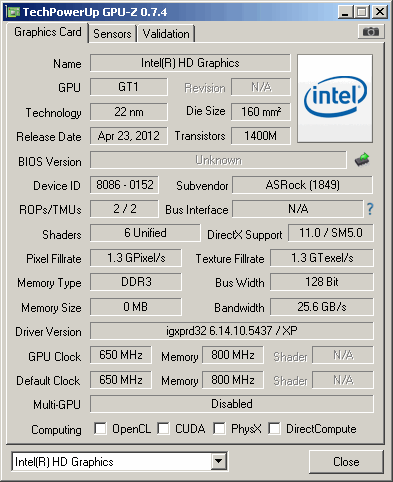
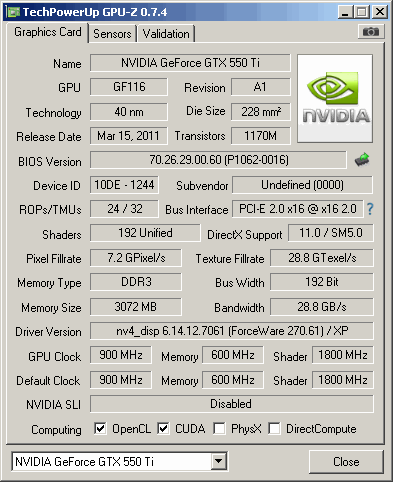
As i described above: With Ingame button i can't leave the table. Playfield and backglass are going black for about 0.5 seconds, and then the table returns. If i don't use the Ingame button, all seems to work perfect, i can exit the table with the ExitEmulator key, and i can leave PinballX with the Quit key. But once i have pressed the Ingame key then leaving the table with the ExitEmulator key will crash PinballX. I have now reconfigured my buttons. I try to use PinballX without Ingamefunction. Here are more infos of my system: OS: Windows XP x32 Professional V5.01 Build 2600 Service Pack 3 CPU: Intel Core i5 Quad 3570 (Ivy Bridge) 3.40GHz [E1] RAM: 4GB GPU1: Intel HD 3000 Builtin in motherboard/CPU for the DMD Display (17" at 1280x1024) GPU2: NVidia GeForce GTX 550 Ti with driver Ver: 270.61 for Playfield (FullHD) and Backglass (FullHD) I also use DOF with a Ledwiz for RGB-Leds and other toys. I have forgotten: I don't use any videos. So i don't have installed any codecs. log.txtPinballX.ini
-
The same for me. With Ingame button i can't leave the table. Playfield and backglass are going black for about 0.5 seconds, and then the table returns. If i don't use the Ingame button, all seems to work perfect, i can exit the table with the ExitEmulator key, and i can leave PinballX with the Quit key. But once i have pressed the Ingame key then leaving the table with the ExitEmulator key will crash PinballX. I have now reconfigured my buttons. I try to use PinballX without Ingamefunction. I downloaded the V1.57 from above. This version seems to be V1.58. I have the same problems with it.
-
I will try V1.57 and v1.68 tomorrow. I have WinXP and Nvidia too. I Use the Nvidia driver V.270
-
Hi Tom, i did some testing with the latest version: Quit button during playing works as expected InGame button opens InGame menu Directb2s after InGame button and return to table works InGame button and then exit the table from within the InGame menu => crashes PinballX Quit button during playing after once going in the InGame menu and return to table => crashes PinballX Many thanks for your work to solve this problem. Best regards Antonius
-
Hi Tom, i did some testing with the version from today with the following results: Quit button during playing works as expected InGame button opens InGame menu Directb2s after InGame button and return to table works => YEAHH InGame button and then exit the table from within the InGame menu => crashes PinballX Quit button during playing after once going in the InGame menu and return to table => crashes PinballX It seems to be the same result as with the second version from yesterday. Thank you very much for working on resolving the problems. Best regards Antonius
-
I have only one Exit button in my cab. I have configured the InGame key and the Quit key to this Exit button. So if i press the Exit button during playing in table, the InGame menu appears, and i can leave the table using the InGame menu. I don't use the ExitEmulator key. [KeyCodes] quit=69 left=37 right=39 select=49 rotate=82 pageleft=33 pageright=34 exitemulator=27 ingame=69 screenshot=83 screenshotbackglass=66 instructions=73
-
Hi Tom, i did some testing with the two versions from today. With the first version I had following results: Exit button during playing works as expected InGame button works as expected Directb2s after InGame button and return to table works not ( It's in the background) Exit button during playing after once going in the InGame menu and return to table => crashes PinballX With the second version I had following results: Exit button during playing works as expected InGame button opens InGame menu Directb2s after InGame button and return to table works => YEAHH InGame button and then exit the table from within the InGame menu => crashes PinballX Exit button during playing after once going in the InGame menu and return to table => crashes PinballX Best regards Antonius log_V1_1.txtlog_V1_2.txtlog_V2_1.txtlog_V2_2.txt
-
I will try the new versions when i'm back from work. Thanks.
-
Hi Tom, i have tested the actual version above. It's the same. The InGame-menu doesn't appear, and pressing Exit crashes PinballX. I have checked the GameManager. On every table the hide backglass and the hide dmd is marked with a cross. My config includes Nvidia and XP SP3. I think, the most cabs run with this combination, because this is recommended at VPForums. I'm using Nvidia driver Version 270 because every newer verson slows down VP extreme. Best regards Antonius 23:24:19.3 21.10.2013: PinballX - Version 1.67 23:24:19.3 21.10.2013: Loading Settings 23:24:19.3 21.10.2013: Initialize Component 23:24:19.4 21.10.2013: Initialize Display 23:24:19.4 21.10.2013: Loading PlugIns 23:24:19.5 21.10.2013: Created DirectX BackGlass Window 23:24:19.5 21.10.2013: Hiding Cursor 23:24:19.5 21.10.2013: Hiding Taskbar 23:24:19.5 21.10.2013: Load Game List 23:24:19.5 21.10.2013: Loading Database: Visual Pinball 23:24:19.5 21.10.2013: Finding and matching artwork and videos 23:24:19.9 21.10.2013: Loading Game Statistics and Scores 23:24:20.7 21.10.2013: Initialize Audio 23:24:20.8 21.10.2013: Set Keyboard Controls 23:24:20.8 21.10.2013: Initialize Joystick 23:24:20.9 21.10.2013: 1 Joystick Attached 23:24:20.9 21.10.2013: Started 23:24:51.3 21.10.2013: Launch System 23:24:51.3 21.10.2013: Waiting for threads 23:24:51.3 21.10.2013: Disposing display 23:24:52.4 21.10.2013: C:\Programme\Visual Pinball\VPinball.exe /play -"C:\Programme\Visual Pinball\Tables\ARFM_VP91x_v2.3FS.vpt" 23:24:52.4 21.10.2013: C:\PinballX\vpauto.exe 23:24:57.6 21.10.2013: Found PinMAME ROM: afm_113b.nv 23:25:02.3 21.10.2013: In Game: Error Initializing Display 23:25:04.7 21.10.2013: In Game: Error Initializing Display 23:25:06.7 21.10.2013: In Game: Error Initializing Display 23:25:08.6 21.10.2013: In Game: Error Initializing Display 23:25:10.4 21.10.2013: In Game: Error Initializing Display 23:25:12.3 21.10.2013: Exit System Control Pressed 23:25:15.1 21.10.2013: Error. Exiting 23:25:15.1 21.10.2013: Error in the application. 23:25:15.1 21.10.2013: at Microsoft.DirectX.Direct3D.Device..ctor(Int32 adapter, DeviceType deviceType, Control renderWindow, CreateFlags behaviorFlags, PresentParameters[] presentationParameters) 23:25:15.1 21.10.2013: at Direct2D.Direct2d.Device..ctor(Form FormHandle, Int32 Width, Int32 Height, Boolean Windowed, Boolean VSync, Boolean Display16Bit, Int32 DisplayNbr, Int32 RefreshRate) 23:25:15.1 21.10.2013: at PinballX.Main.b(Boolean A_0, Boolean A_1, Boolean A_2) 23:25:15.1 21.10.2013: at PinballX.Main.ac() 23:25:15.1 21.10.2013: at PinballX.Main..ctor() 23:25:15.1 21.10.2013: Disposing Plugins 23:25:15.1 21.10.2013: Showing Taskbar 23:25:15.1 21.10.2013: Unhiding Mouse Cursor
-
Hi Tom, I have tested the new version above. For me this version is bad. The InGame-menu doesn't appear, and pressing Exit crashes PinballX. I have reinstalled the older version. With the older version I did some test with the directb2s. It seems, that the directb2s is running when I return from Ingame-menu to normal playing. The directb2s is only hidden behind the black PinballX-backglass. I can switch the directb2s to foreground with Alt-Tab. But this is not very usefull in a cab. Thanks anyway for your incredible work. Can you tell us more about the weird issue we have? Can we just reorganize something in our config? Best regards from bavaria Antonius
-
Yes, a hard coded delay could be a reason. But it is not a problem for me. I put the link to PinballX in the autostart-folder, and so it starts fast. I use PinballX in my cab, so I want to start it automatically. I was only a little bit confused about this. Thanks.
-
Sorry, I explained this wrong. The start of PinballX is even slowlier when I start it manually from desktop after I closed it manually. If I uncheck the option ' Start with windows', PinballX will start much faster from desktop.
-
I've now tested 18 tables in one PinballX-session. There was no crash. But I don't use the Exit-table-button. I've only one Exit-button in my cab and i configured this button to InGame and Exit-PinballX. So when i'm in a table i press InGame and leave the table with the Ingame-menu. I made another test with the Exit-table button with my keyboard. I started and exited 14 tables with the exit-table-button without any crash. The only thing I've mentioned is after pause a game and reenter in the game, the directb2s-backglass went away. And there is another odd thing: I set the option 'Start with windows'. If i set this option PinballX started slowlier. Can somebody confirm this? log_with_Exit.txtlog_with_InGame.txt
-
Hi Tom, I've tested the new version in my cab with VP. This version is almost perfect. I can exit VP-tables to PinballX without crashing. The InGame-Button works also After pressing the InGame-Button, the menu appears. The only odd thing is, when I press the InGame-Button and then go back to the VP-table, then the backglass went away. I have to exit the table and restart the table then the backglass starts. I use directb2s backglasses. Here is my logfile: 15:32:21.9 18.10.2013: PinballX - Version 1.67 15:32:21.9 18.10.2013: Loading Settings 15:32:21.9 18.10.2013: Initialize Component 15:32:21.9 18.10.2013: Initialize Display 15:32:21.9 18.10.2013: Loading PlugIns 15:32:22.0 18.10.2013: Created DirectX BackGlass Window 15:32:22.0 18.10.2013: Hiding Cursor 15:32:22.0 18.10.2013: Hiding Taskbar 15:32:22.0 18.10.2013: Load Game List 15:32:22.0 18.10.2013: Loading Database: Visual Pinball 15:32:22.0 18.10.2013: Finding and matching artwork and videos 15:32:22.4 18.10.2013: Loading Game Statistics and Scores 15:32:23.3 18.10.2013: Initialize Audio 15:32:23.3 18.10.2013: Set Keyboard Controls 15:32:23.4 18.10.2013: Initialize Joystick 15:32:23.4 18.10.2013: 1 Joystick Attached 15:32:23.4 18.10.2013: Started 15:32:29.9 18.10.2013: Launch System 15:32:29.9 18.10.2013: Waiting for threads 15:32:29.9 18.10.2013: Disposing display 15:32:31.0 18.10.2013: C:\Programme\Visual Pinball\VPinball.exe /play -"C:\Programme\Visual Pinball\Tables\TAF VP91X FS 2.0.1.vpt" 15:32:31.0 18.10.2013: C:\PinballX\vpauto.exe 15:38:14.3 18.10.2013: Created DirectX BackGlass Window 15:38:16.2 18.10.2013: Exit System Control Pressed 15:38:18.5 18.10.2013: Created DirectX BackGlass Window 15:38:24.5 18.10.2013: Launch System 15:38:24.5 18.10.2013: Waiting for threads 15:38:24.5 18.10.2013: Disposing display 15:38:25.7 18.10.2013: C:\Programme\Visual Pinball\VPinball.exe /play -"C:\Programme\Visual Pinball\Tables\STTNG_VP916_HD_GI_MOD_1.0.vpt" 15:38:25.7 18.10.2013: C:\PinballX\vpauto.exe 15:38:30.9 18.10.2013: Found PinMAME ROM: sttng_s7.nv 15:43:26.2 18.10.2013: Created DirectX BackGlass Window 15:43:49.1 18.10.2013: Created DirectX BackGlass Window 15:43:51.7 18.10.2013: Exit System Control Pressed 15:43:54.1 18.10.2013: Created DirectX BackGlass Window 15:44:04.7 18.10.2013: Exiting You made my day!!! :D :D :D Thank you very much. Antonius
-
Hello Tom, thank you very much for your hard and fast work!!!! I did some tests with the version from today 03:22 PM: If I start a VP-table I can now exit this table and come back to PinballX. Yeah!! This worked for me a few times. This seems to be independent from the config of 'Hide DMD' or 'Hide Backglass'. But once I pressed the InGame-Button which causes an error in the log, the next try of exit a table to PinballX ends in a crash of PinballX. This meens, if I do not use the InGame-Button, then all works perfect. This is also independent from the config of 'Hide DMD' or 'Hide Backglass'. Here is my logfile: 22:42:43.8 17.10.2013: PinballX - Version 1.67 22:42:43.8 17.10.2013: Loading Settings 22:42:43.8 17.10.2013: Initialize Component 22:42:43.8 17.10.2013: Initialize Display 22:42:43.9 17.10.2013: Loading PlugIns 22:42:43.9 17.10.2013: Created DirectX BackGlass Window 22:42:44.0 17.10.2013: Hiding Cursor 22:42:44.0 17.10.2013: Hiding Taskbar 22:42:44.0 17.10.2013: Load Game List 22:42:44.0 17.10.2013: Loading Database: Visual Pinball 22:42:44.0 17.10.2013: Finding and matching artwork and videos 22:42:44.3 17.10.2013: Loading Game Statistics and Scores 22:42:45.2 17.10.2013: Initialize Audio 22:42:45.3 17.10.2013: Set Keyboard Controls 22:42:45.3 17.10.2013: Initialize Joystick 22:42:45.3 17.10.2013: 1 Joystick Attached 22:42:45.3 17.10.2013: Started 22:42:56.7 17.10.2013: Launch System 22:42:56.7 17.10.2013: Waiting for threads 22:42:56.7 17.10.2013: Disposing display 22:42:57.8 17.10.2013: C:\Programme\Visual Pinball\VPinball.exe /play -"C:\Programme\Visual Pinball\Tables\ARFM_VP91x_v2.3FS.vpt" 22:42:57.8 17.10.2013: C:\PinballX\vpauto.exe 22:43:03.0 17.10.2013: Found PinMAME ROM: afm_113b.nv 22:43:08.2 17.10.2013: Exit System Control Pressed 22:43:11.7 17.10.2013: Created DirectX BackGlass Window 22:43:22.0 17.10.2013: Launch System 22:43:22.0 17.10.2013: Waiting for threads 22:43:22.0 17.10.2013: Disposing display 22:43:23.2 17.10.2013: C:\Programme\Visual Pinball\VPinball.exe /play -"C:\Programme\Visual Pinball\Tables\ARFM_VP91x_v2.3FS.vpt" 22:43:23.2 17.10.2013: C:\PinballX\vpauto.exe 22:43:28.4 17.10.2013: Found PinMAME ROM: afm_113b.nv 22:43:30.2 17.10.2013: Exit System Control Pressed 22:43:33.7 17.10.2013: Created DirectX BackGlass Window 22:43:43.1 17.10.2013: Launch System 22:43:43.1 17.10.2013: Waiting for threads 22:43:43.1 17.10.2013: Disposing display 22:43:44.2 17.10.2013: C:\Programme\Visual Pinball\VPinball.exe /play -"C:\Programme\Visual Pinball\Tables\AFM_vp914_v2.4FS.vpt" 22:43:44.2 17.10.2013: C:\PinballX\vpauto.exe 22:43:49.4 17.10.2013: Found PinMAME ROM: afm_113b.nv 22:43:54.9 17.10.2013: Exit System Control Pressed 22:43:58.4 17.10.2013: Created DirectX BackGlass Window 22:44:04.8 17.10.2013: Launch System 22:44:04.8 17.10.2013: Waiting for threads 22:44:04.8 17.10.2013: Disposing display 22:44:06.0 17.10.2013: C:\Programme\Visual Pinball\VPinball.exe /play -"C:\Programme\Visual Pinball\Tables\AFM_vp914_v2.4FS.vpt" 22:44:06.0 17.10.2013: C:\PinballX\vpauto.exe 22:44:11.2 17.10.2013: Found PinMAME ROM: afm_113b.nv 22:44:19.3 17.10.2013: Exit System Control Pressed 22:44:22.7 17.10.2013: Created DirectX BackGlass Window 22:44:27.0 17.10.2013: Launch System 22:44:27.0 17.10.2013: Waiting for threads 22:44:27.0 17.10.2013: Disposing display 22:44:28.2 17.10.2013: C:\Programme\Visual Pinball\VPinball.exe /play -"C:\Programme\Visual Pinball\Tables\AFM_vp914_v2.4FS.vpt" 22:44:28.2 17.10.2013: C:\PinballX\vpauto.exe 22:44:33.4 17.10.2013: Found PinMAME ROM: afm_113b.nv 22:44:37.3 17.10.2013: In Game: Error Initializing Display 22:44:41.5 17.10.2013: Exit System Control Pressed 22:44:45.0 17.10.2013: Error. Exiting 22:44:45.0 17.10.2013: Error in the application. 22:44:45.0 17.10.2013: at Microsoft.DirectX.Direct3D.Device..ctor(Int32 adapter, DeviceType deviceType, Control renderWindow, CreateFlags behaviorFlags, PresentParameters[] presentationParameters) 22:44:45.0 17.10.2013: at Direct2D.Direct2d.Device..ctor(Form FormHandle, Int32 Width, Int32 Height, Boolean Windowed, Boolean VSync, Boolean Display16Bit, Int32 DisplayNbr, Int32 RefreshRate) 22:44:45.0 17.10.2013: at PinballX.Main.a(Boolean A_0, Boolean A_1) 22:44:45.0 17.10.2013: at PinballX.Main.ac() 22:44:45.0 17.10.2013: at PinballX.Main..ctor() 22:44:45.0 17.10.2013: Disposing Plugins 22:44:45.0 17.10.2013: Showing Taskbar 22:44:45.0 17.10.2013: Unhiding Mouse Cursor Antonius
-
Ahhh, i forgot. I use only VP.
-
Hello Tom, i did some testing with your Pinballx.7z from today. I installed V1.67 again. Then I installed your new exe over the existing exe. The first time I started PinballX, there was no crash at exiting PinballX. But everytime afterwards PinballX crashed. I have still problems with the InGame/Pause. This doesn't work for me. The table and the backglass disappears for about 0.5 seconds, and then they come back. No menu is showed. Here is my log.txt: 22:30:43.4 16.10.2013: PinballX - Version 1.67 22:30:43.4 16.10.2013: Loading Settings 22:30:43.4 16.10.2013: Initialize Component 22:30:43.4 16.10.2013: Initialize Display 22:30:43.4 16.10.2013: Loading PlugIns 22:30:43.5 16.10.2013: Created DirectX BackGlass Window 22:30:43.5 16.10.2013: Hiding Cursor 22:30:43.6 16.10.2013: Hiding Taskbar 22:30:43.6 16.10.2013: Load Game List 22:30:43.6 16.10.2013: Loading Database: Visual Pinball 22:30:43.6 16.10.2013: Finding and matching artwork and videos 22:30:43.9 16.10.2013: Loading Game Statistics and Scores 22:30:44.7 16.10.2013: Initialize Audio 22:30:44.8 16.10.2013: Set Keyboard Controls 22:30:44.8 16.10.2013: Initialize Joystick 22:30:44.8 16.10.2013: 1 Joystick Attached 22:30:44.8 16.10.2013: Started 22:30:48.8 16.10.2013: Launch System 22:30:48.8 16.10.2013: Waiting for threads 22:30:48.8 16.10.2013: Disposing display 22:30:49.9 16.10.2013: C:\Programme\Visual Pinball\VPinball.exe /play -"C:\Programme\Visual Pinball\Tables\TOTAN_VP91x_3.4FS_Classic.vpt" 22:30:49.9 16.10.2013: C:\PinballX\vpauto.exe 22:30:55.1 16.10.2013: Found PinMAME ROM: totan_14.nv 22:30:59.8 16.10.2013: In Game: Error Initializing Display 22:31:02.2 16.10.2013: In Game: Error Initializing Display 22:31:05.4 16.10.2013: In Game: Error Initializing Display 22:31:07.2 16.10.2013: In Game: Error Initializing Display 22:31:09.0 16.10.2013: In Game: Error Initializing Display 22:31:11.1 16.10.2013: In Game: Error Initializing Display 22:31:13.3 16.10.2013: Exit System Control Pressed 22:31:16.0 16.10.2013: Waiting: 266 22:31:16.4 16.10.2013: Error. Exiting 22:31:16.4 16.10.2013: Error in the application. 22:31:16.5 16.10.2013: at Microsoft.DirectX.Direct3D.Device..ctor(Int32 adapter, DeviceType deviceType, Control renderWindow, CreateFlags behaviorFlags, PresentParameters[] presentationParameters) 22:31:16.5 16.10.2013: at Direct2D.Direct2d.Device..ctor(Form FormHandle, Int32 Width, Int32 Height, Boolean Windowed, Boolean VSync, Boolean Display16Bit, Int32 DisplayNbr, Int32 RefreshRate) 22:31:16.5 16.10.2013: at PinballX.Main.a(Boolean A_0, Boolean A_1) 22:31:16.5 16.10.2013: at PinballX.Main.ac() 22:31:16.5 16.10.2013: at PinballX.Main..ctor() 22:31:16.5 16.10.2013: Disposing Plugins 22:31:16.5 16.10.2013: Showing Taskbar 22:31:16.5 16.10.2013: Unhiding Mouse Cursor I tried to log all the happening with ProcessMonitor. Maybe there is a problem with DirectX on my machine. I use WinXP Pro 32bit SP3 with Directx V9.0c. Is this ok for PinballX? Thank you for your efforts. Please excuse my bad english - I'm from bavaria.....
-
Can please somebody test the Pause/InGame-Button? There should open a menu. In my case there is no menu opening, and I become an error 'In Game: Error Initializing Display' in the log, everytime pressing the Pause button. I think this error is combined with the Exit-error.
-
Hello Tom, I have the same problem. I started with PinballX V1.65. I tried to downgrade to V 1.56 but the error was the same. I tried your V1.67 and the version you provided above as 7z-file. It's always the same. I have a second problem. When I try to press the Ingame/Pause-button, then disappears the playfield and the backglass for about 0.5 seconds, and then they appear again, and I can continue playing the game. Everytime when I press the Ingame/Pause-button, an entry in the log is created 'In Game: Error Initializing Display'. I tried to update my NVIDIA-drivers, but this doesn't help. Here is one of my logs: 22:21:17.8 14.10.2013: PinballX - Version 1.67 22:21:17.8 14.10.2013: Loading Settings 22:21:17.8 14.10.2013: Initialize Component 22:21:17.8 14.10.2013: Initialize Display 22:21:17.8 14.10.2013: Loading PlugIns 22:21:17.9 14.10.2013: Created DirectX BackGlass Window 22:21:17.9 14.10.2013: Hiding Cursor 22:21:17.9 14.10.2013: Hiding Taskbar 22:21:17.9 14.10.2013: Load Game List 22:21:17.9 14.10.2013: Loading Database: Visual Pinball 22:21:18.0 14.10.2013: Finding and matching artwork and videos 22:21:18.3 14.10.2013: Loading Game Statistics and Scores 22:21:19.1 14.10.2013: Initialize Audio 22:21:19.2 14.10.2013: Set Keyboard Controls 22:21:19.2 14.10.2013: Initialize Joystick 22:21:19.2 14.10.2013: 1 Joystick Attached 22:21:19.2 14.10.2013: Started 22:21:48.3 14.10.2013: Launch System 22:21:48.3 14.10.2013: Disposing display 22:21:49.5 14.10.2013: Waiting for threads 22:21:49.5 14.10.2013: C:\Programme\Visual Pinball\VPinball.exe /play -"C:\Programme\Visual Pinball\Tables\ARFM_VP91x_v2.3FS.vpt" 22:21:49.5 14.10.2013: C:\PinballX\vpauto.exe 22:21:54.6 14.10.2013: Found PinMAME ROM: afm_113b.nv 22:21:58.3 14.10.2013: In Game: Error Initializing Display 22:22:00.9 14.10.2013: In Game: Error Initializing Display 22:22:06.5 14.10.2013: Exit System Control Pressed 22:22:08.9 14.10.2013: Waiting: 2765 22:22:11.9 14.10.2013: Error. Exiting 22:22:11.9 14.10.2013: Error in the application. 22:22:11.9 14.10.2013: at Microsoft.DirectX.Direct3D.Device..ctor(Int32 adapter, DeviceType deviceType, Control renderWindow, CreateFlags behaviorFlags, PresentParameters[] presentationParameters) 22:22:11.9 14.10.2013: at Direct2D.Direct2d.Device..ctor(Form FormHandle, Int32 Width, Int32 Height, Boolean Windowed, Boolean VSync, Boolean Display16Bit, Int32 DisplayNbr, Int32 RefreshRate) 22:22:11.9 14.10.2013: at PinballX.Main.a(Boolean A_0, Boolean A_1) 22:22:11.9 14.10.2013: at PinballX.Main.ac() 22:22:11.9 14.10.2013: at PinballX.Main..ctor() 22:22:11.9 14.10.2013: Disposing Plugins 22:22:11.9 14.10.2013: Showing Taskbar 22:22:11.9 14.10.2013: Unhiding Mouse Cursor Thank you for your effort!!!! antonius from bavaria.. ;-)