|



repetto74
-
Posts
162 -
Joined
-
Last visited
Content Type
Profiles
Forums
Events
Downloads
Store
Articles
Everything posted by repetto74
-
Hi Nullpointer Understood your clear explanation on this matter thanks :-) Let me give a try to your suggestion tonight when back home and I will revert. Thanks again. Rick
-
Hi, I am using Winvice 2.1 with Gamebase to run the VIC-20 emulation with the in-built gamebase support in Gameex. Everything is running pretty fine except one annoying thing : In full screen mode Winvice will still display the top menu and I do not want it to show up. Is there any trick to get rid of it? I have tried also Winvice 2.4 but it does not handle low resolution optimaly for athe best experience on my mamecab machine with a low res CRT monitor. Thanks and Merry Christmas Rick
-
OK NullPointer I got it. :-) Here it is. Thanks Rick Sega SG1000 (MESS).ini
-
Hi NullPointer, I have checked the roms folder for a console giving me troubles (the Sega SG-1000) and I confirm each game version has its own rom zipped in a separate file. There is a video preview file for each rom with the same rom name. Could this be the issue as gameex is generating its own game name based on the Custom gamelist when the merge option is enabled? I have attached the Gameex.ini. Could you please point me to the folder where I can find the Emu config file?? I cannot find it. Thanks Rick GameEx.ini
-
First of all I wish a Merry Christmas to all of you! :-) I'll try to explain my problem as best as I can. Actually I do not think this is a real problem but mostly related to a correct set up of Gameex for which I do not know how to handle. I am using Gameex to manage the emulation of various old consoles (Sega, Nintendo, Atari, etc...) and for each game I want a game video preview playing when I scroll through the main gamelist. Actually many consoles had the same game released in different region (USA,Japan, Europe) so I set up gameex to merge those sets in order to keep one single entry in the main gamelist. The problem I have now is that the game preview will not play in the main gamelist but only in the sub-list (where for example the USA,Japan and Europe version of the game roms are displayed). Setting the Merge option to "NO" will of course get rid of this problem but then the gamelist will have game names displayed twice or even three times and more (depending on the number of region version of the game) and I do not really like it. You may told me the best thing to do is to get rid of duplicated roms and keep only one copy but this will be really a time spending process and I would like also if possible to keep every version. Is there a particular setting in Gameex which allows me to display the game video preview on a merged game name entry? Thanks a lot and Merry Christmas again! Rick
-
Hi Nullpointer Many thanks for your clear help on this. There is unfortunately no way to add this command into gamebase. Gamebase can normally autosetup an emulator via GEMUS wizard but a Gemus dat file is needed and this was missing in the Atari800 gamebase package. There is a script for Altirra I can view but is it that one I need to edit? The document you are pointing is the tutorial for setting up Steem. Altirra do not have an option where you can set fullscreen mode by default...
-
Hi guys, I am using Altirra emulator through Gamebase for the Atari 800 and XL 8-bit computers. The Emulator is playing fine but I do not know how to force it to run in full screen mode when a game is selected. There was no Gemus DAT file with the gamebases packages so I did edit manually the emulators INI files pointing them to the Altirra.exe path. Is there a way to do a batch file with the full screen command? Secondly I do not know how to remap keys for the Select,Start and Reset keys from the Altirra menu?? Thanks Rick
-
Hi, I want to give it a try as I would like to run an emulator for Atari800 and 800XL with Gameex. Any chance you may know if it is possible also to switch resolution in full screen mode? I would like to use a non-interlaced resolution to avoid flicker on my CRT arcade cabinet. Thanks Rick
-
Hi Nullpointer, I am not using a MAP file for the MESS config but has stated on my previous mail I managed to get Mess Vectrex working now (I swaped the .vec roms with the .bin roms+no map file in the config) I would be glad if either you or U-man can post a working config for ParaJVE as I have to admit it is far more good! Thanks both for your help
-
Hi DazzleHP As far as I remember what is important for MESS is to have the correct BIOS Romset Vs the MESS version you are using. Cartridge image files can be used with any version of MESS whatever the source is (Goodump, No Intro, TOSEC). I confirm that Vectrex is running fine when started from the Mess GUI I played a little bit more with the Gameex emulator settings and here are the outcomes: First I tried to delete the MAP file Gameex was pointing at in the emu settings and noticed then that no roms could be found in the game list. I started wondering the roms extension are giving trouble with Gameex (they are in .VEC). I copied then the roms (BIN) from the ParaJVE package into my vectrex romfolder and here it is now Gameex is running MESS Vectrex good. I have just noticed the overlays will not display but I assume this is a common problem which can be fixed. I have also given a try to ParaJVE, it looks very nice but I am having also an issue with it. When I quit ParaJVE with the ESC key I am back to the desktop instead of being sent back to Gameex ?? The desktop become also unresponsive and need to reboot. Also I do not know if it is possible to set a different resolution in fullscreen mode....I am using a CRT arcade monitor and the image is way to flickery (640*480 I believe)...
-
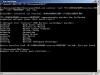
Hi, I will give ParaJVE a try for sure thanks. Anyway I have used the RunitGame.bat command and here are the outcomes in the screenshot. I do not understand why Mess is using a software list to launch a game? I never set this....
-
Hi , I want to set up the Vectrex emulation with Gameex but I can't get any rom to load from Gameex. Loading the roms from Mess GUI will work good. I have been through some posts here but are only related to the overlay issue. I am using this command line in the Wizard :mess.exe vectrex -cart "[ROMPATH]\[ROMFILE]" -view "[ROM]" -joy -now -nonewui. My paths to the rom folder and mess exe are good. I did ask initially to use the Gameex Vectrex database but then I have switched off this option but I noticed the gamelist is still unchanged?? Roms are in the VEC format and are working with Mess. Thanks,
-
Hi, Thanks for the proposal but will not be available right now for this. I may try to set up Winvice with Gameex as I read it is far more easy to get it running...
-
Nope have tried the above command line options but same problem...
-
It is the EMU number 12. here it is [Emulator_12]Enabled=TrueSystem=Commodore 64Category=PCEmulator=CCS64Version=3.8Rating=7.5DownloadUrl=http://www.gamesdbase.com/setupwizard/emulators/download/CCS64.7zRequiredFiles=Website=http://www.ccs64.com/Info=Commodore 64 EmulatorTitleText=Commodore 64StartPageName=[PC] Commodore 64 (CCS64)StartPageLogo=CommodoreCommand=CCS64.exe "[ROMPATH]\[ROMFILE]" -fullscreenRomFilter=Database=[PC] Commodore 64ConfigFile=[Mapping Off] Exit (Process Close)MapFile=RomPath=D:\CONSOLEROMS\C64SnapPath=C:\Assets\Commodore 64\SnapsTitlePath=C:\Assets\Commodore 64\TitlesBoxPath=C:\Assets\Commodore 64\BoxesCartPath=C:\Assets\Commodore 64\CartridgesManualPath=C:\Assets\Commodore 64\ManualsControlPanelPath=C:\Assets\Commodore 64\ControlsWorkingPath=C:\Emulators\CCS64MapKeys=TrueWaitBeforeKeys=SendKeys=ReplaceDash=TrueReplaceUnder=TrueCapitals=TrueRemoveBrackets=TrueShowDesktop=FalseDebug=FalseAlsoLaunch=OLDatZip=LaunchBefore=LaunchAfter=ExcludedFiles=CustomBackground=PlayMusic=FalseDontShowInfo=PlaySelectionMusic=FalseSelectionMusicFolder=PCGame=FalseGamesIn7Zips=TruePlayInScreenSaver=FalseShowMostPlayed=TrueRandomMostPlayed=TrueCDCheck=FalseCDCheckFile=RomsInFolders=Truelastgame=
-
Hi Dazzle The cartridge which is still loaded is the one that has been selected and loaded directly from CCS64 (so it can be any cartridge). If I want to select another game from Gameex list it will keep loading the last one. I have tried the Runitgame.bat with Pause option and there is apparently no error. I can see the cartridge selected is unzipped but then for an unknown reason it is not loaded in CCS64 and the emu will start with the last cartridge been loaded...
-
Hi, Sorry for the late reply on this but I was out of home for some days. I have enclosed the Gameex.ini and log file. To sum up this issue, whenever I want to start a crt from CCS64 GUI it will load fine (using the insert cartridge menu from the main menu options). If I want then to launch from Gameex, CC64 will always start with the last game launched from the GUI and keeps launching that game whatever is selected from the game list.. log.txt GameEx.ini
-
Hi, I have setup also CCS64 with gameex but it won't load any game cartridge (.crt format). Each time I select a game from the list and launch it it will launch CCS64 on the main C64 Welcome Screen. The CCS64 is working good from its own GUI so wondering if something is bad with the gameex settings. I have installed CCS64 downloaded directly from the designer portal (not from the Gameex Wizard download utility) Cheers
-
Hi, Sorry I forgot the config and log files. Here they are! Thanks log.txt GameEx.ini
-
Hi, I am running a bunch of old consoles through the MESS emulator. As with Mame I want a game video preview to pop up each time I scroll through a game list. Things are working fine but I have a small problem with the Atari 7800 game list. I can't have the video preview to play from the main console game list. The video will play only when getting into the next page (where you can select 'play this game'). My roms are located into a single folder but some games have more than one rom available and Gameex is set to use the Custom List for this console. Any idea on how to fix this and have the video playing at the main gamelist menu?? Thanks
-
Hi, OK It's resolved now! {RESOLVED} I tried to change the Folder.png to the jpg extension and got a prompt saying a file with that name already exist. I could not see this Folder.jpg (I have XP set to show hidden files) so I started wondering something went bad with the mp3 folder. I did it from scratch, created another folder and copied all my Mp3 there + the Folder.png image....now Gameex Jukebox is displaying the correct album art In reply to AlphaUMI the album art displayed by WMP was the correct one. Something went bad into the Mp3 folder I guess where an "hidden" wrong image called "Folder" had the priority.... Thanks a lot for your support!
-
Hi, I have cleaned the mp3 file involved in this problem with a Tag utility so gameex should display the image in the .png file. Where I am supposed to look in Windows Media Player for any hidden files to delete? My Xp is set to show hidden files but where should I look into?
-
Hi AlphaUmi Thanks a lot for your help on this. All settings are as you described and also my ALBUM folder is empty (there is only a text file in it). The Jukebox is also set to use the Media Player Library so really do not know whatelse can be done to fix this....
-
Hi, I have tried deleting all cache files, tried to change the theme but this cover art for one music folder is still not the correct one. I really do not know where this image is hidden in the Gameex tree....
-
Hi, I deleted all files with dbcache extension into the DATA folder but it will not solve the problem