About This File
VPX & Backglass File Checker is a Windows application designed for users who use DirectB2S Match in B2S Server

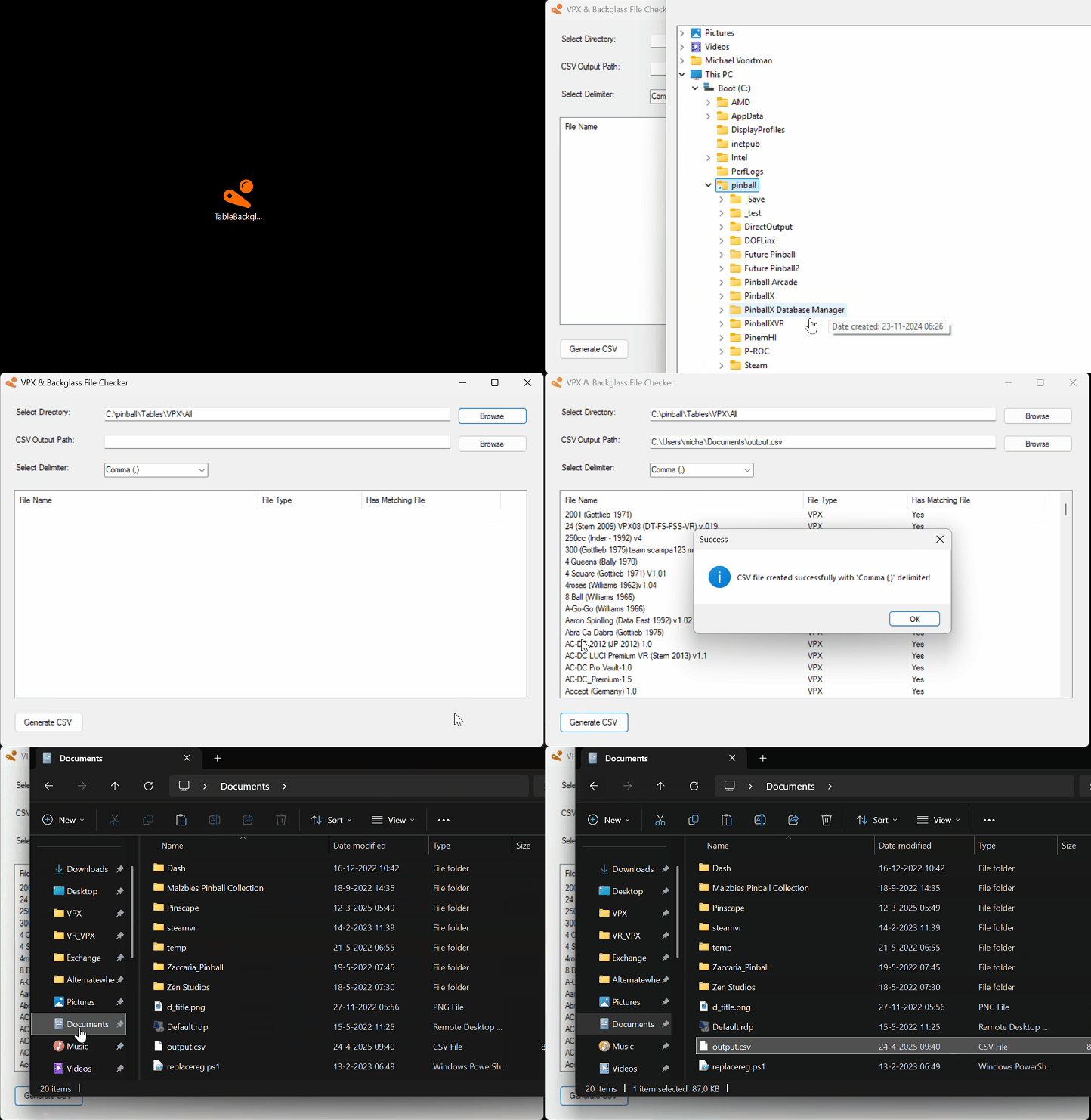
The VPX & Backglass File Checker is a Windows application designed to help users manage their Visual Pinball X (VPX) and DirectB2S backglass files efficiently.
It scans a selected directory and checks whether corresponding .directb2s files exist for each .vpx file, ensuring that all required files for a table are properly paired.
How to Use
-
Select the Directory to Scan
- Click the Browse button next to "Select Directory."
- Choose the folder where your VPX and DirectB2S files are stored.
- The path will be saved for future use.
-
Set the CSV Output Path
- Click the Browse button next to "CSV Output Path."
- Select or enter the location where the report should be saved.
- This path will also be remembered for next time.
-
Choose a Delimiter
- Select the preferred delimiter (e.g., comma, semicolon, tab).
- This controls how the CSV file separates values.
- Generate the Report
- Click Generate CSV to scan the selected folder.
The application will list detected files and their pairing status in the UI.
A CSV report will be saved to the selected output location.