


Please write a review and rate 1-5 stars on the bottom of this page!
Also check the support topic for any help or comments.
Scutters and Mike Da Spike are proud to present "Database manager for PBX"
We built this program to make it easier for ourselves to update/add tables in PBX.
Beforehand, please make a copy of your database directory (and maybe your media folder too)!
We are not responsible that anything goes wrong.
(but it is proofed that we don't wreck any database files  or media files )
What is DBM ?
Are you ready to take your PinballX experience to the next level?
Look no further than DBM—the ultimate Swiss Army knife for PinballX enthusiasts!
Whether you’re a seasoned player or a newbie, DBM has got your back. From customization options to essential features, it’s all packed into this handy tool. So, what are you waiting for? Dive in and discover the magic of DBM!
Features:
- Resizable multilanguage interface
- Easy filtering of tables and systems
- Easy to use drag and drop for updating media
- Media preview on right mouse click
- Delete media with one click
- Media Audit to check for missing or unused media
- Loading media support if de-randomiser plugin is used (2*)
- Uses updated IPDB data and adds Original tables (source sheet by Dux Retro)
- Adds custom fields for extra information (1*)
- Online media import from GameEx or Mega link
- Bulk functions to download GameEx media, update IPDB entries and for video creation.
- Populate data from Visual Pinball tables (Author, Version and Rom)
- Auto delete old playfield videos when creating bulk videos (Visual Pinball only)
- POV & VBS import (Visual Pinball only)
- Drag and drop for new/modified VP/FP Table files
- Zen Pinball FX3 auto populate tables when using Steam (all tables)
- Compatible with some other GameEx applications as well
- Embedded recording that can capture Visual Pinball GL, Future Pinball, and every pinball game we tested.
- Record media in PNG and MP4, including parallel recording and audio recording.
(1*) If you use custom fields and you use Gamemanager, the XML will be overwrite by Gamemanger and you will lose the custom entries !
(2*) See :
Prerequisite:
Installation of PinballX/PInballX Legacy Editon/Touch Play
FFMPEG.exe in Installation folder for Creating videos
Windows Media player for showing media
Microsoft .NET 8. (download is available at the download button as well)
The following NUGet are used to build Databasemanger
- Mega API Client for downloading on Mega (https://github.com/gpailler/MegaApiClient)
- JSON framework for .NET (https://www.newtonsoft.com/json)
- Costura add in for Fody (https://github.com/Fody/Costura)
- Fluent FTP (https://github.com/robinrodricks/FluentFTP)
- Resource.Embedder (https://www.nuget.org/packages/Resource.Embedder.Core)
- Mediarecorderlib (https://github.com/sskodje/ScreenRecorderLib)
External Source :
- Visual Pinball Spreadsheet by Dux Retro and Fraesh , see https://virtualpinballspreadsheet.github.io/
Please use the following thread for questions/remarks/issues
Note :
The installer and program are not signed, this can give a popup in windows like this :
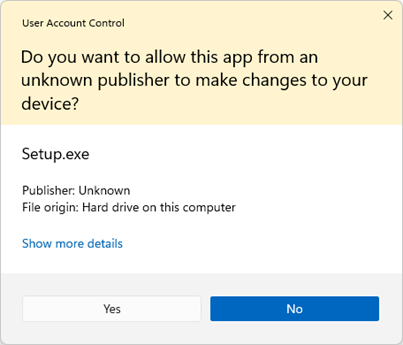
Click on Yes to install the program
if you see the following screen
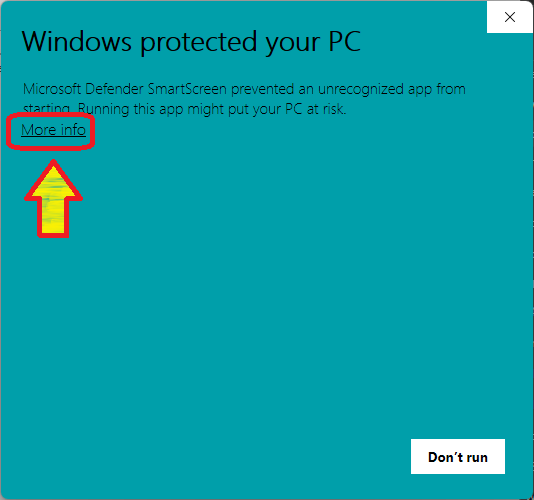
click on more info and select "Run Away"
What's New in Version 26.10.21.0
Released
New features :
Added support for importing VPX and FP tables directly from ZIP files.
Added support for drag-and-drop from ZIP files opened in Windows Explorer.
ZIP files can now be dropped directly onto the 'Add Table' and 'Select File' buttons.
Added a 'Table Launch' context menu for VPX tables.
Support for launching tables using an Alternate Executable when configured.
Added 'Edit' Instead of 'Play' mode for VPX tables, allowing tables to be opened directly in the editor with the configured launch options.
Updates:
Updated the project from .NET 8 to .NET 10.
Removed the option to add new tables to statistics. New tables are now always added automatically.
Statistics processing has been aligned with Tom's latest updates.
Improved network connection monitoring and detection frequency.
Updated the DBM website documentation at dbm.pinballx.com with guides and examples for the new ZIP file and Table Launch features.
Updated the PDF user manual with new sections covering ZIP file support, drag-and-drop functionality, and Table Launch options.
Bug Fixes :
Fixed a crash that could occur after video recording or bulk video creation (NullReferenceException). reported by @robertms
Fixed an issue where bulk imports did not create statistics entries.
Fixed an issue where bulk imports could assign incorrect systems.
Fixed a performance issue caused by keyboard imports while DBM was running in the background.
Fixed an issue where deleting multiple files could remove the entire list.
Fixed an issue where the Media Recorder could save media into subfolders when tables were stored in subfolders.
Fixed a potential lock-up when performing multiple 'Add Table' actions simultaneously.
- 26.10.21.0
-
26.09.13.0
-
26.09.13.0
-
26.08.14.0
-
26.06.29.0
-
26.06.29.0
-
26.05.08.0
-
26.02.26.0
-
25.10.28.0
-
25.10.15.0
-
25.09.26.1
-
25.09.26.0
-
25.09.04.0
-
25.09.04.0
-
25.09.04.0
-
25.06.28.0
-
25.06.28.0
-
25.06.28.0
-
25.06.28.0
-
25.06.28.0
-
25.06.25.0
-
25.05.22.0
-
25.04.27.0
-
25.04.27.0
-
25.04.15.0
-
25.03.17.0
-
25.03.17.0
-
25.02.19.0
-
25.02.12.0
-
24.10.11.0
-
24.09.06.0
-
24.09.06.0
-
24.08.02.0
-
24.06.19.0
-
24.06.09.1
-
24.06.09.0
-
24.06.09.0
-
24.06.07.0
-
24.04.15.0
-
24.03.26.0
-
24.03.26.0
-
24.03.04.0
-
24.03.04
-
24.02.27.2
-
24.02.27.1
-
24.02.27.0
-
24.01.23.0
-
24.01.23.0
-
23.09.14.0
-
23.08.29.0
-
23.08.12.1
-
23.08.12.0
-
23.05.06.0
-
23.04.18.0
-
22.11.22.0
-
22.10.20.0
-
22.09.05.0
-
22.09.05.0
-
22.08.14.0
-
22.07.15.0
-
22.06.24.0
-
22.05.27.0
-
22.05.27.0
-
22.05.27.0
-
22.05.14.0
-
22.04.21.0
-
22.02.21.0
-
22.02.17.0
-
22.02.16.0
-
22.01.09.0
-
21.12.10.0
-
21.12.03.0
-
21.11.29.0
-
21.11.02.0
-
21.11.02.0
-
21.10.15.0
-
21.09.16.0
-
21.09.08.0
-
21.09.01.0
-
21.06.23.0
-
21.06.05.0
-
21.04.26.0
-
21.04.16.01
-
21.04.16.0
-
21.04.08.0
-
21.03.15.0
-
21.1.31.0
-
20.12.25.0
-
20.11.12.0
-
20.09.05.0
-
20.08.28.0
-
20.08.28.0
-
20.08.18.0
-
1.9
-
1.9
-
1.9
-
1.9
-
1.9
-
1.8
-
1.7.2
-
1.7.1
-
1.7.1
-
1.7
-
1.6
-
1.5.1
-
1.5
-
1.4.3
-
1.4
-
1.3
-
1.2
-
1.1.0
-
1.1.0
-
1.1.0
-
1.0.0
-
 10
10
-
 6
6

Join the conversation
You can post now and register later. If you have an account, sign in now to post with your account.