|

Search the Community
Showing results for tags 'Demul'.
Found 5 results
-
Unbelievable!!! I was using a third party cmd line app called PowerCmd for testing... I tried windows stock and it worked first time!! Lesson learned - if hit a brick wall, 1st test = using Windows Cmd. Correct cmd: demul.exe -run=dc -image="I:\EmuTests\roms\Dreamcast\Quicklaunch\Soul Calibur v1 001 1999 Namco PAL M4 zip\Soul Calibur v1.001 (1999)(Namco)(PAL)(M4)[!].gdi" There's 10 hours of my life I'll never get back... -------------- Original Post ----------------------------------------- So, this post here made it look easy! http://www.gameex.info/forums/topic/12094-resolved-demul-and-dreamcast/ But can I find a way to do this? (rhetorical 'no') tried: demul.exe -run=dc -image="I:\EmuTests\roms\Dreamcast\Quicklaunch\Soul Calibur v1 001 1999 Namco PAL M4 zip\Soul Calibur v1.001 (1999)(Namco)(PAL)(M4)[!].gdi" and demul -run=dc -rom="I:\EmuTests\roms\Dreamcast\Quicklaunch\Soul Calibur v1 001 1999 Namco PAL M4 zip\Soul Calibur v1.001 (1999)(Namco)(PAL)(M4)[!].gdi" no dice... the gdi boots fine if I load via demul gui (Config>GD-ROM>Imagefile). GDRImage plugin selected. Demul does launch, but 'silently' - running in background processes but not visable on screen. Also, no sign of game running. Any ideas? Very little documentation available online,.
-
Scenario - You're booting Atomiswave/Naomi/Dreamcast games from GameEx via Demul. However, you have to set up the controls each time. Solution: This approach saves the key configs for each game when you exit Demul. Use: Run game. Set up controls via Demul menu. Exit Game. Next time you load that game, the controls will be recalled. How to: Make a folder somewhere for your individual game controls Copy this text and make a bat file: Change the User Variables Section to match your system. Save it as a batch file (use notepad - put .bat at end of filename) In your command line for GameEx, enter the following: {Path and bat} "[ROM]" "{system name}" For e.g.: C:\GameEx\AHKS_BATS\Demul_load_save_controls.bat "[ROM]" "naomi" Copy text below into notepad and save as "[Mapping Off] Exit (Process Close) - Demul.ini" in C:\GameEx\CONFIG\EMULATORS Finally, under Advanced config, select this file: Hope this helps and let me know if buggy!
-
Hello. I'm configuring demul atomiswave but I doesn't work with the following configuration: [Emulator_18]Enabled=TrueSystem=Sammy AtomiswaveCategory=ArcadeEmulator=DEmulVersion=0.5.7Rating=DownloadUrl=http://www.gamesdbase.com/setupwizard/emulators/download/DEmul.7zRequiredFiles=Atomiswave arcade system BIOS (awbios.zip)Website=http://DEmul.emulation64.com/Info=Sammy Atomiswave emulatorTitleText=Sammy AtomiswaveStartPageName=Arcade - Sammy AtomiswaveStartPageLogo=AtomiswaveCommand=DEmul.exe -run=atomiswave -rom=[ROM]RomFilter=*.zipDatabase=[Arcade] Sammy AtomiswaveConfigFile=[Mapping Off] Exit (Process Close)MapFile=E:\Emulacion\Arcade - Sammy Atomiswave\extras\map\Arcade - Sammy Atomiswave.mapRomPath=E:\Emulacion\Arcade - Sammy Atomiswave\romsSnapPath=E:\Emulacion\Arcade - Sammy Atomiswave\extras\videosTitlePath=E:\Emulacion\Arcade - Sammy Atomiswave\extras\titlesBoxPath=CartPath=ManualPath=ControlPanelPath=WorkingPath=E:\Emulacion\Arcade - Sammy Atomiswave\emulatorMapKeys=TrueWaitBeforeKeys=SendKeys=ReplaceDash=FalseReplaceUnder=TrueCapitals=FalseRemoveBrackets=TrueShowDesktop=TrueDebug=TrueAlsoLaunch=OLDatZip=LaunchBefore=LaunchAfter=ExcludedFiles=CustomBackground=PlayMusic=FalseDontShowInfo=PlaySelectionMusic=FalseSelectionMusicFolder=PCGame=FalseGamesIn7Zips=TruePlayInScreenSaver=FalseShowMostPlayed=TrueRandomMostPlayed=TrueCDCheck=FalseCDCheckFile=UseDbName=TrueWhen I debug I get this output: E:\Emulacion\Frontend\GameEx>chcp 65001E:\Emulacion\Frontend\GameEx>E:E:\Emulacion\Frontend\GameEx>CD "E:\Emulacion\Arcade - Sammy Atomiswave\emulator"El sistema no puede escribir en el dispositivo especificado.DEmul.exe -run=atomiswave -rom=---TEXT---El sistema no puede escribir en el dispositivo especificado.E:\Emulacion\Arcade - Sammy Atomiswave\emulator>PAUSEPresione una tecla para continuar . . .E:\Emulacion\Arcade - Sammy Atomiswave\emulator>DEmul.exe -run=atomiswave -rom=---TEXT---I think the problem is that the variable [ROM] doesn't work in the command option. I have tried to replace with [ROMFILE] and I have get the rom file name with the extension (which doesn't work with demul).
-
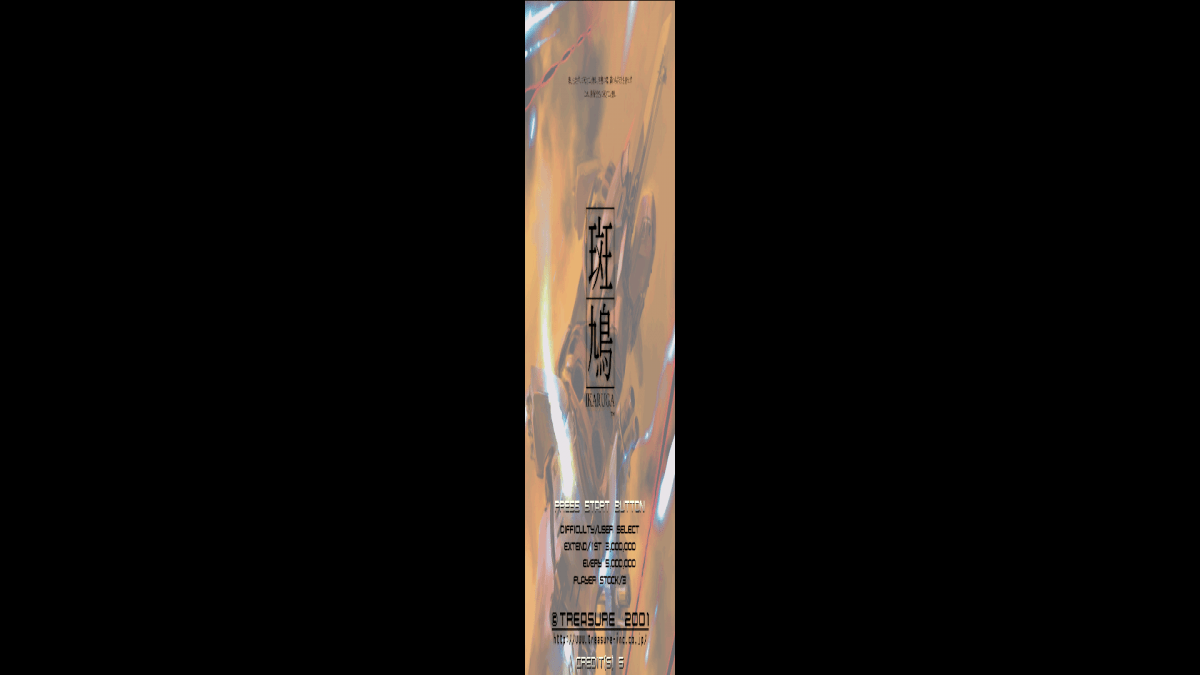
Hey fellas. More of an emulator problem then GameEx. For Sega Naomi, I was using my MAME roms and everything was rainbows and unicorns. Then I decided to update my MAME set, run clrmamepro then CHDman. MAME works fantastic. Demul however, did not. I've since then I rebuilt my Demul 0.57 for Naomi/Naomi 2 and Atomiswave. Everything works fine except all vertical games (Ikaruga for example) run fullscreen but super narrow! It's probably some silly setting that I've overlooked a couple hundred times but I can't seem to figure it out. I've tried to uninstall/reinstall and its still the same. Anyone have this problem before? I'll post a pic and config in a sec. Arcade Sega Naomi.txt


-
This forum was so helpful with SSF. I need some help with Demul to run Naomi roms. I have Demul 0.5.6. I downloaded the dll files and put them all in the plugins folder. I have the roms in Winzip format in a roms folder. I have the configuration pointed to those locations. The gpaddemul.dll (spelling may be wrong) will not load stating it is incompatible. I have Daemon Lite on my PC running Windows XP, but I do not even know if that is needed to run it. This is a Noob question that I am having trouble to even start the program and load the roms correctly or unzip the roms then run them. I am lost on this one on how to get it to work outside Gameex or inside Gameex. Thanks for the help. Demul.ini