|



couslev
-
Posts
30 -
Joined
-
Last visited
Content Type
Profiles
Forums
Events
Downloads
Store
Articles
Everything posted by couslev
-
-
huzzah! This has indeed fixed the crash I was experiencing using the internal theme picker. TY sir.
-
Feature & Enhancement Requests
couslev replied to Tom Speirs's topic in FAQs, Guides, & Other Useful Information
I would like to have selected list item scaling enabled for all lists and theme versions (not only the start list in only v3 themes). Its a very attractive behavior of lists. Described in this post: http://www.gameex.info/forums/index.php?showtopic=9624&view=findpost&p=71990 EDIT: A preferable alternative would be to have it as an attribute of themes that could perhaps be set on a per template basis. -
Feature & Enhancement Requests
couslev replied to Tom Speirs's topic in FAQs, Guides, & Other Useful Information
I like this idea. I currently use clrMAMEpro to merge my roms so I don't have to see all the children roms, but it prevents me from playing clones and takes a long time. I have to split them all when a new MAME update is release so I can synch my collection and then merge them again for pleasant display. -
I don't see the line in your log file that indicates you attempted to run a game. Usually it will say something like "cmd.exe <bunch of arguments>" but I don't see it. Go into GameEx, try to launch a game, exit then upload the new log?
-
User Submitted Themes & Media (Uploads)
couslev replied to Tom Speirs's topic in GameEx Media Projects
ty sir! -
User Submitted Themes & Media (Uploads)
couslev replied to Tom Speirs's topic in GameEx Media Projects
Hey all, I uploaded my first theme, you can get it here: http://www.gameex.com/themes/Dark%20Nebula%20Widescreen.zip Dark Nebula is an alpha theme. I reworked all the logos so they were appropriately alpha channeled and adjusted the position of content in the images so the items will appear in the same place. The top bar was redone to be alpha channeled, color adjusted, and I smoothed out the sharp lighting edges. The theme references vista/win 7 fonts, so if you are still on XP it won't be quite as intended. The please wait dialog and bar were completely replaced, both making heavy use of alpha blending. Overall I'm pretty pleased with the theme, especially the please wait dialog. For once, I wish things would take longer to load. You'll have to check it out to see what I mean. Its pretty amazing what you can accomplish with enough alpha blending. I really enjoy dark themes and space, so it makes GameEx feel like home. For the complete effect you need some nice space muzak so, I highly suggest you point GameEx's radio to listen.di.fm/public5/ambient.asx and just soak it up. Anyway, hope you enjoy it. Let me know what you all think. I'm still learning so I definitely appreciate suggestions and constructive criticism. -
I've attached a copy of my log when I tried to swtich themes. You can see the line where I change the theme and GameEx starts reinitializing: 19:13:42.7 4/6/2011: GameEx configuration updated, reinitialising Also attached is my GameEx.ini as found after I tried to switch themes. I don't understand your response about the registry access error I see that in HKCU GameEx stores the location to various Emulator INI files, so each user can create their own emulator configs, but it doesn't seem that any other settings are decentralized. I just meant to say that GameEx itself should NOT attempt to write to HKLM to store any settings. I understand the Setup Wizard and Advanced Config writing to HKLM... they are configured to run as administrator by default when installed, so this works out fine. The GameEx process itself shouldn't need to be elevated though, so it shouldn't attempt to write to HKLM. log.txt GameEx .txt
-
lol, nice. So the "bar" that appears at the top of your Sins of a Solar Empire theme is actually part of your foreground image? Pretty cool idea. I like how the scroller for the song goes behind it. Top notch! Does GameEx still make clicking sounds when you mouse over where the bar elements SHOULD appear (like the back button and help button) and let you click where they should be? I wanted to take this opportunity to pull a discussion that got started in my Steam integration thread out of there and into here, especially since Mr. Speirs is viewing this thread. =) One big question I have about lists in GameEx themes is how the start list makes the selected item grow in a v3 theme, but selected items on any other list don't grow. In a v4 theme no selected list item ever grows. Its a very cool effect and I strongly believe it should be enabled for all lists by default (in all theme versions), or better yet made into a theme option! Here a link to the last post I made that describes the issue: http://www.gameex.info/forums/index.php?showtopic=9624&view=findpost&p=71990 Please respond in this thread, as it was an off-topic discussion in the other thread. Thanks!
-
[GUIDE] Steam in GameEx
couslev replied to couslev's topic in FAQs, Guides, & Other Useful Information
Ok, I'll try to pull Tom's eye to this question in another thread. I don't want to gum up this thread about Steam integration with all my blather about themes. -
[GUIDE] Steam in GameEx
couslev replied to couslev's topic in FAQs, Guides, & Other Useful Information
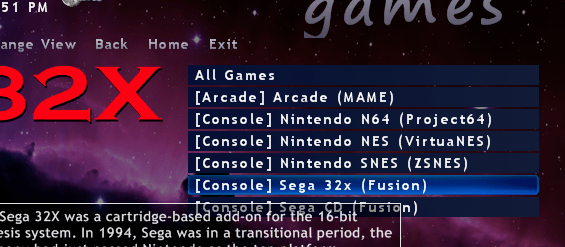
I attached some pictures to help show what I mean: In growth.png, you see on the start list the selected Emulated Games item is actually larger than the rest of the list items. In nogrowth.png, you see on the emulator list the selected Sega 32x item isn't any larger than the rest of the list items. This is a v3 theme, and only the start list scales the selected item like this. In a v4 theme no item is ever scaled, even on the start list. Any ideas? Maybe a theme setting I'm missing in v4? I'd definitely love to see this effect applied to all lists regardless of theme version. Oh, and having the alpha channel involved in the selector bar animation sounds like a glorious idea. I'm definitely going to play around with that.
-
Sounds great, I'm looking forward to future versions of GameEx. I just finished up a v3 theme that I'll upload and post details to the User Content pinned thread this evening. Although a bit confining and having some strange requirements for image sizes (especially for the top bar) there is still a lot you can accomplish when alpha is enabled. I was studying up on the v4 design (mostly by dissecting Draco's Sins of a Solar Empire theme) and I'm pretty excited to try my hand at exploiting the versatility of the layout and the foreground implementation. I think after understanding and working around the idiosyncrasies of each version I can definitely appreciate that there is a ton that can be done to change the look and feel of GameEx, especially in v4. I'm definitely curious to see what you guys have cooked up for the rewrite. Tom, while I have you on the thread is the original issue I mentioned going to be fixed in a near release? In a v4 theme it should be pretty simple to only draw one layer of the bar at a time (since the images don't overlap like they do in v3 themes). I guess its not a huge deal, but I bleeding love alpha blending, and would really like to see the theme's background show through the top bar to some degree... Aero style. If not, I'll abandon any ideas for an alpha bar in my next v4 theme.
-
I didn't even know you could switch themes using Advanced Config... I've been using the Setup Wizard, going to custom, just picking theme selection and changing the theme that way. But yes, it happens when I select a theme from the Theme Picker within GameEx. I currently have the install running from d:\gameex, I don't think there would be any different permissions between there and the C drive. As long as the directory is outside Program Files or Program Files (x86), it should be unprotected by Windows UAC's ACL settings. Do you run GameEx as admin? I expected it would be an access rights issue as well (especially after seeing it throw a SecurityException when debugging the crash), so I totally expected it would work when I ran GameEx as administrator. Unfortunately it still crashes when I run as administrator, and it turned out the SecurityException was from GameEx trying to access a protected registry key, and it happens every time GameEx initializes (and doesn't cause a crash). I can't tell exactly what GameEx is trying to do when it throws the NullReferenceException because the code appears to be obfuscated. Speaking of the registry SecurityException, is there any chance GameEx can be configured to not try and access HKLM, and instead use HKCU for storing per-user settings while running normally? It would definitely be a step toward making GameEx Windows 7 friendly.
-
No, it doesn't matter which theme I have selected or am switching to. Happens every time. Probably going to save off my configs and try reinstalling soon.
-
[GUIDE] Steam in GameEx
couslev replied to couslev's topic in FAQs, Guides, & Other Useful Information
Is there any way to make the menu items in a v4 theme animate in scale like they do in a v3 theme? Like on the main menu, selecting an item not only makes the animated selector graphic appear on that item, but the item also grows in size. This doesn't happen in the v4 themes I've made, and although a small thing I really like it. I also wonder why only the start menu does this? I'd really love it if all the lists did this. Also v4 themes don't seem to have the radio/music scroller text at the bottom left and the audio visualization placement is wonky... can that be remedied? I agree the v4 theme spec is much more versatile... the image sizes etc make more sense as well. -
Well, going to the SetupWizard every time I wanted to change themes (which I'm doing a lot right now as I learn theme design) started really annoying me, so I took the liberty of attaching the VS2010 debugger to the GameEx process and then crashing it to see if I found anything useful. Well, I definitely did: A first chance exception of type 'System.Security.SecurityException' occurred in mscorlib.dll A first chance exception of type 'System.UnauthorizedAccessException' occurred in mscorlib.dll A first chance exception of type 'System.NullReferenceException' occurred in GameEx.exe The program '[3316] GameEx.exe: Managed (v2.0.50727)' has exited with code 0 (0x0). I'm not running GameEx with administrative rights, but I have it installed at D:\GameEx (outside the protected Program Files / Program Files (x86) folders), so I figure it should be fine. Apparently when I change themes and GameEx starts to reinitialize, it gets to the "Loading graphic Surfaces" step and then it attempts to access some protected location in the ag.a(..) function? Strangely if I run GameEx as administrator and switch themes, it still crashes at "Loading graphic Surfaces", but with different exceptions: A first chance exception of type 'System.NullReferenceException' occurred in GameEx.exe A first chance exception of type 'System.ArgumentException' occurred in Microsoft.VisualBasic.dll The program '[6812] GameEx.exe: Managed (v2.0.50727)' has exited with code 0 (0x0). Tom, you have a better idea what might be going on here? EDIT: Additional information - When NOT running as administator, the first SecurityException's Message is "Requested registry access is not allowed.", but I found that exception isn't critical as it is thrown even when starting GameEx normally, and it doesn't cause a crash. So, this has nothing to do with security, it is all about the NullReferenceException.
-
I deleted all files from ./GameEx/DATA/ with cache in the name and also the contents of the XFILE_CACHE, but still no dice. Still get the same crash when trying to change themes. 04/05/2011 06:46 PM 44,085 Cached-FontBlack.png 04/05/2011 06:46 PM 46,354 Cached-GameFont.png 04/05/2011 06:46 PM 46,512 Cached-GameFontFaded.png 04/05/2011 06:46 PM 2,560,054 Cached-MenuFont.bmp 04/05/2011 05:08 PM 54,177 Cached-TitleFont1.png 04/05/2011 05:08 PM 76,689 Cached-TitleFont2.png 04/05/2011 05:08 PM 66,105 Cached-TitleFont3.png 04/05/2011 05:08 PM 116,738 DGameExthemesDefault Alpha Blue 2011MEDIALOGOSGameExTextGameExText.x.x 04/05/2011 05:08 PM 64,920 DGameExthemesDefault Alpha Blue 2011MEDIALOGOSGameExTextGameExText.x.x.positioncache 04/04/2011 02:34 AM 8 EMU_10.dbcachenodata 04/04/2011 02:34 AM 90 EMU_10.map 04/04/2011 10:16 PM 548 EMU_12.map 04/03/2011 05:39 PM 8,771 EMU_5.dbcache 04/03/2011 05:39 PM 13,148 EMU_5.dbcacheini 04/03/2011 05:39 PM 645 EMU_5.map 04/03/2011 05:39 PM 51 EMU_5_Cat.dbcache 04/03/2011 05:39 PM 52 EMU_5_Dev.dbcache 04/03/2011 05:39 PM 42 EMU_5_Ply.dbcache 04/03/2011 05:39 PM 12 EMU_5_YR.dbcache 04/03/2011 05:39 PM 1,003 EMU_6.dbcache 04/03/2011 05:39 PM 7,164 EMU_6.dbcacheini 04/03/2011 05:39 PM 69 EMU_6.map 04/03/2011 05:39 PM 14 EMU_6_Cat.dbcache 04/03/2011 05:39 PM 17 EMU_6_Dev.dbcache 04/03/2011 05:39 PM 12 EMU_6_Ply.dbcache 04/03/2011 05:39 PM 6 EMU_6_YR.dbcache 04/03/2011 01:45 PM 144,345 EMU_7.dbcache 04/03/2011 01:45 PM 152,867 EMU_7.dbcacheini 04/03/2011 01:45 PM 9,979 EMU_7.map 04/03/2011 01:45 PM 99 EMU_7_Cat.dbcache 04/03/2011 01:45 PM 652 EMU_7_Dev.dbcache 04/03/2011 01:45 PM 72 EMU_7_Ply.dbcache 04/03/2011 01:45 PM 48 EMU_7_YR.dbcache
-
[GUIDE] Steam in GameEx
couslev replied to couslev's topic in FAQs, Guides, & Other Useful Information
Yeah, this definitely looks good. I figured I could resize the images to the correct aspect ratio by cropping or adding a border, I was just hoping to get them to display correctly without modification (and learn a bit about theme design in the process). I like how you have the background transparent if alpha is enabled or the gradient if it isn't. I'll probably do something like this for now in a v3 theme. It seems the spec and implementation of v4 themes still have a way to go, eh? -
[GUIDE] Steam in GameEx
couslev replied to couslev's topic in FAQs, Guides, & Other Useful Information
Sure. I somehow found out where Steam was pulling the nice looking graphics for the Library's "Grid View" layout. You can find the graphics at: http://cdn.steampowered.com/v/gfx/apps/<appid>/header.jpg Where <appid> is the application ID of the game in question. Like for example the appid of Crysis 2 is 99830, so you can find the header at cdn.steampowered.com/v/gfx/apps/99830/header.jpg, if you go to pixlr.com, you can easily load the jpg straight from this url then save it as a png. The filename is important because it has to match the "rom name" exactly. In our configuration above the "rom names" are the names of the .url shortcuts. So in my ROM Path as specified in the emulator config (in my case "D:\Roms\Steam\Shortcuts\"), I have: D:\Roms\Steam\Shortcuts\Crysis 2.url You just need to save the image as a .png with the exact same name as this .url shortcut in the Snap/Video Path as specified in the emulator config (in my case "D:\Assets\Steam\Snaps\"): D:\Assets\Steam\Snaps\Crysis 2.png GameEx will then pick up the image as if it were a game snapshot, and display it when browsing your Steam games list. Unfortunately the aspect ratio of these header.jpg files doesn't jive well with GameEx, and it keeps scaling them to 4:3, which makes them look pretty distorted when displayed on the game list (although they look great displayed below the console Logo when displayed on the emulator list). I'm currently struggling to find a solution to the problem... if you have Theme knowledge and are reading this, check out my Alpha Themes thread, and please reply if you can. Cheers! EDIT: Oh, and if anyone knows the filename on the Steam server for the smaller images used in the Steam Library's "List View", I'd be interested to know. I launched Steam using the -console command line option, and then disconnected from the internet and tried to refresh the List View hoping to have it report back an error about being unable to get the file, but it kept pulling them from some cached location. I didn't try too hard to find the location of this cache, but whatever. -
Can you point me to the location of these cache files? You mean the Cached-* image files found in ./GameEx/DATA/, or the contents of ./GameEx/DATA/XFILE_CACHE/?
-
Ever since I installed GameEx, I have been unable to change the theme from within GameEx. I have been starting the Setup Wizard, going into the Theme selection, and changing my theme there. Its pretty cumbersome though. If I change my theme using the Theme Picker under Other Games & Applications, GameEx crashes with this in the log: 14:37:45.2 4/5/2011: GameEx configuration updated, reinitialising 14:37:45.2 4/5/2011: Opening Configuration File 14:37:45.2 4/5/2011: Getting Configuration Values 14:37:45.2 4/5/2011: Using Theme: Default - Alpha Blue 2011 14:37:45.2 4/5/2011: Checking for alternate Image Directory for Theme: Default - Alpha Blue 2011 14:37:45.2 4/5/2011: Initialising Video/MNG DLL's 14:37:45.2 4/5/2011: Hiding Taskbar 14:37:45.3 4/5/2011: Is Media Center running? 14:37:45.3 4/5/2011: Checking/Creating LCD Registry values 14:37:45.3 4/5/2011: Check Media Center Exit/Start Mode 14:37:45.3 4/5/2011: Media Center Mode 0 14:37:45.3 4/5/2011: Video previews on. Warning: Only recommended on modern systems 14:37:45.3 4/5/2011: Custom Game Device Input enabled: Getting custom codes 14:37:45.3 4/5/2011: Snap Delay set to: 2 14:37:45.3 4/5/2011: Get other settings 14:37:45.3 4/5/2011: Set: Find emulator artwork on best match basis 14:37:45.3 4/5/2011: Opening Database Connection 14:37:45.4 4/5/2011: Retrieving resolution setting 14:37:45.4 4/5/2011: MAME Path is: D:\Emulators\Mame32 14:37:45.4 4/5/2011: Cannot Find MAME Path: MAME Disabled 14:37:45.4 4/5/2011: Using 3D Alpha Blended Animations. 14:37:45.4 4/5/2011: Using General Font: Trebuchet MS 14:37:45.4 4/5/2011: Using Title Font: HandelGothic BT 14:37:45.4 4/5/2011: Initialising Direct3D 14:37:45.4 4/5/2011: Applying GameEx is Loading Image 14:37:45.4 4/5/2011: Setting Resolution to 1920x1080 32 bit color 14:37:45.4 4/5/2011: Creating Surfaces 14:37:45.7 4/5/2011: Creating Primary Surface - Full Screen Mode 14:37:45.7 4/5/2011: Creating Back Buffer 14:37:45.7 4/5/2011: Loading graphic Surfaces 14:37:45.7 4/5/2011: --**-- 14:37:45.7 4/5/2011: ERRORS DETECTED: EXITING 14:37:45.7 4/5/2011: Object reference not set to an instance of an object. 14:37:45.7 4/5/2011: at ag.a(Boolean A_0, String A_1, Boolean A_2) 14:37:45.7 4/5/2011: at ag.c(Boolean A_0) 14:37:45.7 4/5/2011: at ag.ad() Is this a known issue, or just me? EDIT: I'm using Win 7 Pro x64 if it makes any difference.
-
Are there even any attributes of the image box I can modify in a Version 3 theme? In the theme.ini, there is Image=15,165,385,180 but this appears to be entirely ignored in a Version 3 theme, and in a Version 4 theme like I said, although the image box is located and scaled appropriately, it seems the snap in this element is scaled to 4:3 then placed in this box. You'll have to excuse my ignorance, is there any central documentation for editing themes?
-
[GUIDE] Steam in GameEx
couslev replied to couslev's topic in FAQs, Guides, & Other Useful Information
I can't say anything about Impulse because I know nothing about it. Essentially Steam has two specific features that make this possible. The centralized launch system that lets you run a .url or .lnk to start various games through the distribution client, and the overlay system that is launched / terminated as a separate process in parallel with the actual game process. I don't expect other distribution channels to have the level of integration Steam has... many users don't like this quality, and would rather just have clean individual games that are launched independently of the distribution client. Games for Windows Live have a similar 'Overlay', but I don't think this is implemented as a separate process like the Steam overlay is. I have Fallout 3 GOTY and Resident Evil 5 (on Steam) which are GFWL titles... there doesn't seem to be any other process started along with the games. -
Hmm... interesting. After changing the image box size in the theme editor globally (it saved under [Layout] as previously described), I expected the snaps would look perfect for this emulator (since the snaps are the exact dimensions of the image box). Strangely enough the snaps are still distorted, but just smaller. It appears that GameEx is forcing the snap into a 4:3 aspect ratio, then centers it in the image box. Is this correct? Is there some setting I can change to make GameEx not force the snap into a particular aspect ratio like this?
-
[GUIDE] Steam in GameEx
couslev replied to couslev's topic in FAQs, Guides, & Other Useful Information
Unintentional double post shows just how enthusiastic I am!