|



TimeBandit
-
Posts
40 -
Joined
-
Last visited
Content Type
Profiles
Forums
Events
Downloads
Store
Articles
Everything posted by TimeBandit
-
Glad to see that you guys are going to implement an installation suite package. Hopefully this will make GameEX a much more attractive product for the masses and for those of us who just hate to tinker with all that.
-
The program is certainly swift. Good news is that I discovered the problem with GameEX on my system. Turns out that I had to disable the intro sound / sound FX. I believe all of my "headaches" from Vista 5472 have been associated with a "bad" audio driver. Now the keyboard functions perfectly fine after each game and no more exception errors.
-
Well Tom, we do apperciate your diligent efforts on these improvements. Unfortunately, I'm still having the same problem. After I return back to GameEX from a game, my keyboard simply doesn't work. Up and Down arrows just jump around on the game menu and I cannot press the Backspace to return to the main menu, nor will Escape exit the game. I'm basically stuck for a few seconds, then the same exception is thrown. The mouse isn't even responding to the screen until the error is thrown. This might be a result of my interim build 5472 which wasn't freely distributed to all testers. Its been giving me some headaches in other areas unlike Beta 2. The next big public release is due out in about 10 days....we might have to wait to see how it handles on that revision.
-
For some reason, I keep getting an error at the 21% marker while downloading the default themes when I install GameEX. My internet connection is very slow on my HTPC (~37kbps) and thats about 1:53 into the download. Just curious if this is a problem on my end, ISP, or the "server." The only way I can install GameEX is to unselect the download theme option. Hopefully this won"t cause any problems. Thanks
-
I'm not sure if my problem is the same as the others. I installed GameEX 6.65 onto Vista build 5472 and whenever I exit out of a MAME or snes9x game, my navigation doesn't work correctly. The up or down arrow jumps either 2-3 positions on the menu. After awhile I get the following exception error: 21 Consecutive Exceptions Occured: Exiting Error in the application. at Microsoft.DirectX.DirectDraw.Surface.Flip(Surface surafce, FlipFlag, flags) at GameEx.GameEx.mainform.DisplayFrame() Seems like the similar error as with the database problem that I reported before, however I did disabled this feature in configuration and MAME doesn't offer this feature, I don't think. Good news though is that "My Games" label is showing in Vista Media Center. Yay! p.s. Vista RC1 is expected within a week or so and will be the final public beta.
-
Adrian, I'm running a HTPC at 720x480 using component video out (best my analog TV supports). The resolution is extremely low for desktop use, but works just fine with Media Center and Game EX. You should be fine running your ROMs since most don't support higher resolutions. The only issue that you might encounter is if you want to run Amiga games or the like which require a higher resolution. S-Video can only provide low resoultion support and the quality is okay. You will have to make a judgement call on the ROM game quality assuming thats your main concern. As you step up, you will probably want to go with a EDTV or HDTV that will support higher resolutions. These digital TVs support digital connectors. When you reach that point, you will want to get a new video card with a DVI connection (unless your onboard video has this already). DVI (or HDMI with an adapter) supports true digital high resolution and the quality will be as sharp and crisp as a high quality monitor. The quality of your connection will matter so go in the following order from analog to digital. Analog (from lowest quality to highest): Composite, S-Video, Component Digital (higher resolution support): VGA, DVI (HDMI). Hope that helps.
-
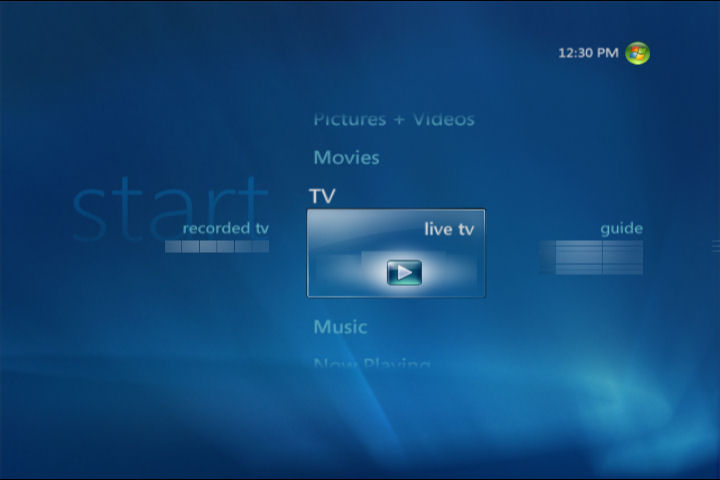
Vista Media Center has new horizontal menus (strips) and tiles in addition to the same vertical menu as in MCE 2005. Think I have a screenshot here: http://www.gameex.info/forums/index.php?ac...post&id=812 Anyway, I thought it might provide some insight on how the new Media Center handles menu items assuming you were planning on still providing a way for media center users to launch gameex directly.
-
Hey Tom, I'm not sure what your timetable was for adding a Vista Media Strip to GameEX, but I did find a link that might be of some use: http://blogs.msdn.com/astebner/archive/200.../04/689085.aspx I've been in the process of upgrading to the most recent build and as always am willing to test any new features you add for the new OS. p.s. your message box seems to be full.
-
Oh well, all in due time. Well I'm still amazed at the screenshot for your theme and am going to give it a shot.
-
Amos, This is simply great for us folks that like to keep that consistent theme between MCE and GameEX. Great job! Now I'm tempted to try the theme editor to see if I can create one with the Vista MCE. I've attached some of my screenshots of the new MCE. Not sure how close I'll be able to recreate a consistent theme.



-
The problem is in your INI configuration files for those emulators (located in /MESS/INI). Each of them have been configured to load a particular ROM (probably as a result of it being the first ROM that you loaded and played directly in MESS) regardless of the parameters that you are currently sending from the command line. Just edit those text-based files and remove the line that is automatically loading those ROMs....forgot what its called, but it will be obvious. That should solve your problem.
-
Just for your information the definition of "oriental" from the Merrian-Webster dictionary online. Main Entry: Oriental Function: noun 1 sometimes offensive : ASIAN; especially : one who is a native of east Asia or is of east Asian descent 2 : ORIENTAL RUG 3 : ORIENTAL SHORTHAIR It is a known offensive word and has been for quite sometime now and something that needed to be corrected. Like I said, I'm a bit disappointed with the remark, not insulted nor am I calling anyone anything. As for your question about the game, it's a game that spans cultures (all of Asia), people (billions) and time (thousands of years). People of certain areas had their own variety that they played. Additionally, there's a philosophy and belief behind the game, so I'm sure each varieity had been kept over the years. Anyway, this all can be found on the internet.
-
The word oriental is used to describe material things from Asia, while people from Asia are called Asians. Additionally, I do not think all Asians spend their friday and saturday nights playing these games. To be frank, I'm a bit disappointed with your brash comments. Dispite your assumption, most Chinese and other Asians only play one type of Mahjong in their region. There are many varieities, I would imagine, because the game has existed for thousands of years and spread over a large area. I'm sure if you look it up on wiki and do some research, you might find your answer.
-
Wow, that looks great and every easy to follow and understand. Great job!
-
Have you tried this? http://www.gameex.info/forums/index.php?sh...entry1907
-
I don't think when someone vents out like this are really interested in having us troubleshoot their problems. Well, at least the problems we can fix.
-
I really don't understand why some people are so bent out of shape that they feel the need to just post their vent to a group of strangers. All over ROMS not playing?!?! You're right, if something isn't what you want, then don't use it. Thats the great thing about GameEX being FREE to TRY. But if you think this is the way to make Tom change GameEX for your needs, I would guess that won't work. If you want people to support and agree with your points, I doubt that will happen. Glad you uninstall it successfully and hopefully you will find your answer elsewhere. ::boggled::
-
Not to be a nay sayer but to give you my 2 centsâ?¦ I know when I was a kid, the word XXX or â??Adult onlyâ? would like draw more curiosity than being a deterrent. Knowing how well kids today are learning how to use the computer and internet, it would probably be easy for them to "hack" the password. Heck, most kids that I know already know the passcodes to watch TV at their homes. Another method would be to have some real â??hiddenâ? feature that is out of sight and out of mind. I just donâ??t have much creativity to think of any ideas ATM.
-
I think I'm in the same situation. After installing the Lite version, I'm stuck with this feature even after an upgrade. Does anyone know if this is a simple configuration setting that we can edit, or do we have to do a delete and install? If a delete and reinstall is required, what are the minimum files that we should save so that we don't lose all of our configuration settings? Thanks
-
I'll be happy to try it out and let you know how it runs on my system. Great job guys, glad to see that there will be some solutions.
-
Going to specific GameEx menus via command line?
TimeBandit replied to Marker0077's topic in General
If I remember correctly, there is an option during installation of GameEX to only install the game features with a note saying that it wasn't recommended. This is the option that I selected, so that when I launch GameEX it simply displays all the emulators, MAME, configuration and favorites. Now if I can only get "My Games" to appear in Media Center EDIT: Looks like you already tried the Lite GameEX feature and now you want to restore back to the full version. Nevermind. -
Maybe it your vrefresh. Depending if you're using s-video or component, you might want to try 60 Hz or 59Hz in display properties in Windows to see if that fixes the problem in 1024. Just a thought
-
I know that Adultery has been working on a web site to provide a guide, but its not complete ATM. This is a feature that I would love to see as part of an installation package where some of the basic emulators (NES, SNES, Genesis, SEGA, Atari) can be automatically installed and all the configuration setting set correctly as an option. I'm sure there will have to be some licensing agreements worked out. I have been using is the following thread: http://www.gameex.info/forums/index.php?showtopic=3 Look through it for an emulator that you have installed, and match those settings in Configuration. However, most of it comes down to doing research and knowing the exact Command Line setting to use by testing it at a Command Prompt. Needless to say, its for the birds.
-
Wow Adultery, you gotta hook us up with the ROMs brother! My N64 ROMS are .zipped while the others are not. So that isn't a factor. Good Merged? I learn something new everyday. No clue what that is. As for the cartridge scan and box cover directories, originally I had those fields blank and that is the reason why the error says "they do not exist." Since then, I have pointed them all to the approperiate directories with no difference. Everything is tied directly to the "Database" setting. Its interesting how the limit of ROMs vary greatly between the emulators when this setting was set (~53 for N64, ~351 for NES).
-
Thanks for the feedback fellas. I also noticed that I was having a similar problem with my NES and SNES ROMS. However, after playing around with the configuration, I found the solution. It seems that there is a setting called 'Database' in Configuration for each emulator (4 pages deep). The ROMS that were giving me problems had this setting preselected to some database name (NES, SNES, etc). Everything ran fine when I blanked out that field. Can you guys confirm your 'Database' settings for your N64, NES, SNES? I'm curious if this is a Vista only issue that needs to be reported. Thanks.