|



Gandalf467
-
Posts
8 -
Joined
-
Last visited
Gandalf467's Achievements

Member (1/5)
1
Reputation
-
Thanks for the feedback guys! I'll make the corrections and additions. Also, I've scraped a number of other threads in the forum, So will have a much more comprehensive user guide for you guys to review on this next pass. I used the information that stryker had created as a starting base for the new document and have been adding new sections and information based on the other threads (I've finally got the scraper/crawler to a point where it is pretty reliable and can do an entire thread in 5-10 minutes). Unfortunately I can't crawl the entire forum space in one shot...have to be more selective than that. If you guys have other suggestions for threads that would be appropriate to grind that might contain troves of valuable information let me know. I'm trying to be somewhat selective and pick threads that are likely to result in a good amount of useful context. Regarding the screen grabs...noted...and agree that they would help...unfortunately that isn't something I can get the AI tools to do easily, so I'll have to come up with a different solution for that, but I will work on getting them in there.
-
Draco, I tried reading through the original thread you pointed me at, but the history of evolution is hard to keep track of. So...I used AI to screen scrape the original forum thread you pointed me at and used it to process everything that it found in that thread and turn it into a Markdown document. Draco & u-man, I would be very interested in your feedback to help understand how good of a job the AI did in terms of summarizing how the Theme Editor works and if this could be a possible starting point for an actual user guide/document. (Let me know if you guys would like to see this in a different format...it was a starting point. I'm happy to set up a Github repo or other storage that contains this, and I can do this for other threads in the forum as well.) GameEx_Theme_Editor_Usage_Summary.md
-
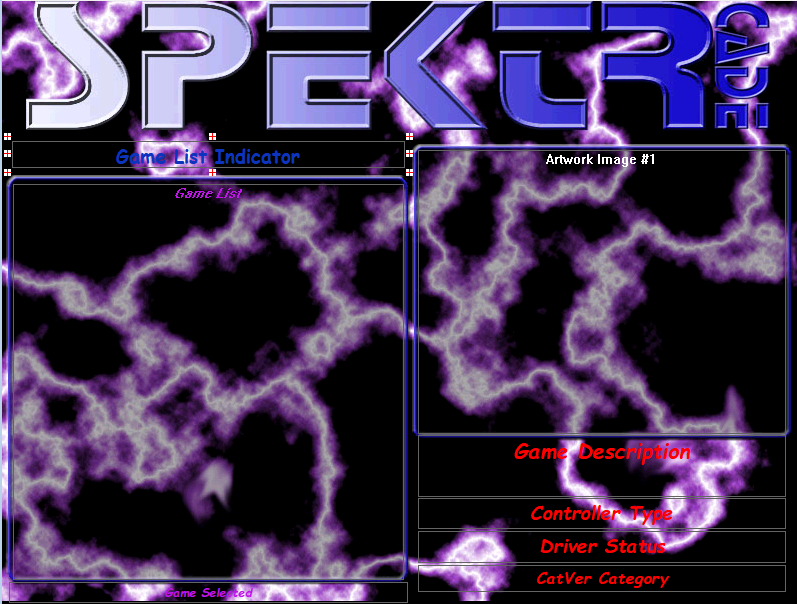
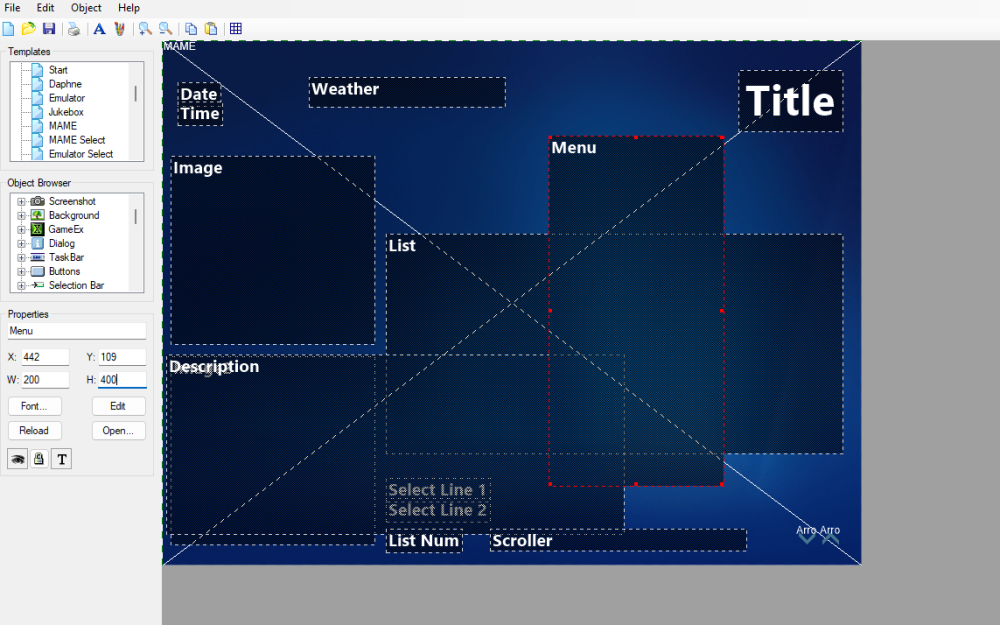
U-Man, Thanks for the detailed response. Let me give you a bit more context. I'm trying to rebuild my Mamewah configuration, which is purely limited to MAME classic Arcade games (layout screenshot attached). You have the ability to select a game from a list, get a snap of the game (in Artwork Image #1), and some description information about the ROM (there are a number of other objects you can place on the layout as well, but I don't use most of them). Mamewah's menu system is more of a "popup" style menu...you can press a key to access the menu, it shows up, you leave the menu and it goes away...so it doesn't directly influence the primary goal of the interface which is to allow selection of games to play. You can also configure Mamewah to generate a new list of ROMs from the ROM folder directly vs. using an XML file to figure it out, so updating the listing is, at the worst case, restarting Mamewah. Although I've been able to make Mamewah work on my new setup (new machine, new O/S, new monitor, new everything) Mamewah is no longer supported, and doesn't handle the video transitions very well, thus why I started looking around for alternatives. All of my questions are driven around trying to figure out how the system works and get back to that point. The Theme Editor has an "Import Mamewah" option, but it doesn't work, so I'm left to figuring this stuff out. I have been playing with different themes and playing around A LOT with the Setup Wizard to try different options and understand how some of this works, but as you can see, it has still left me with a lot of questions (the descriptions are not always helpful). Your description of the layering is very helpful...I haven't found anything that describes it as a sandwich...thanks for that analogy. My hardcoding question was not stated very well. The question that I'm really driving toward is for objects like the Media controls, it seems like that always has to have a particular "format"/structure with the pause/play, back, forward, volume down, volume up buttons in specific positions, and in a specific order. I think (although I haven't found anything that clearly states this), that as long as that is true you can put that thing anywhere on the screen and use it...but no one ever places it anywhere except in the taskbar, so not sure if that is a true statement. The reason the ordering of the buttons is important is because GameEx expects them to be in a particular order, with a particular spacing, otherwise it doesn't know which control to manipulate when you "mouse over" the controls and push a button. Is that true? I think this goes back to your buttons & coordinates comment...I'm trying to figure out if there are certain functions/features that have specific coordinates they are tied to...because the layout edito r doesn't appear to restrict this in any way. Hopefully this gives you a bit more context. I completely agree, a guide of some kind would be super helpful. I'm trying to go through the thread that Draco provided around the theming system, but there is a lot there and since I started at the beginning of the thread it is taking time. Draco, any chance you can export that thread to a file of some kind that we could run through a ChatGPT session and try to turn it into a starting point for a user guide? I'm happy to do the work, but would need the information to do it. I can make something that will grovel through the whole thread, but it will take longer.
-
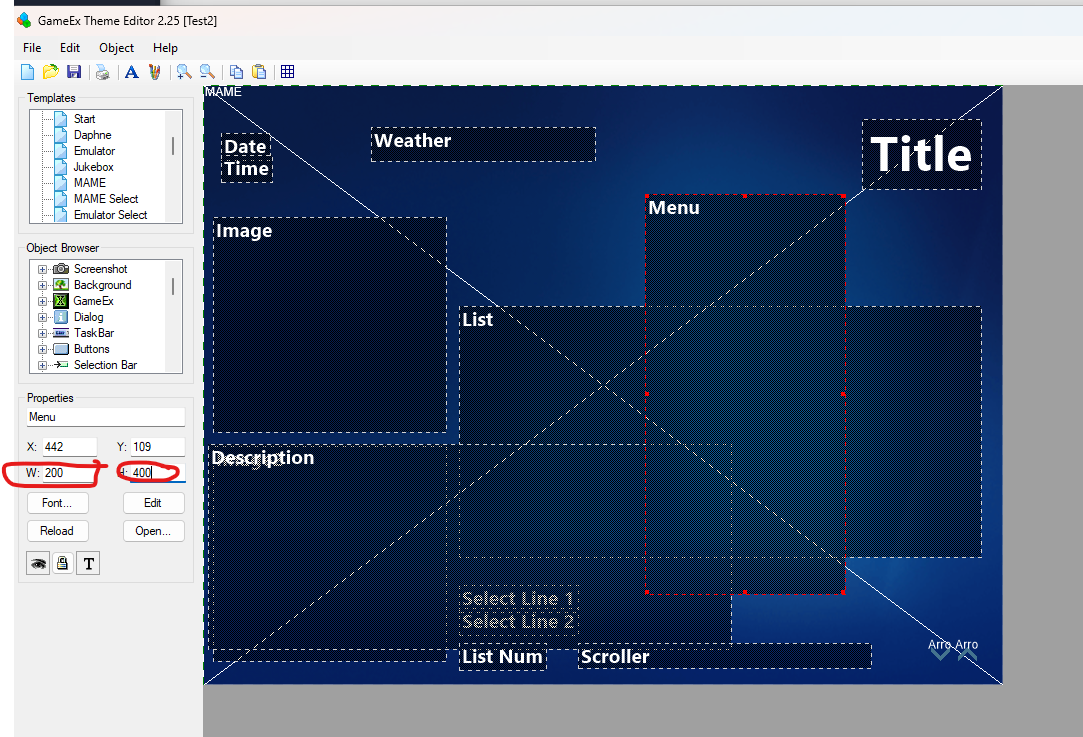
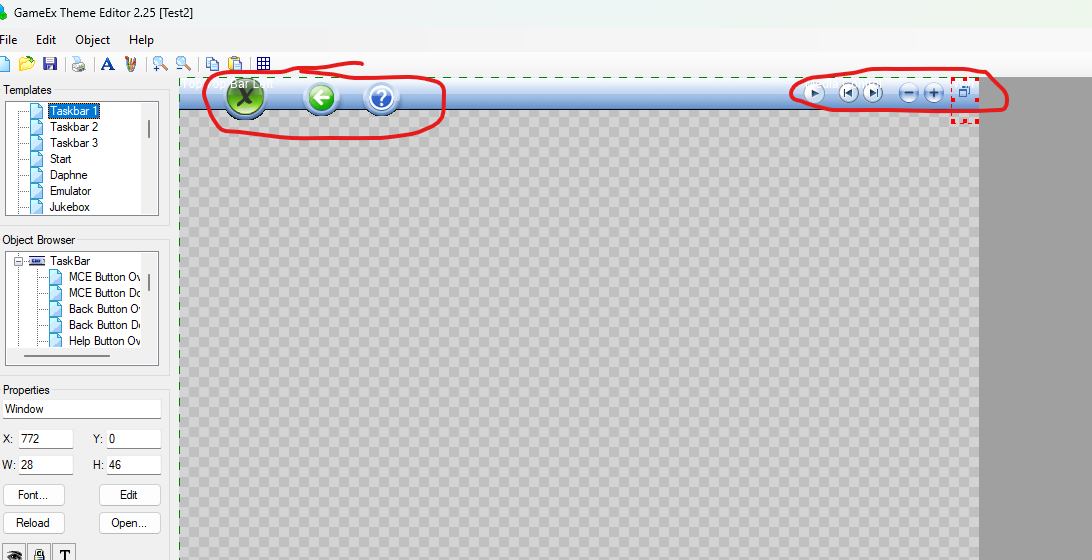
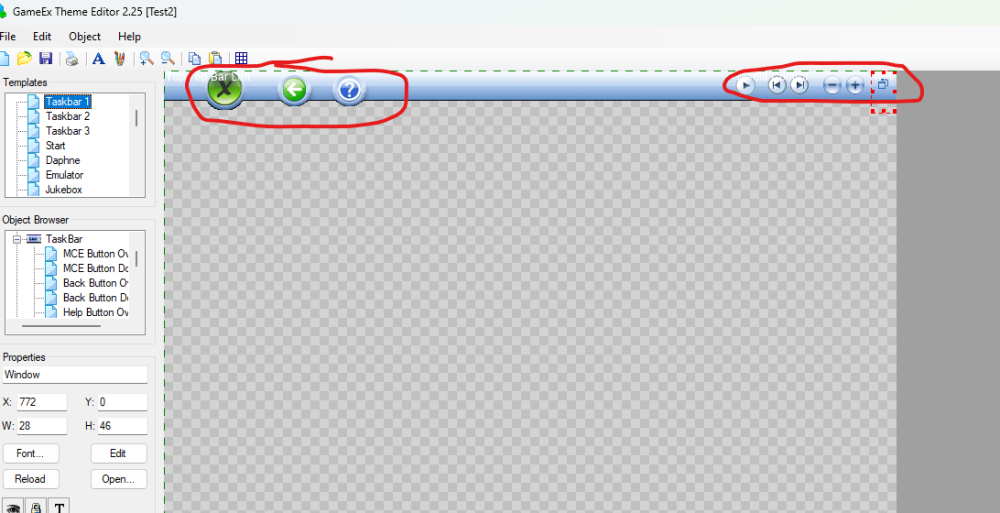
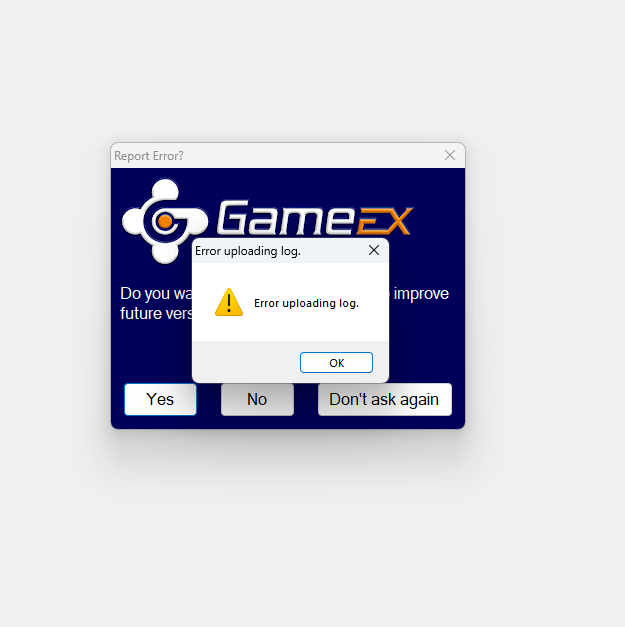
Being new to GameEx I'm finding a lot of little nuances to it that are very different from my past experience with Mamewah...particularly around theming and options. I'd like to try and get some questions answered around the theming system and how some things work. These are my current observations so just looking for confirmation or responses so that I can figure out next steps, 1. Themes are nothing more than a visual layout. There is no hard functionality tied to a theme (sort of...see questions below). 2. Some of the objects in a theme are basically fixed objects. For example, menus or the taskbar...the size of these objects can't be manipulated using a mouse "drag and drop" kind of approach, however I have found that I can manipulate size of these objects by changing the "W" & "H" values directly in the editor panel on the left (most on this below/next). 3. If I manually manipulate the dimensions of these objects as stated above, specifically the menu, then it will cause GameEx to generate an error when it tries to load the theme. For example, if I try to make the menu 200 Wx400 H in a theme GameEx will error out. I suspect it is because GameEx is expecting the menu object to be designed as a horizontal menu, not a vertical menu, and when you do this it can't handle it (which would also explain why it won't let you manipulate the object dimensions using the mouse). Is this correct? By the way, trying to "Upload the log" options results in an error from this screen... 4. Some pieces/components have to appear in fixed locations in the layout and those same components appear to have functionality that is "hardwired" to them, but no way to obviously move them around. For example, I haven't found a single theme that has a taskbar someplace other than the top of the theme. If I wanted to put my taskbar elsewhere, and then tie things like "volume up/down" to that new positioning it doesn't seem like there is a way to do that. Volume Up/Down is expected to live in a specific place in the layout, much like the MCE button, the "Back" Button, and the "Help Button". To be visual with it...are the objects circled in red below something that can be moved to another location either horizontally or vertically...or is this the only place those objects can live? 5. I haven't found a way to tie "functions" to a keypress without selecting them from a menu (FYI...I don't want a menu on the theme...or I want a menu setup that is more like mame or mamewah where the menu "pops up" when you press a certain key). For example, I would really like a way to trigger a ROM list update for MAME from a cabinet button push, but that doesn't seem possible. Is this a situation where you could create a "back" menu or a menu tied to a different key that that goes to a different layout that has all of the MAME options on it?? I want to "fix" GameEx to MAME as the only option, but still be able to access the menu system via a keypress of some kind. 6. In the ThemeEditor there appears to be a "hierarchy" of objects. For example, there is a background object, but also a Mod Background, and a Emu Background. I'm not entirely sure how to use these vs. simply changing the background in one or more of the templates. Is there a 'hierarchy map" for the themes that shows how each template/object relates to each other, and what the specific items are in the MEDIA library for the template that are associated with each object? 7. The MAMEWAH import option doesn't appear to work...at least not trying to import my current mamewah theme configuration (see attached). This is the error that I receive. 8. On MAMEWAH there was a lot of granularity for information related to the ROMs that you could place on the layout including, - Game Description - ROM Name (+ Parent) - Year & Manufacturer - Screen Type - Controller Type - Driver Status - Catver Category Some of these appears to be covered through filtering mechanisms and other things, but I'm particularly interested in whether the "Controller Type" object is available in the layout system at all. It doesn't look like that level of granularity is available but I wanted to check before I gave up on it. Sorry if this stuff has been answered in the past. I've been searching around the forums and have not been able to find answers to these questions. mame.lay



-
New versions are working as expected. Thanks!
-
Thanks Tom! I'll download it and give it a try!
-
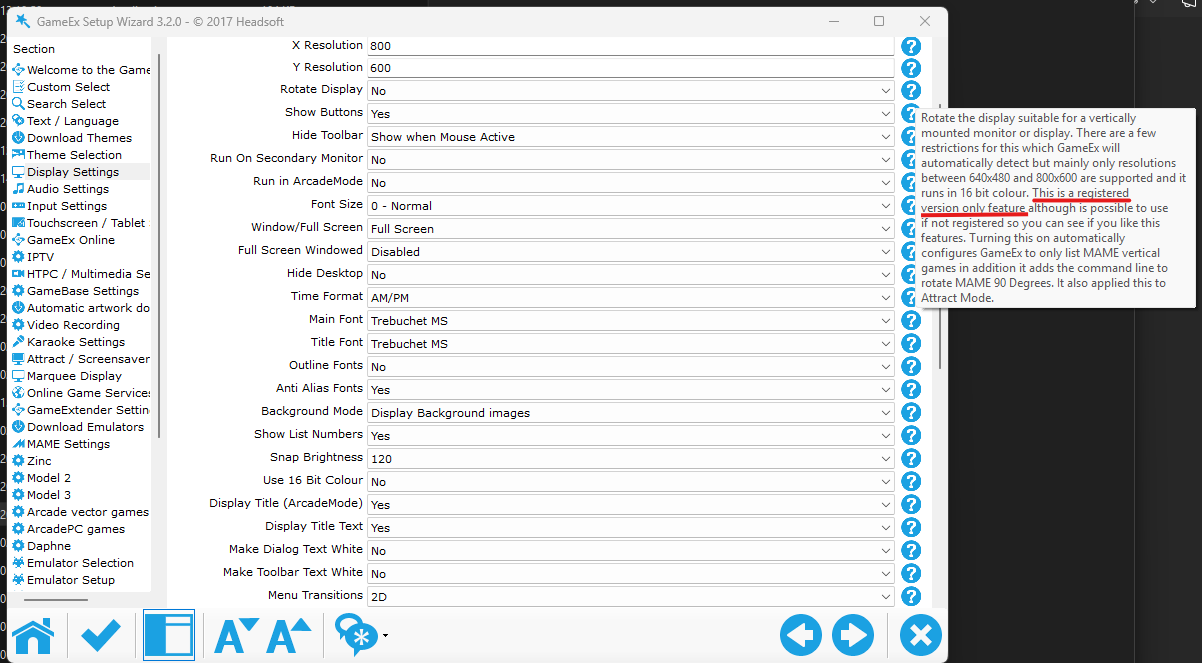
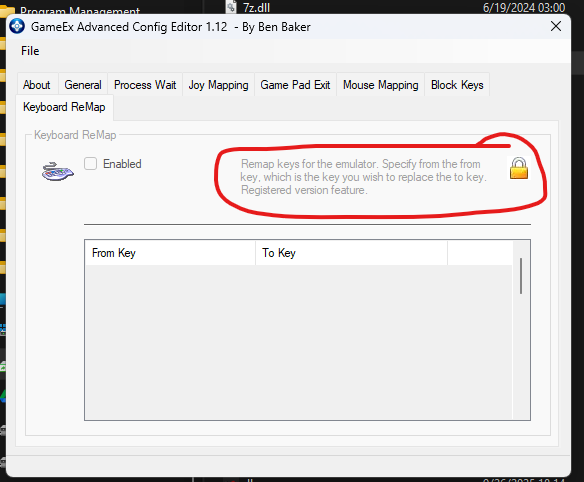
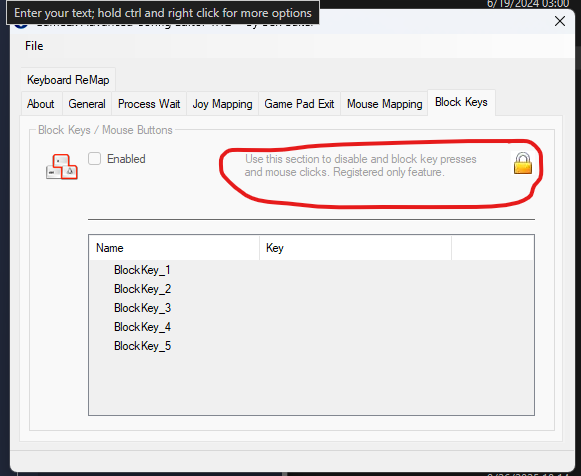
Draco1962, thanks for the quick response. I'm finding it in a number of different, and possibly strange locations as I poke around. For example, in the advanced config editor it shows up in a couple of different locations. And then in the setup Wizard I'm finding a bunch of references like this... These are examples of what prompted my question. I believe I'm using the latest version of GameEx...I downloaded it like 3 days ago from the download link on this site (unless that is not the correct place to get it from).

-
I've had my cabinet since 2004 and recently made the decision to invest in some upgrades across the board to bring it out of the dark ages. This has included everything from the monitor to the controller boards to the PC running the system (I was running a very old Windows 98 setup...yes...that old 🙁). As part of the upgrade process I also decided to take a look at the software I was running. I'm not doing anything fancy, only MAME with old arcade roms, but I was using Mamewah as a front end. Generally been very happy with it, but getting it running on Windows 11 was a little work (long story...if someone is interested message me and I'll write it up). That said Mamewah is obviously not supported any longer, so I went looking for alternatives to see if I could find something that was still being supported and would allow me to get the same kind of behavior that I had from Mamewah. That is how I stumbled on GameEx. I've got it up and running, but still have a lot of questions. For this particular post I want to focus on the registration stuff. As I'm going through different configuration I keep coming across information in the setup wizard and other places that indicates there are features which are only available to registered users. So I paid for a lifetime "membership", however, then I came across a post that indicated that everything was now totally free, so I'm confused. Is GameEx free at this point? If so are there still features that require registration, or are those actually just cleanup problems in the various text, guides, etc. that I'm coming across. Don't get me wrong, I have no problem paying for something that seems to be pretty decent (albeit not well documented), and that I think I can get to work for my purposes, but I'm just trying to figure out if I have access to everything, or if there is something I'm missing that I need in order to get access to additional features.o Any help/assistance appreciated.