



|



DeadC0w
-
Posts
9 -
Joined
-
Last visited
Content Type
Profiles
Forums
Events
Downloads
Store
Articles
Everything posted by DeadC0w
-
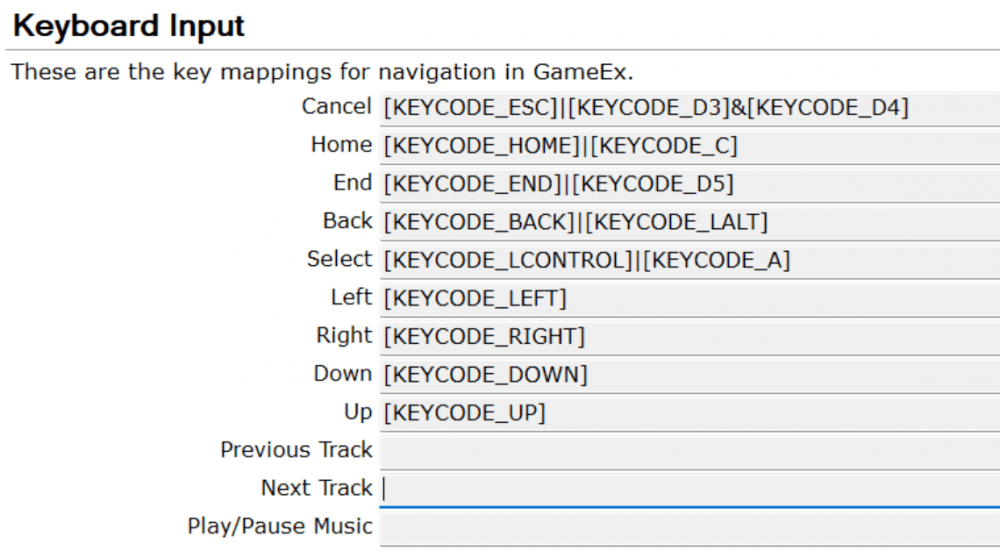
Sure. Here's my ini. I'm using an X-Arcade as a controller. I reprogrammed the suspect button to KEYCODE_T instead of KEYCODE_LCONTROL to see if it was something with the left control button in GEE, but it still doesn't recognize that specific button press. Further information: when I go into general settings in MAME, and map that button, it does recognize it as LEFT CONTROL, and then when I reprogrammed the controller, it then recognized it as "T", so it's definitely sending the correct commands to MAME. I just cannot use the button, no matter how it's mapped, to select in GEE. If I use the keyboard to control GEE, buttons worked as mapped, so I'm assumign this is an Arcade-X > GEE issue, because once the game is launched using hte keyboard, the controls on the Arcade-X work as mapped. [GAMEEX].ini
-
No idea why KEYCODE_LCONTROL is borked?
-
I have Keycode Left COntrol designated as select in GEE Setup Wizard 3.3.0, and GEE does not respond to this. I mapped Keycode A to it and it responds without issue. How can I troubleshoot this?
-
[RESOLVED] GameEx Evolution Wizard Setup Questions
DeadC0w replied to DeadC0w's topic in Emulator Support
I figured this out by using the MAME Filter page instead. Feature request: when you are in the "Edit Game List" please add: Right Click > Add to Exclude List Right Click > Add to Include List Switching back and forth to add/remove is very time consuming. It would be good to be able to select multiples with SHIFT or CTRL and "Add All Selected to Include/Exclude" -
When I'm trying to filter my MAME list in GEE, I'm trying to understand how the "Excluded ROM Filter" works. It seems to work for thing like bioses, and a few other, but for names ROMs, I can't seem to get it to recognize the ROMS I want to exclude. Here's an example of what I'm trying: I want to exclude all beatmania games from my audited list of games, but I don't want to move the ROMs. The ROMs are all named bm<random>mix.zip. When I audit my game list in GEE, the "Edit Game List" in MAME Emulator Setup shows the games as beatmania<verion, release, etc> In the "Excluded ROM Filter" for MAME (under Emulator Setup), I have: *[BIOS]*;*(Demo)*;* Test*;*(Japan)*;*(Asia)*; That works, fine, but if I add any of the follow to the list, then re-audit the games list, the beatmania games never disappear. beatmania*; or bm*mix; or *bm*mix*; How do I properly use the filter and is there a limit?
-
I have my key in the registry. The setup program for Evolution on the "Finished Setup Wizard" shows " You are already a registered user of GameEx Evolution. Thank you for your continued support!", however, launching a game still gives the nag screen. How do I fix that?
-
Hey Tom, no, I said in my last reply it's resolved. But for continuity, you might want to consider making the username field in the setup accept the email OR username. I use my email to login here, so I thought that's what I needed in the setup program.
-
So you can use your username instead of email to login. This is resolved.
-
GameEx online is not accepting my login when I click "Download" on the "Download Emulators" page (error: "Invalid Username or Password"). I believe it has to do with a "+" being in my email address. It is the same login I use to get into this site (which has no problem with the +). I haven't tested the login for EmuMovies, but that also has a "+" in it, so I imagine I'll hit the same login wall when I go to use that function. Can I get some dev help on this? Edit: This is also occurring in GameEx 3.2.0
