|



jcsk8
-
Posts
5 -
Joined
-
Last visited
jcsk8's Achievements

Member (1/5)
2
Reputation
-
 I have the same problem. What temporaly solved for me is to go into the exit screen settings into the pinballX settings app and select "Hold key to exit emulator". That way, when I press and hold the exit key (default) pinballx exit the game into the game list normally.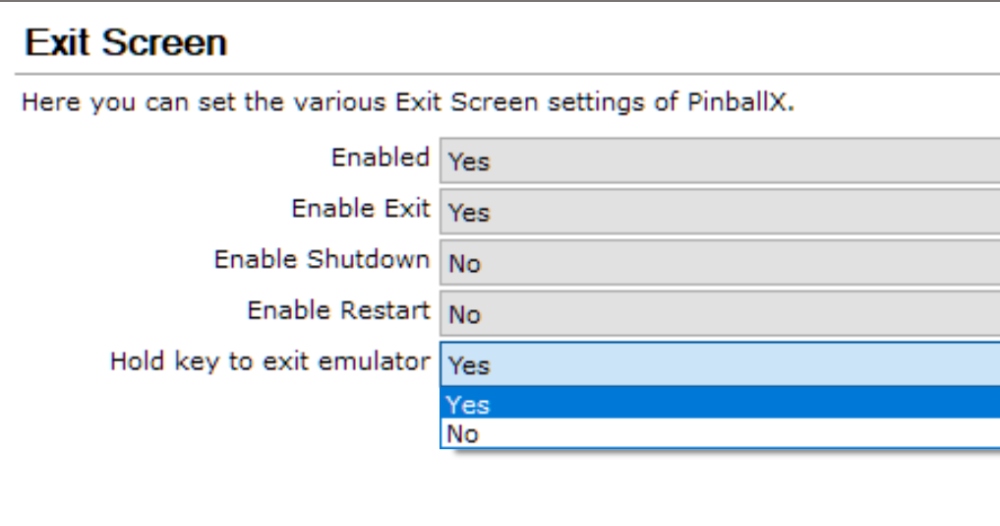
-
Thanks. I wasn´t finding the previous ones. Tried three and they did the same. Probably windows update broke something. I´m not into the last Nvidia drivers anyway, but last 2025 one, as the newer broke my flight simulator really bad. I was able to revert table exiting problem using the hold key to exit. That worked. The tables screen is what missing. Gonna wait for other uptades. Thank you, guys.
-
Thanks, Draco1962 log.txtPinballX.ini
-
Hello. There´s any place where I can donwload the previous version of PinballX? I can´t take screenshots from tables anymore. I (key is assigned) The exit (ESC) table is bringing me to the same table again, etc.
-
 Tried some visual front ends to a single desktop monitor as an introduction into the virtual pinball world and this one works like a charm. Thank you for this.