



|



jat428
-
Posts
16 -
Joined
-
Last visited
jat428's Achievements

Advanced Member (2/5)
0
Reputation
-
Just got a lightgun for my gameex cab and installed with little trouble. The ems topgun 3 works pretty good except I'm having trouble getting anything other than the fire trigger to work in mame. Button one is the fire button in mame and setting that through the tab menu works fine but any other button pushed on the gun doesn't register. I would like to be able to add credits, start the game, and reload from the gun buttons. Anyone with any experience with the ems topgun? Please help!!
-
yeah as soon as I played a few more games and realized they were all a little different I knew it wasn't going to really be possible for a one config to rule them all approach. Never tried xpadder but have seen it mentioned here a few times, might give that a try sometime, thx
-
I am running GameEx through my cab and am using an Ipac interface. My question is what is the best way to map the keys while in GameEx Arcade? I tried a few games that are the default standard ASWD config but did not see any in game mapping abilities. My Ipac is Mame default up=up down=down etc. I think these new games are a really cool addition from my previous GameEx versions but I don't see any option in the system config for GameEx Arcade other than turning arcade on or off. I'm sure I am totally missing something obvious here and apoligize if this has been asked before but I was not able to find it. Thanks for any advise! EDIT:Nevermind, apparently the three games I tried at random all were aswd but now I've tried a few more and realize they are all different. It would seem a hopeless cause to try and remapp every game. Just thought it would be neat to integrate all these new games into my mame cab. Very cool for computer though
-
Yaaaaaay it worked! Thank you so much Draco!
-
This version of gameex is completely different than the previous two I have used and was having a little trouble with the config screen while viewing from the tv I am using as a monitor. I enabled no verify roms and updated the list and now all the games pop up on the list but again some are still not playable that play fine through standalone mame. I will try and plug a regular monitor in so I can get the log and ini posted here. thanks for the quick response! GameEx.ini log.txt
-
I recently pulled my arcade out of storage and plugged it in and poof went the hard drive in a cloud of smoke! oh well I had another tower ready to go with a fresh install of xp and so purchased gameex, again, and transfered my roms\mame from my cocktail table to start over. Got the mame list updated but there are quite a few games not showing up in my gameex list. They show up fine in mame and play fine in mame but aren't showing up in Gameex. It's seems like if they work in mame they should work in gameex though! Wasn't trying to hijack this thread but it seemed like it was along the same problem lines! Thanks for any advise
-
Thanks for the advice. I however have made a decision the other direction just so my build can move forward. My cab will now feature a powered rotating monitor. I can handle mechanical devices much easier than scripting as I have little knowledge on that and the ones who do seem reluctant or unwilling to part with it. I've built two cabs now with GameEx on them this being the third and never really needed any help. Now that I needed it it seems in short supply. Several forums and posts later I am just giving up on it and will go a new direction. On to my issues with Daphne, another GameEx nightmare...
-
I just need a way to attatch a send keys command when the rom exits so it flips the screen back to vert. I know very little about this in fact I just figured out send keys today! I know there are people here much smarter than me about how to do this. I've read that with a batcth file this might be possible but have no clue how to do it. Please someone help!
-
The full screen 16:9 tables need to be launched from a widescreen desktop perspective then they auto rotate after launch to fill the screen. There seems to be no way of correcting it from that end, so I've been told. I could play their 4:3 tables but they are real stretched and ugly with a vert WS monitor
-
Forgot to add I already know game ex will rotate for me it's just that when I do game ex runs super slow. When ran from a vertical aspect to start works just fine.
-
I have a verital LCD monitor I am using for my cocktail cab and would really love to incorperate Visual Pinball to it. The problem is I run windows in a vertical position. The visual pin tables for widescreen require to be launched from a landscape perspective. So I have now set a send key command to rotate the screen via Irotate and it does this perfectly, game opens and plays like it should. when the game is closed however GameEx crashes. I have no option for a send keys after game exits that I'm aware of. I tried putting the command "^%{LEFT}" which is send keys for ctrl+alt+left in the launch after but does not work. Any help here would solve a huge problem for me as I am delaying my build until this is sorted out. Thanks
-
Does anybody know how to add more than one favorites file,ex-His and Hers? Any help would be great! I've included a pic of my completed first cab, check it out!
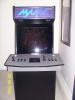
-
i had the same issue with my usb track ball and had to manually fix. open your mame ini file then open mame configuration file and about halfway down where it says dual lightgun 0 change it to 1 and that should force it to detect. hope that helps!
-
well my front end sure is shaping up! i now have mame, nes, snes, and n64 all running very nicely through gamex but as you know there are a lot of different game specific button configs for n64(also my control panel only has 6 buttons+start per player)which makes having only one default config setting not work. so my question is i am using pj64 and can save individual states, how do i make my config save states load with individual games? or is there a way to access the pj64 menu after starting through gameex ? thanks for any help!
-
got disable nag reg key today, thanks tom!! thanks also jedah for the tips. i swithced the debug and desktop settings in both emu's and ended up figuring out that i had two more separate issues. the working path in snes9x was missing one last file. in my fceultra it was the rom filter. thanks for the help!
