|



dopefish3d
-
Posts
3 -
Joined
-
Last visited
Content Type
Profiles
Forums
Events
Downloads
Store
Articles
Everything posted by dopefish3d
-
Is this really "rotation" though, from GameEx's perspective? It was my understanding that, at the application level, this is just seen as a different resolution, and GameEx is crashing when it sees a non-standard resolution when it hasn't been told it is rotated.
-
I did, it's that pastebin link right up there at the top, and again here for your clicking pleasure: http://pastebin.com/mbe690e8 the juicy part is: 02:57:52.2 2/4/2010: Testing Main Loop Once: Processing Frame 02:57:52.3 2/4/2010: --**-- 02:57:52.3 2/4/2010: ERRORS DETECTED: EXITING 02:57:52.3 2/4/2010: Error in the application. 02:57:52.3 2/4/2010: at Microsoft.DirectX.DirectDraw.Surface.DrawInternal(tagRECT* destRectangle, Surface sourceSurface, tagRECT* srcRectangle, DrawFlags flags, DrawEffects& bltEffects) 02:57:52.3 2/4/2010: at Microsoft.DirectX.DirectDraw.Surface.Draw(Rectangle destRectangle, Surface sourceSurface, Rectangle srcRectangle, DrawFlags flags) 02:57:52.3 2/4/2010: at u.j() 02:57:52.3 2/4/2010: at u.af()
-
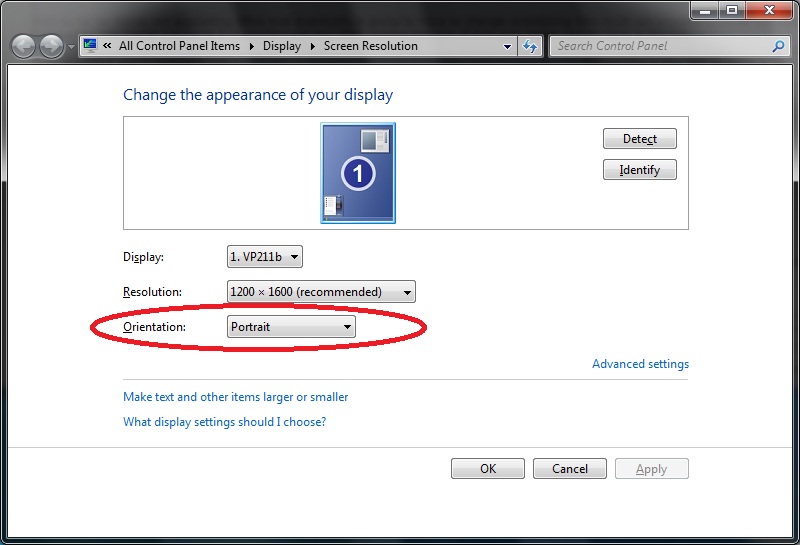
Pastebin of my crashlog: http://pastebin.com/mbe690e8 The problem: I have a 4:3 monitor, rotated 90 degrees (love those vertical shooters!). In win7, you can natively rotate the desktop to "Portrait". Hence, my actual desktop size is 3:4 (1200x1600). Running GameEx fullscreen with my desktop set this way crashes as soon as the register-screen goes away (running windowed does not crash, but defeats the whole point of using GameEx). Setting my windows desktop settings back to "Landscape" 4:3 (1600x1200, meaning i now have to hold my head sideways to read anything on my vertical monitor), and then telling GameEx to rotate itself 90 degrees correctly gets GameEx up and running vertically. Only now I can't use any other applications on this machine because my monitor is sideways. Using windows (as opposed to GameEx) to set the desktop rotation is clearly the best way to achieve this effect, as all applications are usable without any custom rotation shenanigans. Any help here or is this straight up a code problem?