



|



se_lees
-
Posts
34 -
Joined
-
Last visited
se_lees's Achievements

Super Member! (3/5)
0
Reputation
-
Right, I was confirming that, because I tried it before I read that post. In Mala, there's 'show task bar' (and it is global only). The benefit of this seems that it doesn't interfere with emulators if set to 'no'. On that note, I would definitely streamline the entries in the wizard to simply what the parameter is ('show...', versus 'show/hide...'), and the value being 'yes/no'.
-
Actually, 'pixelly' means progressive scan, hi-res image. 15khz monitors only drawing so many lines created a visual effect that is similar to a 'fabric pattern'. That, the shading of colors via phosphors, plus the natural rounding of 'pixels' that 15khz display enables make for a certain kind of 'depth' to the objects in the image that, especially if you don't remember seeing it back then, you won't have any idea of in comparison to hi-res monitors.
-
Someone's going to the chapel and going to get married...
se_lees replied to Draco1962's topic in Social Club
I think you're mixing fornication and adultery. Groovy cake. -
I just found this out. Hide Desktop makes the table not show (though VPMAME still shows). Closemul works great for closing VP without quit confirmation with other emus. Also, other emus I've used don't flip back to the desktop when exiting a VP table, so I can only guess it's something with GameEx. On the flipside....I'm not seeing any 'exit screen' from VPLoader unless VPauto is also in the loop - so it goes: quit confirmation, desktop, VPLoader exit splash, then GameEx. Something new that's weird. I have a U360 in my CP. In the GameEx input settings, I have 'enable gamepad/joystick' set to "DON'T initialise and use Joystick". Yet when I exit GameEx, the stick is reset to analog or mouse mode (starts in 4-way). I know this because if the stick isn't dead center, it pulls my mouse down.
-
Until very recently, I said that about Monty Python. Thought it was dreadful stuff. http://www.youtube.com/watch?v=rJGHVYPG_HY
-
Take them humourously.
-
According to this, you don't: AlsoLaunch= Command=""F:\Pinball\VPinballLoader.exe" "[ROMFILE]" "[WORKINGPATH]"" LaunchBefore=F:\xpadder\Xpadder.exe PinMAME1 PinMAME2 /M LaunchAfter=F:\xpadder\Xpadder.exe Default1 Default2 /M However, I set it that way, and while it does exit with one keypress, the confirmation still briefly shows, as well as the flash through the desktop. (I made sure to enable 'hide OS', but that doesn't change the behavior.) I'm not rotating the game at all. My monitor is in horizontal orientation, and MAME is in default display mode, which means all games are displayed horizontally. Vertical games are not set to fill the screen, so there are spaces on each side of the image, for which as I was under the impression the 'bezel' is for. Yes?
-
Just depends on what the designer's aim is....and perhaps how civilly...I mean seriously they take themselves.
-
I think my working path was missing 'tables'. (I found this via another thread, where Adultery posted an image of his ini.) Also, I set up Tempest's loader, and that's pretty nifty. Even loads the tables faster than I've ever seen them load - like, 3-5 seconds! The only hitch is that it doesn't handle exit; the VP quit confirmation still shows up, and when exiting the table, there's a quick snap back to the desktop before the UI shows. I can't figure out how to get Closemul in the mix. So that one's 95%. Definitely, there should be a stickied thread of emulator set-ups. We'll see on the MAME32 game list import. Since it does support at last one ini, I might think it would be easy enough to allow multiple lists via various inis. Also, I'm going to add another pretty minor issue: during vertical games run horizontally in MAME, the GameEx 'bezel' is not showing.
-
@Draco: - I'm using Mala. I like it well enough, and it pretty much handles all my needs. I like some of the interface features of GameEx better, as well as the image and video file features - fades, etc. The screensaver feature of GameEx is far better. With Mala, I disable the screensaver feature, and run Windows screensaver on 'blank' - but sometimes I like to see the games running/cycling. - importing my MAME32 game lists in Mala isn't perfect, but you can fairly easily do it from the Mala game list editor, then save/move those files to the Mala directory. It does it by ini, so I have an ini for each of my 'sub-folders/sub-lists' in MAME32, and it doesn't miss any of the entries in the ini. - Daphne in Mala, on the other hand, is handled with bat files or shortcuts, either containing the following format per game: d:\games\daphne\daphne.exe mach3 vldp -framefile "d:\games\daphne\vldp\mach3\mach3.txt" -fullscreen -x 1024 -y 768 -fastboot Mala configuration is: exe path blank, rom path to bats/shortcuts, file extension is bat/lnk, and cmdline is %rom%. I just figured out the above data corresponds to parts in the GameEx config, but I was confused by the 'Daphne options' and per game options. I now have it correct, and Daphne games run, hooray! (Not 'automatic', but I can live with it.) First time I've gotten them to run in GameEx. (Incidentally, I do not have an 'all emus' directory (or *anything* other than OS stuff on C, dear lord). I have separate directories for all my emus, and in the cases of multiple MAMES that use the same romsets, I set their respective inis accordingly to share one rom folder.) - now, VP: Mala needs the following - exe, rom path (tables), file extension, and cmdline vpinball.exe -play -"%path%\%rom%.%ext%". I use closemul as the exe, as VP's quit 'confirmation' is not toggle-able. Bizarre - but obviously the VP devs still see the app from the angle of table creators. There should probably be a kind of 'binary' spin-off for users. --Edit: I missed your commentary about 'rom filter'. That makes the list right. Now I just can't get the syntax correct. Either it pops up VP (another 'throw-back' element of the app), or, more commonly, I get "Error loading file".
-
I always get your attention, Tom. For those of you unfamiliar, that means I have been here about annually the last few years with the same requests, and trying to troubleshoot them. Because I've always liked GameEx. It just hasn't done those things, done those things properly, or in a manner I felt appropriately easy. Tom has always listened, though obviously was busy with other, arguably, more community-used items. I wasn't and have not been upset. I expressed things a slight colorfully. Only a slight. Now if I'd said something in the vein of, 'why is GameEx suckin in dese ways hea??'..... Well, actually that would've been quite funny - the vernacular and imagery and all - and I sometimes am suckin at something....Anyways. Draco, thank you for the depth of your communication. I've always been using the Setup Wizard. Also, I started with a fresh installation. So I just now installed 11.82 over 11.81 . Nicely, all my original settings were intact. The new options were available, I selected them, and they worked. So those are squared away. (I don't know whether Tom put in a randomizer, though the files seem to be playing in a different order than they are in the directory. Just to present: an issue I've found with randomizers, is they will use some number generation method, and will somehow play the same or similar arrangment, or/and replay files before the complement of files has been played. My idea on this is for the randomizer to consider the files in question, arrive at an arrangement, then find a new one when the set is completed.) So next is the MAME32 folders ini files. On Daphne: Daphne is designed to have its own directory; I would set it up to find all the 'encompassed' paths if the exe path is set. Or I wouldn't support it. I would set up Visual Pinball similarly, and make sure GameEx only recognized vpt files as tables. OR I would change 'working path' to exe path, and add in file type choice.
-
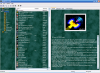
Okay. Thank you for your assistance. Listed in increasing importance (to me) : -screensaver: yes, I would like the minimum time between games during screensaver mode to be 1 minute. - Arcade ambience: I would assume the parameter would by default allow more than one file, so that people could select one, or as many as they like. It occurs to me that Tom might've had in mind Arcade Ambience (the file), rather than 'arcade ambience'. And perhaps he may think people would use the 'player' for this; perhaps they do, though I think that would be untidy. Sequential or random is another thing. I prefer random - but I have a special idea on that. - Daphne would be here in importance. - MAME32/UI game list import. I use MAME32 as an easy way to group, filter, and shuffle games. In the four years I've known of and checked out GameEx, there has been an issue with how it recognizes the entries in the favorites ini regarding sub-folders. Probably, no one else has created sub-folders in a main folder (as shown below), instead creating (if they created new ones at all) separate categories and hence inis, and so Tom didn't anticipate this possibility. I have each of these sub-folder entries as separate inis, so if I could import each one of them, that would work just as well. GameEx.zip
-
Neither, actually. I presented what I found fault with, along with some feelings about what those faults were. The forum is the place to put such things, no? I said nothing personal nor obscene about GameEx. At this point, it's up to Tom whether he's interested in the things I found fault with, and proceed some way if he is.
-
Trying this out again. 1. arcade ambience: I'm.......flabbergasted.....that you can *still* only select a file, and not a directory of files. Like. Really? 2. screensaver change period: the minimum is.....*still*.....2 minutes? (( Curiously, the start time *does* go down to one minute. Things are not looking good here.... )) 3. setting the MAME directory did not handle all the parameters on the page - ie: 'custom lists' and 'favorites' file had to be manually selected. (This isn't critical, but again surprising.) It still clips the first (or second, even weirder...) and perhaps another game in each category/sub-folder in the file - and in some of the sub-folders doubled the entries of one or more games. I remember last time that I had to add a space between each sub-folder designator and the first game (actually rom) name, and this allowed the first game of each sub-folder to be recognized....but then it started creating more double entries in GameEx itself. 4. Daphne: (minor) setting the exe directory does not affect the 'options'. (MAJOR) there are still extra Cobra Command entries, with blank entries after that. Not all the games are default. I mean, seriously, either put in all the supported games - or don't put none of 'em in. I anticipated this, though hoped for difference. So, after another year hiatus, and even though it's cheaper, I'm still not compelled to use GameEx. Alas.
-
Well, it looks like this may not happen. Oh well.
