



|



Cinnastar
-
Posts
15 -
Joined
-
Last visited
Cinnastar's Achievements

Advanced Member (2/5)
0
Reputation
-
I'm just reporting that starting from patch that went through last week the AVI that was set to play in the background of my theme no longer plays and hangs for a couple of seconds in trying to load it, regardless of using Media Foundation. I fixed this by converting it to an MP4, which is fine but the Theme Editor should be updated because it currently only lets you select an AVI or MPG for video. So I have solved this problem but I wanted to bring it to your attention, I'm probably not the only one using AVIs as background videos because that's what the editor tells you to use. Thanks for the continued hard work!
-

Feature & Enhancement Requests
Cinnastar replied to Tom Speirs's topic in FAQs, Guides, & Other Useful Information
FEATURE REQUEST - I do have a few quality of life requests I'd like to mention. It would be great if the TV Adverts used the same media playback as the video player. Currently TV Adverts only support FLV and AVI while the built in video player supports many more. Also this is probably only affecting me, but if it wouldn't be too much trouble to add more Emulator Groups I would really appreciate it. Currently it's capped at 30 and I filled them up years ago due to my particular setup. When returning from a random game launch it uses the default Start layout instead of the layout designated for the emulator that ran. -
Ok, turning on Sample Grabber does allow the videos to play again. Thanks, that works.
-
Cinnastar changed their profile photo
-
Just wanted to chime in to report the same issue. All video playback is broken on 591 drivers and working fine on 581 drivers. I hope you can fix this soon, and thanks again for your hard work! Edit: I do know the 591 update also broke Parsec for a number of weeks due to the update removing something deprecated.
-
We've made our own GameEx plugin but there is one issue I've noticed. It seems like the unicode is being stripped off the game names before being passed to the plugins? Example, The database name is: Yū Yū Hakusho 2: Kakutō no Sho The Game_Info struct GameEx returns: Yu Yu Hakusho 2: Kakuto no Sho Is there a way to have it return the proper unicode name?
-
Awesome! Thanks for your quick turnaround!
-
I did that too, no difference. I noticed that the logos no longer display on 18.26 but do on 18.25. Not sure if that's a clue to anything but at this point 18.26 is completely unusable unfortunately.
-
Sure, its a bit of a doozy though. I can confirm it doesnt affect MAME but it does affect all other emulators whether the roms are zipped or not, and with custom menus on and off.
-
Certainly, though I don't think the log shows the extent of the issue so I included a small video. https://streamable.com/rgysxc It's not opening the game info page, its double opening the rom list page. I've included the log of that recording, though I dont think it will show much except this. I did downgrade and confirmed this is only in 18.26 not 18.25
-
Oh no, something in this 18.26 seems to have broken its ability to drill down into the games properly and it's running commands like this
-
Working great, thanks.
-
Just wanted to let you know that the Video playback crash has returned in the newest version, identical to this post here: Same crash, same log. I did some testing for you and can confirm that it works in 18.21, 18.22, and 18.23. I believe it broke in 18.24 but its definitely still broken in 18.25. Then crash to desktop. Thanks for continuing to develop this wonderful program btw.
-
The newest update has a bad zip file and cannot be opened, which also prevents the auto-update from working properly.
-
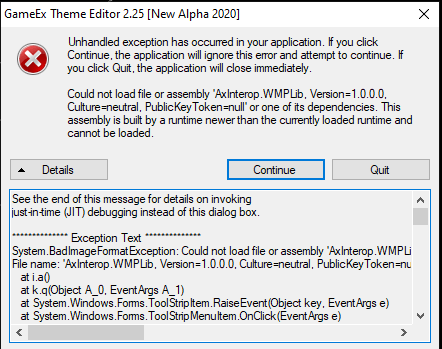
I didn't see it mentioned anywhere here but after upgrading to GameEx 16 the Theme Editor now throws exceptions on Edit > Video and Edit > Audio. You can continue, but the dialog boxes don't open so you can't change the settings. I'm certain this was working when I was running 15.73.
-
It appears that this plugin does not load on GameEx 16.00 and up with the new platform changes. I've downgraded for now, but it would be great if this was an easy fix for Adultery to patch.