|



miniashman
-
Posts
4 -
Joined
-
Last visited
Content Type
Profiles
Forums
Events
Downloads
Store
Articles
Everything posted by miniashman
-
Future Pinball Playfield Size shrunk in PinballX
miniashman replied to miniashman's topic in General
Ok tried changing FullScreenWindowed=True Set to False Tried VPX and that runs in full screen -
Future Pinball Playfield Size shrunk in PinballX
miniashman replied to miniashman's topic in General
Sure, am at work now. Once home will try that and confirm. Will also post the screenshot of the emulator setup. yes its 1920*1080 in native resolution. -
Future Pinball Playfield Size shrunk in PinballX
miniashman replied to miniashman's topic in General
Mike, i am running 1920 x 1080 i did change the windowwidth=1920 and windowheight=1080 in the .ini file but didn't make any difference so i changed it back to the original setting. Although i did not try windowwidth=1080 and windowheight=1920. Also this happens on all even VPX and VP995 -
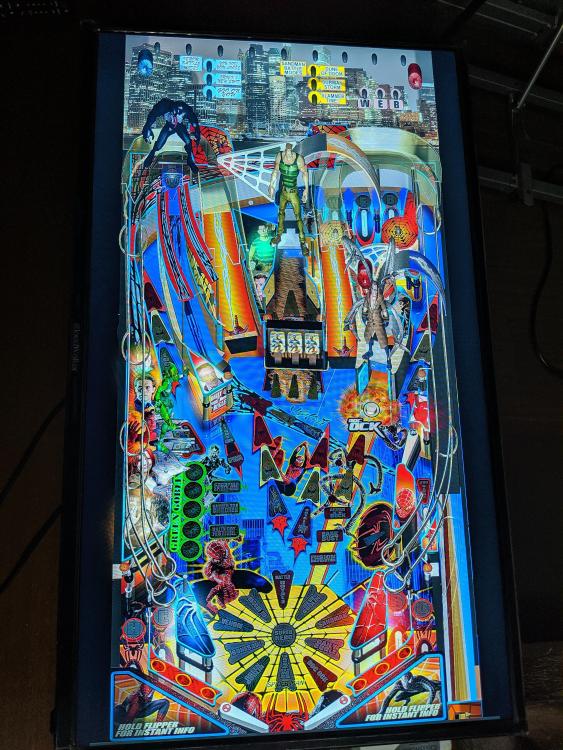
After figuring out how to resize Future Pinball tables and setting up around 20 tables fully working in FP including Backglass and DMD, i am now stuck running the same in PinballX. Been reading all the forums and researching for about a week i am still stuck. When i run in FP everything works fine and i get full screen and can play. But when i start any table in PinballX the width reduces and the height increases. Can someone guide me on how to fix this issue. I have latest version of PinballX running. Prior to this i was on 3.43 (now on 3.47) I have attached my log file and PinballX.ini file and also pic of how the PF looks in PinballX Thank you in advance.. PinballX.ini log.txt [SETTINGS].log