|



Domia
-
Posts
32 -
Joined
-
Last visited
Content Type
Profiles
Forums
Events
Downloads
Store
Articles
Everything posted by Domia
-
Hi all, I created some nice videos of the PC games I play on my machine but it seems the option in the advanced config is only to show images (even if it says "video snaps").. any idea how to do it? Thx for the help Dominique
-
Has anyone been able to map the left and right mouse button to keys with the advanced config editor? It's been working great for me to remap keyboard keys but no luck with mouse buttons. Thx for the help, Dominique
-
To be clearer the left and right button re-mapping doesn't work..
-
That's an awesome idea! I bought the movies from Emumovies and only uses 2 or 3 % of them, it would be great to have a "ALL EXISTING MAME ROMS" menu item...
-
I'm having problems re-mapping keys to mouse buttons, anyone else had that issue? Dominique
-
Hi Headkaze, I've been using the Advance Config Editor and it solved 90% of my problems, I only have a mall issue with games not recognizing keys re-mapped to "left mouse button". The config works fine but it doesn't work in the game.. ever had that problem? (can you test on your side see if it works?) Thx for the help, Dominique
-
I went through the text without finding any missing entries but let me tell you what I did which solved this problem: I deleted a group I had created with 2 PC games in it and VOILA... the weird behavior is gone, all my PC games are now created as "treat as PC game" YES and now they all start fine. When I'm done setting them all I will need to group them again and I'll update you with what I find. Thx for your help Dominique
-
Hi all, I've been messing with PC games setup in GameEx for 2 weeks now so maybe I messed up something but here is what happens when I run GameEx: I have on the main menu: All mame games, Nintendo 64 games and 2 or 3 PC games, lets say I want to play a Mame game I select Mame which gives me the list of roms, I select the game I want which takes me to the Info page with the "play this game" option and this is where the weirdness begins.. ) If I press "play this game" nothing happens, I cannot go down to "Add to Favorites" but I can go up to "Back" and other options which work fine. If I use the mouse clicking on "play this game" doesnt do anything as well but if i mouse over "Add to favorites" I hear a sound (as if a key is stuck on the keyboard) If this is not strange enough I now figure out that by going back to the main menu then trying again 2 or 3 times will unlock everything then all problems are gone and GameEx runs fine. I was tempted to un-install then do a fresh install of GameEx but I'm afraid to lose my settings I worked for so long on! Thank you for your help, Dominique
-
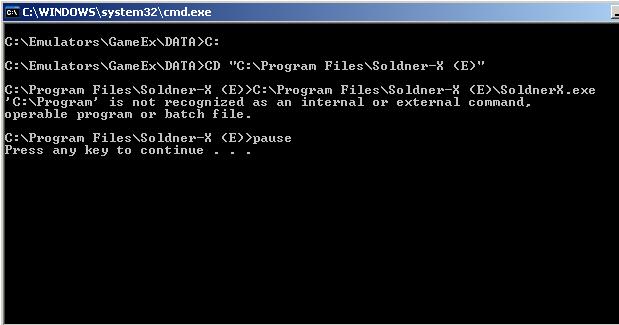
I tried what you said, this is what i get:

-
Well I don't really get it, I thought my problem was linked to Soldner so I went ahead and bought another PC game (Droid Assault) and it's doing exactly the same thing (which is doing nothing!) The shortcut in Windows works fine but starting from GameEx does nothing. The strange thing is that I have 2 other PC games (outrun 2006 and Fifa 2009) that work great... I'm lost Domia
-
C:\Soldner
-
13:19:09.4 5/10/2009: GameEx: Version 10.07: Starting Log13:19:09.4 5/10/2009: Operating System Platform: Win32NT 13:19:09.4 5/10/2009: Operating System Name: Windows XP 13:19:09.4 5/10/2009: Operating System Version: 5.1.2600 13:19:09.4 5/10/2009: Checking for versions of .net Framework installed 13:19:09.4 5/10/2009: .net Framework 2.0 Installed 13:19:09.4 5/10/2009: AMD Athlon Dual Core Processor 4450e, 3070MB 13:19:09.4 5/10/2009: 2.31Ghz - 2 Cores or CPU's 13:19:09.5 5/10/2009: Running Randomize() 13:19:09.5 5/10/2009: Loading PlugIns 13:19:09.5 5/10/2009: Checking for applications to Launch On Startup 13:19:09.5 5/10/2009: Running Misc startup tasks 13:19:09.5 5/10/2009: Setting Menu types 13:19:09.5 5/10/2009: Opening Configuration File 13:19:09.5 5/10/2009: Getting Configuration Values 13:19:09.5 5/10/2009: Using Theme: Default - Dark Gloss 13:19:09.5 5/10/2009: Checking for alternate Image Directory for Theme: Default - Dark Gloss 13:19:09.5 5/10/2009: Launching HideOS.exe 13:19:09.5 5/10/2009: Initialising Video/MNG DLL's 13:19:09.5 5/10/2009: Hiding Taskbar 13:19:09.5 5/10/2009: Using Cabinet Friendly Control System 13:19:09.5 5/10/2009: Is Media Center running? 13:19:09.5 5/10/2009: Checking/Creating LCD Registry values 13:19:09.5 5/10/2009: Check Media Center Exit/Start Mode 13:19:09.5 5/10/2009: Media Center Mode 2 13:19:09.5 5/10/2009: Video previews on. Warning: Only recommended on modern systems 13:19:09.5 5/10/2009: Snap Delay set to: 2 13:19:09.5 5/10/2009: Get other settings 13:19:09.5 5/10/2009: Desktop set to Hide ICONS and set Background to Black 13:19:09.5 5/10/2009: Set: Find emulator artwork on best match basis 13:19:09.5 5/10/2009: Start work for Form 13:19:09.5 5/10/2009: Getting Original Screen Size 13:19:09.5 5/10/2009: Opening Database Connection 13:19:09.6 5/10/2009: Initializing Component 13:19:09.6 5/10/2009: Retrieving resolution setting 13:19:09.6 5/10/2009: Initialising Windows Media Player Component 13:19:09.6 5/10/2009: MAME Path is: C:\Emulators\Mame32 13:19:09.6 5/10/2009: MAME EXE file is: Mame32.exe 13:19:09.6 5/10/2009: ROM Path is: C:\Emulators\Mame32\roms 13:19:09.6 5/10/2009: Catver.ini is located at: C:\Emulators\GameEx\DATA\catver.ini 13:19:09.6 5/10/2009: History.dat is located at: C:\Emulators\GameEx\DATA\history.dat 13:19:09.6 5/10/2009: nplayers.ini is located at: C:\Emulators\GameEx\DATA\nplayers.ini 13:19:09.6 5/10/2009: MAMEinfo.dat is located at: C:\Emulators\GameEx\DATA\mameinfo.dat 13:19:09.6 5/10/2009: Loading Controls.ini map file 13:19:09.6 5/10/2009: Snap Path is: C:\Emulators\Mame32\snap 13:19:09.6 5/10/2009: AVI Snap Path is: C:\Emulators\Mame32\avisnap 13:19:09.6 5/10/2009: Flyer Path is: C:\Emulators\Mame32\flyers 13:19:09.6 5/10/2009: Cabinet Path is: C:\Emulators\Mame32\cabinets 13:19:09.6 5/10/2009: Title Path is: C:\Emulators\Mame32\titles 13:19:09.6 5/10/2009: PCB Path: Not Found 13:19:09.6 5/10/2009: Artwork Preview Path: Not Found 13:19:09.6 5/10/2009: Panel Path is: C:\Emulators\Mame32\cpanel 13:19:09.6 5/10/2009: Manual Path: Not Found 13:19:09.6 5/10/2009: Icon Path is: C:\Emulators\Mame32\icons 13:19:09.6 5/10/2009: Marquee Path is: C:\Emulators\Mame32\marquees 13:19:09.7 5/10/2009: Loading Custom Emulators 13:19:09.7 5/10/2009: Loading Emulator 1: Nintendo 64 Games 13:19:09.7 5/10/2009: Loading Emulator 3: Pinball Games 13:19:09.7 5/10/2009: Loading Emulator 6: Outrun 2006 Coast To Coast 13:19:09.8 5/10/2009: Loading Emulator 12: Fifa 2009 13:19:09.8 5/10/2009: Loading Emulator 13: Soldner-X 13:19:09.8 5/10/2009: Loading Emulator 14: pc game 13:19:10.0 5/10/2009: Loading Emulator Group 1: PC Games 13:19:10.0 5/10/2009: Using 3D Alpha Blended Animations. This could be slow 13:19:10.0 5/10/2009: Using General Font: Trebuchet MS 13:19:10.0 5/10/2009: Using Title Font: Trebuchet MS 13:19:10.0 5/10/2009: Initialising DirectDraw 13:19:10.0 5/10/2009: Applying GameEx is Loading Image 13:19:10.0 5/10/2009: Creating DirectDraw Device 13:19:10.1 5/10/2009: Using Device: Primary Display Driver 13:19:10.3 5/10/2009: 501mb video memory available 13:19:11.0 5/10/2009: Setting Resolution to 1024x768 32 bit color 13:19:11.0 5/10/2009: Creating DirectDraw Surfaces 13:19:11.0 5/10/2009: Creating Primary Surface - Full Screen Mode 13:19:11.0 5/10/2009: Creating Back Buffer 13:19:11.0 5/10/2009: Loading graphic Surfaces 13:19:11.0 5/10/2009: Display is running at: 1024x768 32bit color, 60hz 13:19:11.1 5/10/2009: Creating Surfaces Flags 13:19:11.1 5/10/2009: Creating Surfaces Misc and Dialogs 13:19:11.1 5/10/2009: Creating Surfaces Volume 13:19:11.1 5/10/2009: Creating Surfaces Arrows 13:19:11.1 5/10/2009: Creating Surfaces GameEXlogo Text 13:19:11.1 5/10/2009: Creating Surfaces Toolbar 13:19:11.1 5/10/2009: Creating Surfaces Backgrounds 13:19:11.3 5/10/2009: Creating Surfaces Toolbar Controls 13:19:11.3 5/10/2009: Creating Surfaces GameEx Logo 13:19:11.3 5/10/2009: Creating Surface Unselected 13:19:11.3 5/10/2009: Creating Surfaces Home & Exit 13:19:11.3 5/10/2009: Creating Surfaces Snaps 13:19:11.3 5/10/2009: Creating Surfaces Menu and List Bars 13:19:11.3 5/10/2009: Creating Fonts 13:19:11.3 5/10/2009: Creating Game Font 13:19:11.4 5/10/2009: Creating Game Font Faded 13:19:11.4 5/10/2009: Creating Title Font 13:19:11.5 5/10/2009: Restoring Title Font From Cache 13:19:11.5 5/10/2009: Creating Font Black 13:19:11.6 5/10/2009: Creating Font Black Small 13:19:11.8 5/10/2009: Fonts Created Succesfully 13:19:11.8 5/10/2009: 439mb video memory left available 13:19:11.8 5/10/2009: Creating instance of global keyboard hook 13:19:11.8 5/10/2009: Attempting to load game list 13:19:11.8 5/10/2009: Text/Language: English 13:19:11.8 5/10/2009: Applying Language/Text 13:19:11.9 5/10/2009: Initialising Bass Audio Library 13:19:12.0 5/10/2009: MAME CMD options: -nowindow -joy -skip_gameinfo 13:19:12.0 5/10/2009: Loading last used Game List 13:19:12.1 5/10/2009: Setting Music Volume 13:19:12.1 5/10/2009: Creating DirectSound Device 13:19:12.1 5/10/2009: Trying: Primary Sound Driver 13:19:12.1 5/10/2009: Loading Sound Files 13:19:12.2 5/10/2009: DirectSound Device Created Successfully 13:19:12.2 5/10/2009: Creating ICONS 13:19:12.2 5/10/2009: Recreating ICONS 13:19:12.3 5/10/2009: Initialising DirectInput for Gamepad support 13:19:12.3 5/10/2009: Unable to create a joystick device 13:19:12.3 5/10/2009: Initializing MCE Remote 13:19:12.3 5/10/2009: Playing intro sound file 13:19:12.3 5/10/2009: Initialization OK! Starting GameEx! 13:19:12.4 5/10/2009: Testing Main Loop Once: Processing Frame 13:19:12.7 5/10/2009: Testing Main Loop Once: Main Loop ran successfully 13:19:17.8 5/10/2009: Validating: Emulator_1: Custom Background: C:\Emulators\Project64\screens 13:19:17.8 5/10/2009: Warning: Emulator_1: Custom Background Does not exist 13:19:17.8 5/10/2009: Validating: Emulator_1: Snap Path: C:\Emulators\Project64\screens 13:19:17.8 5/10/2009: Validating: Emulator_1: Custom Art Path 1: C:\Documents and Settings\tspeirs\Desktop\Nintendo 64 - Cart Scans (No-Intro 20080521)(U)(EmuMovies)\Nintendo 64 - Cart Scans (No-Intro 20080521)(U)(EmuMovies) 13:19:17.8 5/10/2009: Warning: Emulator_1: Custom Art Path 1 Does not exist 13:19:17.8 5/10/2009: Validating: Emulator_1: Custom Art Path 2: C:\eBooks 13:19:17.8 5/10/2009: Warning: Emulator_1: Custom Art Path 2 Does not exist 13:19:17.8 5/10/2009: Validating: Emulator_1: Custom Art Path 3: 13:19:17.8 5/10/2009: Warning: Emulator_1: Custom Art Path 3 Does not exist 13:19:17.8 5/10/2009: Validating: Emulator_1: Control Panel Path: 13:19:17.8 5/10/2009: Warning: Emulator_1: Control Panel Path Does not exist 13:19:17.8 5/10/2009: Validating: Emulator_1: Instructions Path: 13:19:17.8 5/10/2009: Warning: Emulator_1: Instructions Path Does not exist 13:19:17.8 5/10/2009: Validating: Emulator_1: Database: [Console] Nintendo N64 13:19:17.8 5/10/2009: Validating: Emulator_1: Title Snap Path: 13:19:17.8 5/10/2009: Warning: Emulator_1: Title Snap Path Does not exist 13:19:17.8 5/10/2009: Validating: Emulator_1: Box Art Path: 13:19:17.8 5/10/2009: Warning: Emulator_1: Box Art Path Does not exist 13:19:17.8 5/10/2009: Validating: Emulator_1: Cart Art Path: 13:19:17.8 5/10/2009: Warning: Emulator_1: Cart Art Path Does not exist 13:19:17.8 5/10/2009: Validating: Emulator_1: Manual Path: 13:19:17.8 5/10/2009: Warning: Emulator_1: Manual Path Does not exist 13:19:17.8 5/10/2009: Validating: Emulator_3: Custom Background: 13:19:17.8 5/10/2009: Warning: Emulator_3: Custom Background Does not exist 13:19:17.8 5/10/2009: Validating: Emulator_3: Snap Path: 13:19:17.8 5/10/2009: Warning: Emulator_3: Snap Path Does not exist 13:19:17.8 5/10/2009: Validating: Emulator_3: Custom Art Path 1: 13:19:17.8 5/10/2009: Warning: Emulator_3: Custom Art Path 1 Does not exist 13:19:17.8 5/10/2009: Validating: Emulator_3: Custom Art Path 2: 13:19:17.8 5/10/2009: Warning: Emulator_3: Custom Art Path 2 Does not exist 13:19:17.8 5/10/2009: Validating: Emulator_3: Custom Art Path 3: 13:19:17.8 5/10/2009: Warning: Emulator_3: Custom Art Path 3 Does not exist 13:19:17.8 5/10/2009: Validating: Emulator_3: Control Panel Path: 13:19:17.8 5/10/2009: Warning: Emulator_3: Control Panel Path Does not exist 13:19:17.8 5/10/2009: Validating: Emulator_3: Instructions Path: 13:19:17.8 5/10/2009: Warning: Emulator_3: Instructions Path Does not exist 13:19:17.8 5/10/2009: Validating: Emulator_3: Database: [Pinball] Visual Pinball 13:19:17.8 5/10/2009: Validating: Emulator_3: Title Snap Path: 13:19:17.8 5/10/2009: Warning: Emulator_3: Title Snap Path Does not exist 13:19:17.8 5/10/2009: Validating: Emulator_3: Box Art Path: 13:19:17.8 5/10/2009: Warning: Emulator_3: Box Art Path Does not exist 13:19:17.8 5/10/2009: Validating: Emulator_3: Cart Art Path: 13:19:17.8 5/10/2009: Warning: Emulator_3: Cart Art Path Does not exist 13:19:17.8 5/10/2009: Validating: Emulator_3: Manual Path: 13:19:17.8 5/10/2009: Warning: Emulator_3: Manual Path Does not exist 13:19:17.8 5/10/2009: Validating: Emulator_6: Custom Background: 13:19:17.8 5/10/2009: Warning: Emulator_6: Custom Background Does not exist 13:19:17.8 5/10/2009: Validating: Emulator_6: Snap Path: 13:19:17.8 5/10/2009: Warning: Emulator_6: Snap Path Does not exist 13:19:17.8 5/10/2009: Validating: Emulator_6: Custom Art Path 1: 13:19:17.8 5/10/2009: Warning: Emulator_6: Custom Art Path 1 Does not exist 13:19:17.8 5/10/2009: Validating: Emulator_6: Custom Art Path 2: 13:19:17.8 5/10/2009: Warning: Emulator_6: Custom Art Path 2 Does not exist 13:19:17.8 5/10/2009: Validating: Emulator_6: Custom Art Path 3: 13:19:17.8 5/10/2009: Warning: Emulator_6: Custom Art Path 3 Does not exist 13:19:17.8 5/10/2009: Validating: Emulator_6: Control Panel Path: 13:19:17.8 5/10/2009: Warning: Emulator_6: Control Panel Path Does not exist 13:19:17.8 5/10/2009: Validating: Emulator_6: Instructions Path: 13:19:17.8 5/10/2009: Warning: Emulator_6: Instructions Path Does not exist 13:19:17.8 5/10/2009: Validating: Emulator_6: Database: 13:19:17.8 5/10/2009: Warning: Emulator_6: Database Does not exist 13:19:17.8 5/10/2009: Validating: Emulator_6: Title Snap Path: 13:19:17.8 5/10/2009: Warning: Emulator_6: Title Snap Path Does not exist 13:19:17.8 5/10/2009: Validating: Emulator_6: Box Art Path: 13:19:17.8 5/10/2009: Warning: Emulator_6: Box Art Path Does not exist 13:19:17.8 5/10/2009: Validating: Emulator_6: Cart Art Path: 13:19:17.8 5/10/2009: Warning: Emulator_6: Cart Art Path Does not exist 13:19:17.8 5/10/2009: Validating: Emulator_6: Manual Path: 13:19:17.8 5/10/2009: Warning: Emulator_6: Manual Path Does not exist 13:19:17.8 5/10/2009: Validating: Emulator_12: Custom Background: 13:19:17.8 5/10/2009: Warning: Emulator_12: Custom Background Does not exist 13:19:17.8 5/10/2009: Validating: Emulator_12: Snap Path: 13:19:17.8 5/10/2009: Warning: Emulator_12: Snap Path Does not exist 13:19:17.8 5/10/2009: Validating: Emulator_12: Custom Art Path 1: 13:19:17.8 5/10/2009: Warning: Emulator_12: Custom Art Path 1 Does not exist 13:19:17.8 5/10/2009: Validating: Emulator_12: Custom Art Path 2: 13:19:17.8 5/10/2009: Warning: Emulator_12: Custom Art Path 2 Does not exist 13:19:17.8 5/10/2009: Validating: Emulator_12: Custom Art Path 3: 13:19:17.8 5/10/2009: Warning: Emulator_12: Custom Art Path 3 Does not exist 13:19:17.8 5/10/2009: Validating: Emulator_12: Control Panel Path: 13:19:17.8 5/10/2009: Warning: Emulator_12: Control Panel Path Does not exist 13:19:17.8 5/10/2009: Validating: Emulator_12: Instructions Path: 13:19:17.8 5/10/2009: Warning: Emulator_12: Instructions Path Does not exist 13:19:17.8 5/10/2009: Validating: Emulator_12: Database: 13:19:17.8 5/10/2009: Warning: Emulator_12: Database Does not exist 13:19:17.8 5/10/2009: Validating: Emulator_12: Title Snap Path: 13:19:17.8 5/10/2009: Warning: Emulator_12: Title Snap Path Does not exist 13:19:17.8 5/10/2009: Validating: Emulator_12: Box Art Path: 13:19:17.8 5/10/2009: Warning: Emulator_12: Box Art Path Does not exist 13:19:17.8 5/10/2009: Validating: Emulator_12: Cart Art Path: 13:19:17.8 5/10/2009: Warning: Emulator_12: Cart Art Path Does not exist 13:19:17.8 5/10/2009: Validating: Emulator_12: Manual Path: 13:19:17.8 5/10/2009: Warning: Emulator_12: Manual Path Does not exist 13:19:17.8 5/10/2009: Validating: Emulator_14: Custom Background: 13:19:17.8 5/10/2009: Warning: Emulator_14: Custom Background Does not exist 13:19:17.8 5/10/2009: Validating: Emulator_14: Snap Path: 13:19:17.8 5/10/2009: Warning: Emulator_14: Snap Path Does not exist 13:19:17.8 5/10/2009: Validating: Emulator_14: Custom Art Path 1: 13:19:17.8 5/10/2009: Warning: Emulator_14: Custom Art Path 1 Does not exist 13:19:17.8 5/10/2009: Validating: Emulator_14: Custom Art Path 2: 13:19:17.8 5/10/2009: Warning: Emulator_14: Custom Art Path 2 Does not exist 13:19:17.8 5/10/2009: Validating: Emulator_14: Custom Art Path 3: 13:19:17.8 5/10/2009: Warning: Emulator_14: Custom Art Path 3 Does not exist 13:19:17.8 5/10/2009: Validating: Emulator_14: Control Panel Path: 13:19:17.8 5/10/2009: Warning: Emulator_14: Control Panel Path Does not exist 13:19:17.8 5/10/2009: Validating: Emulator_14: Instructions Path: 13:19:17.8 5/10/2009: Warning: Emulator_14: Instructions Path Does not exist 13:19:17.8 5/10/2009: Validating: Emulator_14: Database: 13:19:17.8 5/10/2009: Warning: Emulator_14: Database Does not exist 13:19:17.8 5/10/2009: Validating: Emulator_14: Title Snap Path: 13:19:17.8 5/10/2009: Warning: Emulator_14: Title Snap Path Does not exist 13:19:17.8 5/10/2009: Validating: Emulator_14: Box Art Path: 13:19:17.8 5/10/2009: Warning: Emulator_14: Box Art Path Does not exist 13:19:17.8 5/10/2009: Validating: Emulator_14: Cart Art Path: 13:19:17.8 5/10/2009: Warning: Emulator_14: Cart Art Path Does not exist 13:19:17.8 5/10/2009: Validating: Emulator_14: Manual Path: 13:19:17.8 5/10/2009: Warning: Emulator_14: Manual Path Does not exist 13:19:20.0 5/10/2009: Restoring Emulator from Cache 13:19:20.0 5/10/2009: Restoring Emulator Database From Cache 13:19:23.7 5/10/2009: Exiting GameEx! 13:19:23.7 5/10/2009: Saving Settings 13:19:24.7 5/10/2009: Disposing Plugins 13:19:24.7 5/10/2009: Closing database connection 13:19:24.7 5/10/2009: Checking for applications to Launch On Exit
-
There's only one set of quotes in the advanced setup, i tried removing it entirely but same result
-
Just to add to the mystery; When I use the mouse, if I click on "play this game" it doesnt do anything but if I go over "add to the favorites" I get the same sound as if a key was stuck on the keyboard! very strange Domia
-
Here is the config: [Emulator_14] Enabled=True STARTPAGENAME=pc game TITLETEXT=pc test StartPageLogo= ROMFilter=*.lnk RomPath=C:\Soldner RomsInFolders=False SnapPath= TitlePath= BoxPath= CartPath= ManualPath= ControlPanelPath= InstructionsPath= WorkingPath=C:\Soldner MapKeys=True WaitBeforeKeys= SendKeys= ReplaceDash=True ReplaceUnder=True Capitals=True RemoveBrackets=True ShowDesktop=True Debug=False MAPFile= AlsoLaunch= Command=""[ROMPath]\[RomFile]"" LaunchBefore= LaunchAfter= configFile= ExcludedFiles= CustomBackground= PlayMusic= DontShowInfo= PlaySelectionMusic= SelectionMusicFolder= PCGame= DATABASE= UseDbName= GamesIn7Zips= MergeSets= PlayInScreenSaver=True ShowMostPlayed= RandomMostPlayed= CDCheck= CDCheckFile= CustomArtName1= CustomArtPath1= CustomArtName2= CustomArtPath2= CustomArtName3= CustomArtPath3= [GENERAL] DumbyValue=
-
Hi all, I have another strange issue and since this is the best place to get help here I go: I bought and copied Soldner-X to my hard drive to a c:\Soldnerx directory, I created a shortcut to the main executable and went through the advanced simulator setup. When I restart GameEx my game is there on the 1st page (called My PC games), I select it which takes me to the 2nd page where GameEx finds my shortcut (listed correctly as "shortcut to SoldnerX) I then select again which takes me correctly to the "play this game" page but there I cannot select it..... I keep pushing the key on my cabinet or on the keyboard but no effect at all. Everything else works fine (directional keys, exit, shutdown) but i just cannot start the game! The shortcut works fine when started directly from Windows and I tried the debug mode but with no result because GameEx never actually start the game. I have other PC games running great with the same configuration (rom filter=*.lnk, rom path and working path = c:\SoldnerX and command line = "[rompath]/[romfile]" Any idea? Thx for your help Domia
-
That did it! Thx a lot for your help Domia
-
Thx Headkaze, I tried the "advance Emulator Config" and I have one quick question: I wasn't able to remap the "Enter" key... when you click on remap the program waits for you to type the key but Enter is Cancel by default. any idea? Thx Dominique PS: I realized what I wrote doesnt make much sense but if you try once you'll see
-
Hi all, I just started playing with this so it might be a silly question: I'm remapping a few keys with a custom control ini file using the VKcodes.htm table. I need to remap the left shift and left alt key to something else but they are not in the VKcodes.htm file (only "shift" and "alt" but it doesnt seem to work). Anyone know where to get the code for these 2? Thx Domia
-
Something I realized last night: GameEx doesn't run the "LAUNCH AFTER" script because it doesnt have focus! When I exit the game it takes me back to Windows and hangs until I manually exit the script. As soon as the script is unloaded GameEx pops back up and I guess run the "LAUNCH AFTER" script... So I guess the solution is with Autohotkey and not in GameEx which makes me think that a simple key mapping option would be great in GameEx. I'd be interested to know how you guys run your PC games?, having to grab the mouse to kill the script in order to get back to GameEx is not a big deal but it kinds of ruin the arcade cabinet idea.. Dominique
-
I tried but no luck.. (
-
Here is the runitgame.bat: C: CD "C:\Documents and Settings\Domia\Desktop\PC games\Outrun" "C:\Documents and Settings\Domia\Desktop\PC games\Outrun\Outrun 2006.ahk" c:\documents and settings\domia\desktop\pc games\outrun\outrun close.ahk Here is Outrun 2006.ahk: Run C:\Documents and Settings\Domia\Desktop\PC games\Outrun\Outrun 2006.lnk WinWaitClose, Outrun 2006 exit 1::Esc LControl::Enter LShift::f Here is outrun close.ahk: DetectHiddenWindows On ; Allows a script's hidden main window to be detected. SetTitleMatchMode 2 ; Avoids the need to specify the full path of the file below. WinClose Outrun 2006.ahk - AutoHotkey ; Update this to reflect the script's name (case sensitive). thx fdomia
-
Tempest, I will post my runitgame.bat tonight when I get home. Thx For the help, Dominique
-
I think Key mapping would be fantastic in GameEx on a game per game basis (PC games) Domia
-
Well after trying for a while I am curious to know how you guys handle PC games in GameEx, especially the remapping of keys. I tried Autohotkey scripts and got my game to run but cannot get to the point where I close Outrun 2006 and GameEx regain focus with original key mapping. Every time when I close the game I get back to windows and have to manually exit the script for GameEx to regain focus. I wrote another script who would kill any open script and put this in my "LAUNCH AFTER" but it doesnt work...(works fine when started manually but I don't know why GameEx doesnt launch it)). Just curious if you guys found another solution because there's so many great PC games out there. Thx for the help, Dominique PS: Can GameEx remap keys?