|



E36M3ZF
-
Posts
31 -
Joined
-
Last visited
Content Type
Profiles
Forums
Events
Downloads
Store
Articles
Everything posted by E36M3ZF
-
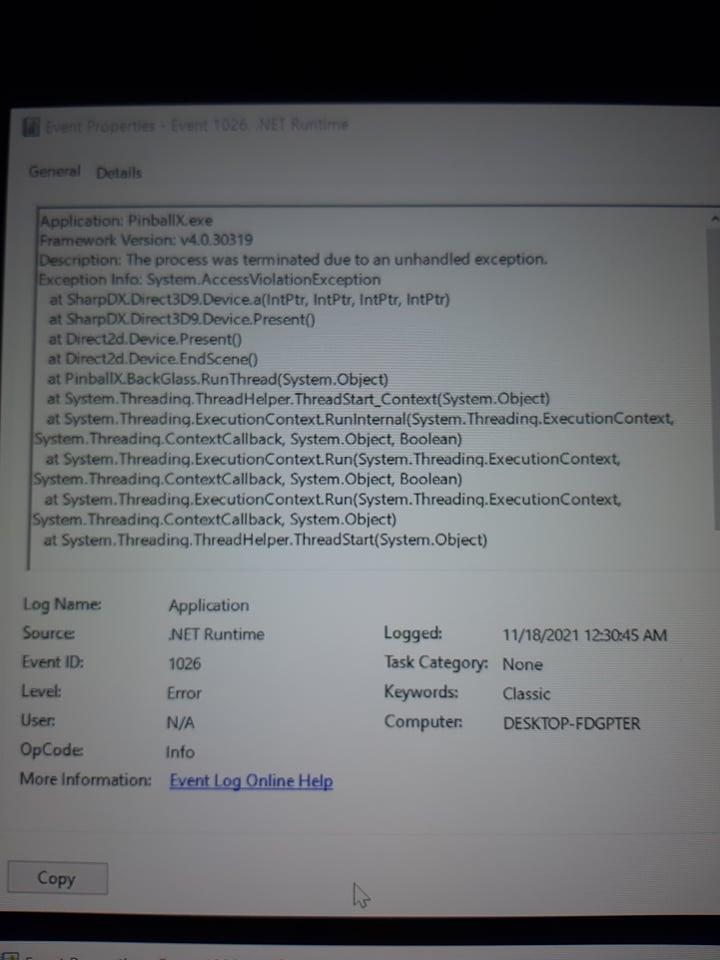
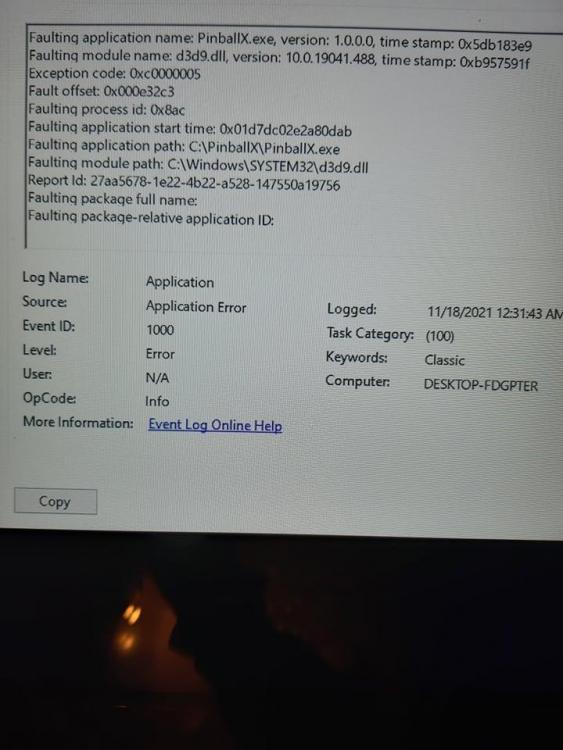
Welp, turned out the problem was RTSS/Afterburner being globally ON, affecting PinballX and causing it to close. Turned it OFF so it only affects Visual Pinball (it helps a bit with frame pacing i think) and the problem went away. Thanks for the suggestions. Even viewer helped a lot identifying the issue.
-
yes i did find some error messaged regarding PinballX I could only take screenshots with my camera though, so here they are Can you figure out anything from this?

-
No, i don't update Windows ever. I just use the one i originally installed. I don't have to update because i don't have the cabinet connected online and i also never do any changes. I just have my 200 favorite tables and play those, i don't ever add new tables, or do any updates. If it works, i leave it as is. But somehow, PinballX broke now and i can't figure out why. I thought it was the PC's fault, maybe a device got busted or something, but i only have this issue with the PinballX menu, not the tables themselves while playing.
-
I'm using Windows 10 (2004 update) I'll post the other log file when i get to my cab tomorrow. I can't use the latest version because it messes up all my options and i have to start all over again. The version i'm using was working fine in other computers, including mine and i tried some different versions anyway that are close to mine (and don't mess the setup), some a bit older and some a bit newer. It's just that on the particular computer in my cab, i have this problem. I don't know if it's some kind of conflict with some device so i'm asking to see if any other had something similar happening to them.
-
I tried some older and newer version. My original version was also working fine for a few years. Log file is the same in all versions. There are no errors.
-
Ι deleted/backed up the PinballX folder (after i uninstalled the program) and made a fresh one in the same location (C:\PinballX) Dunno about the rest, i'm gonna have to test again when i get back to my cab.
-
As i said, the PinballX.ini doesn't matter since it would crash even with a fresh one, right after installing, pure default settings. Media also isn't an issue since it crashes even when i remove them all, the whole folder, images, sounds, everything. So no media and no pattern. The Log also doesn't seem to say anything but here it is anyway log.txt
-
What the title says, i'm running PinballX and while i'm browsing tables or it just sits there, it closes back to the desktop, without any error message or any error line in the log. Things i tried: - Reinstalled the program. - Reinstalled a different version. - Tried both 32 and 64bit versions. - Tried running with or without admin rights. - Removed all media. - deleted the config file and started fresh. Nothing worked. This problem appeared out of nowhere, without me changing any options or anything. If i play a table, there are no crashes, which means VPX is working normally. I only get this crash in the menu, thus it's somethign about PinballX. I was wondering if someone ever had this weird issue and fixed it.
-
I built the pincab myself and it was working fine all this time, that's why i never updated PinballX, because the whole setup is a pretty janky and complex combination of several programs (Pinball X, 2 different versions of VPX, vPinmame, the Puppacks, etc) that all love the Windows Registry so much... So i know anything can go wrong if you change a tiny thing. Until one day it decided to do that. Anyway, i updated to the latest version and things got worse. I uninstalled the old version and did a clean install of the new one, i didn't just copy the files over, the only thing i re-used was the media assets and my database file. Although this particular issue was fixed, i got other issues with the menu itself acting crazy, like the menu not seeing my table images (only the backglass and wheels) and playing the same audio file for every table. And after i quit a table, the menu changes resolution, becomes tiny and everything goes silent and pitch black, except for some text and the wheel images. So i changed to an older version from a year ago and got the same issues. In the end, i ended up with a version about a year more recent to what i already had (but still about 3 years old). Now my issue is fixed and i don't get all the crazy menu behavior of the later versions. I'm happy with it now as is, i don't have the time or energy to deal with all the new issues of the later versions or build a new setup from scratch with a fresh registry and all. I have no idea why the new versions would act this way (Dependencies missing? Drivers? Busted registry? Some forgotten cfg file? A wrong line in the PinballX settings?)... Who knows.
-
Here's the log:
-
So the problem is this: If i open PinballX first and try to load a VPX table, what happens is that i see the loading for a few seconds and i get thrown at the PinballX menu again. Then the table loads and if i quit it, the VPX editor stays in the background instead of closing completely. After i close it manually and load PinballX again, everything returns to normal, i can load tables and quit properly. If i open VPX first, close it and then open PinballX, everything works as normal. Basically, the first launch via PinballX (after every computer restart) is screwed. I always have to load VPX first, quit it, and only then PinballX will work as normal without screwing up the first launch. I can't find a solution for this, anyone else has seen something similar? This isn't a good working state for a Pincab...
-
That solved the issue, thanks!
-
I was using the Game Manager application in PinballX to download assets for my tables. But i was trying today and even though it connects, it doesn't give me any results when i try to find, say, a wheel or Launch Audio file. All results come as empty, no matter what table i choose, even the most popular ones that absolutely have assets available. I thought maybe the Game Manager is obsolete so i tried to connect via FTP, using Filezilla. I followed the instructions from the FTP page and entered my account Username + Password but all i get is a "530 User cannot log in" and a "Critical Error: Cannot connect to the server" message. Is there any other way i could access the files?
-
PinballX Enhancements/Features Requests
E36M3ZF replied to Draco1962's topic in FAQs, Guides, & Other Useful Information
Game Manager could need an "Export media from tables in the database". This way you can gather all the linked media files that are actually in use in one place and get rid of all the left overs, junk, duplicates, old unused files, etc, with ease. It also needs a "Remove missing tables from the database". Every time you delete a table from the tables folder, you also have to manually delete it in the Game Manager. This isn't an issue if it's only a few tables but if it's like 300+ (like in my case) then it becomes a problem. -
Here's the scenario. After a couple of years of setting up your system, gathering media, renaming/deleting/replacing tables, etc, you end up with a huge 10+ GB media folder where at least half of it is unused/old files or duplicates with wrong names that don't get used by Pinball X anymore. How can you get rid of them so you only keep the active files? Of course, we are talking about thousands of files here in this case, in various different folders, so tracking down all the files manually, one by one, is not an option. One solution would be an "export media" option. For instance, the game manager would detect the media files that are "linked" to the tables in the database and export them in a folder. That folder would be the active files that you need so you could now easily delete the old folders and transfer the new ones there. Is there any option anywhere or an addon where this is possible? This could save a lot of space and make your setup much less cluttered, depending on how big your media folder is.
-
I was hoping to avoid this procedure. It's not faster than deleting one by one the tables i have removed. I thought being able to remove the missing tables from the database could easily be a one button thing. Press the "Remove missing tables from the database" button and done!. I guess i can't avoid the manual work (which i will have to do twice, once for VP9 and once for VPX since i need them in two separate databases). But thanks for trying to help.
-
None. I want to make two different databases, one for VPX and one for VP9. But i can't remove the tables from the database, i have to do it one by one. And i also can't make two fresh databases because i have put a lot of work with renaming and other info that i manually added. So these will be wiped off if i make new databases. I need my current database but split in VP9 and VPX tables. If i could just remove the tables that don't exist in the tables folder i could easily do this. i just select all tables with the vpt extension and move them somewhere. Then i could remove all the missing tables and save the database for VPX (with all my changes intact). Then i could do the opposite, move the VPX tables from the folder, delete them all from the database and save it as the VP9 database. Now it's going to take hours of work removing the tables one by one by memory, once for VP9 and another for VPX because i have a large tables collection (800+ tables). I tried it and can't find this delete functionality. You can delete one by one like in the regular game manager but there is no option to remove missing tables or even a filter.
-
Ok got it. So i need to make separate folders for VP9 and VPX. One last question though. What about the "other" files in the default tables directory? Like the B2Sserver files, the dlls etc? Aren't they supposed to be in the default folder along with the tables in order to work? But anyway, thanks. I will test it when i get back.
-
I deleted a lot of old VP9 tables from the "tables" folder (more than 300) but they still exist in the database. So i'm trying to use Game Manager to remove them but i don't see any option to remove missing files from the database. Also, i don;t want to create a fresh database because i made tons of changes and name editing in the current one and it will take me hours to re-do them. Is there a way to clear up the database from the non-existing tables without having to delete them one by one?
-
How do i add vpx or pv9 tables separately though? Game manager just reads all of them and adds them in any list. There is no option or filter to add vpx only or vp9 only. Do i have to use a separate tables folder and path for each maybe? Isn't that going to mess up the paths since "tables" must be the only correct one? Anyway, i'll give this a try.
-
Is there another way to split VP9 and VPX tables? When i use the game manager it adds everything in one list. How else can i launch the correct tables with the correct VP version without using the alternate exe command? I'm trying to figure this out for hours and can't find anything.
-
Yes but PinballX doesn't know which exe to run. If i use vp9 as my main emulator then i have to add this line to every vpx table in the database file: <alternateexe>VPinballX.exe</alternateexe> If i don't, whenever i try to launch a vpx table i get a warning that i'm using the wrong version (because it launches vp9) and then it closes.
-
I have setup a large collection of tables from both vp9 and vpx. So i have to use the alternate exe to be able to run both. Since i started with vp9, i setup the alternate exe as vpx. Problem is that some tables (like The Getaway 2) don't save the nvram (and the high scores) this way. On my secondary setup where i only run vpx tables (so i don't use alternate exe) Getaway 2 saves the nvram fine. Is there any way to fix this? I'm using the latest PinballX version as of now.
-
Thanks all for the replies. I appreciate it. The program i use for measuring is Afterburner. The issue is with the system. Maybe the way it detects the screens (i have two). Sometimes when i go from one screen to the other i get this behavior. If i re-do the change, it fixes itself. That's only when i want to end up to the second monitor. The first monitor is always smooth 100% of the time. In my later testings i saw this behavior with VPX, even without PinballX so it's not an issue with the later as i initially thought. So all is well, thanks again for the replies.
-
Sorry for the late reply but i was troubleshhoting this to find the cause. It doesn't matter which table i use, the behavior is the same with all of them. However, i noticed that sometimes it doesn't do that and the tables run 100% smooth with or without PinballX. So that means there's must be something funny with my system or panels. Need to test more.