|



Doseoracle
-
Posts
5 -
Joined
-
Last visited
Doseoracle's Achievements

Member (1/5)
0
Reputation
-
Short version is I'd like to play marvel vs capcom 2 & snk vs capcom 2 etc. Nulldc was the only emu I had success with. If anyone has suggestions I'm open to ideas, but I want to play the actual arcade versions not the Dreamcast ports.
-
Thx Draco, here they are. Appreciate the help. GameEx.ini log.txt
-
I went through the forums and found some things that helped in setting up NUllDC. For instance I used the [ command line= nullDC_Win32_Release-NoTrace.exe -config ImageReader:DefaultImage="[ROMPATH]\[ROMFILE]" ] to load a game from gameex and set the nulldc.cfg [ Emulator.AutoStart=1, Fullscreen=1] to auto launch in full screen. Problem: when I launch any game from GameEx it only launches the last game opened through the stand alone NullDC emu. No matter what game I pick. Been tinkering for the last few nights without success. Apologies if I missed the entry in forums. NUllDC v1.55 lil help? Thank you.
-
Gameex arcade navigation reverting to joystick 1
Doseoracle replied to Doseoracle's topic in General
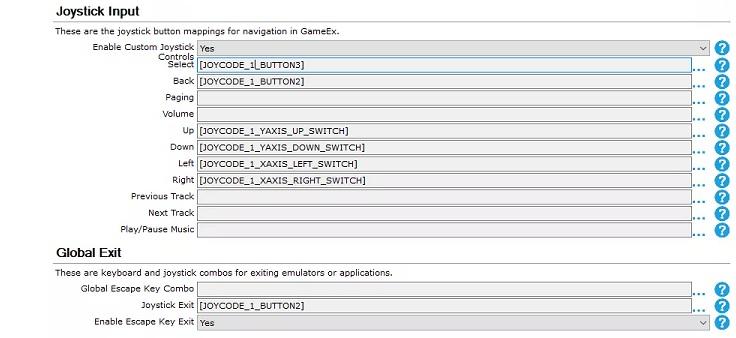
Let me see If I understand. The joystick I'm using to navigate is technically joystick one and the buttons were from joystick 2. So I need to go with one or the other, not both correct? I can't mix and match even if gameex records the buttons. Bummer, that means I need to rethink my layout. Initially my plan was to use joystick 2 board without an actual joystick just for the navigation buttons. Maybe I can remap the up and down to joystick 2 buttons as well? Thank you for the quick response. -
Hi all, I'm new here, so I apologize if this has been answered somewhere previously. I've recently mapped all my controls for gameex navigation. In my present layout I use 1 board for the navigation buttons i.e. coin, player 1 start, : mame. back, select, quit : geamex. Problem is gamex rewrites everything back to joystick 1 and it's associated buttons. so my emulators quit if I hit the button that should be mapped to joycode 2. Super frustrating any help would be appreciated. Thank you.