|



wishiwas
-
Posts
4 -
Joined
-
Last visited
wishiwas's Achievements

Member (1/5)
0
Reputation
-
Yesterday after I sent this question, I downloaded GameEx to see what it looks like. I stored it in a different location than my PinballX. When I was done checking it out, I uninstalled it. Now when I run my PinballX, all my videos (that run on the menu showing the game) are gone and I only get a black screen with the wheel art. Did GameEx delete a key in the registry or turn some other function off in the settings setup wizard? I did go back and have PinballX create new videos, but the screen is still black. Is there a simple fix?
-
I have been running Pinballx for some time now and I find I am using the pinball tables a lot less than I used to. I want to add some emulators to PinballX such as Zsnes but I am having running into issues. I have found work arounds for games like Dragons Lair and Space Ace, but that's only 2 games. Even if I could make Zsnes work on those work arounds, my setup would become messy. Which brings me to seeking another front end program. I am concidering switching to GameEx instead of PinballX but I really don't want to start from scratch again. Is there a way to import my PinballX setup into GameEx? Will GameEx allow me to run any pinball tables? Thanks! BTW, I attached a copy of how to use Dragons Lair with PinballX.

-
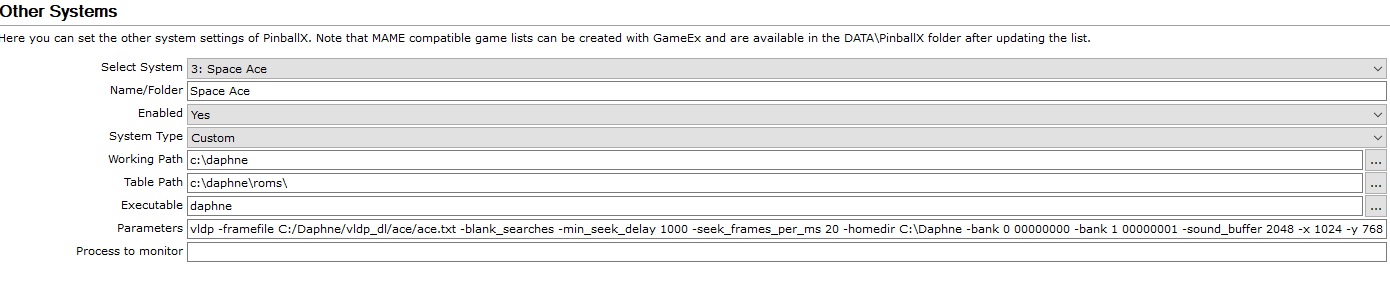
Thanks for the response rablack97 I actually got it going. The screen print below is the way I set it up. I had to delete the game in the game manager and start over like it was a new game. My issue was I kept the old entry there and just tried updating which rom it selected. daphne.exe ace vldp -framefile C:/Daphne/vldp_dl/ace/ace.txt -blank_searches -min_seek_delay 1000 -seek_frames_per_ms 20 -homedir C:\Daphne -bank 0 00000000 -bank 1 00000001 -sound_buffer 2048 -x 1024 -y 768
-
I didn't receive any replies, so let me try again. I am trying to launch Dragon's Lair from the pinballX menu. I am confused as to how to set it up in settings and game manager. Dragon's Lair runs just fine with the command below (as long as I launch it from within the c:\daphne folder which is where it is installed). daphne is the exe file. Can someone please help me with the settings I am to enter? daphne lair vldp -framefile "C:\daphne\vldp_dl\lair\lair.txt" -blank_searches -min_seek_delay 1000 -seek_frames_per_ms 20 -sound_buffer 2048 -x 1600 -y 900