|



Misote
-
Posts
10 -
Joined
-
Last visited
Misote's Achievements

Advanced Member (2/5)
0
Reputation
-
Hello. I have solved it. I have simply changed the gameex.ini file from the laptop to the PC. I attach the 2 files, in case anyone is interested in looking at it. Thank you so much. GameExLAPTOP.zip GameExPC.zip
-
 Misote changed their profile photo
 -
I don't understand. I have GameEx installed on 2 computers. The one I'm going to use for the arcade machine and on a laptop where I do tests. In the first I get the name of the rom and in the second (the laptop) I get that information, but I don't know how, because I haven't requested anything at any time...
-
Hello. In GameEx Arcade edition, how do I make the game information appear (see image) in the upper left corner and the rom name not appear? Thank you!!

-
I have simply eliminated the snap videos, and automatically those games that used videos are now seen with snap and background. Thank you for your excellent disposition.
-
I already solved it, thanks!!
-
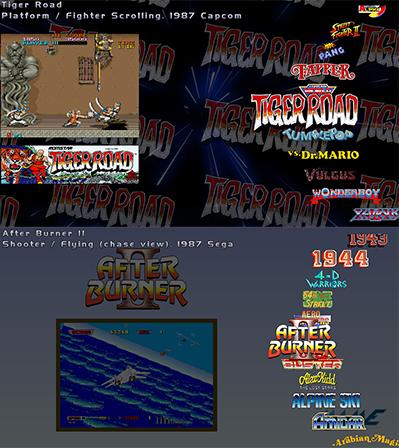
I take this opportunity to ask why some games are seen with video and without a background (lower image) and others with snap and with the background of the logos (upper image) Can it be configured so that they all appear with background and snap? Thank you!!
-
Thank you!! I have already managed to get Mame to come out directly
-
Hello, thanks for answering. I have discovered those options you mention, thank you. I have Gameex on another PC, where the "use flat menu" option appears, I think it is Arcade edition. I will confirm it.
-
Hello. I have installed Gameex Arcade and the "use flat menu" option does not appear Why could it be? Thank you!!