



|



bent98
-
Posts
71 -
Joined
-
Last visited
Content Type
Profiles
Forums
Events
Downloads
Store
Articles
Everything posted by bent98
-
yes there is only ball stutter when using dmdext and only with CCC. I use dmdext with FX2 without and performance issue. I don't run true FS. I was also hoping there was a way to make the dmd disappear like FX2 instead of having it on the BG.
-
Carny I figured out how to get the CCC DMD to display on my Pin2dmd, the problem when I run dmdext to mirror it onto my pin2dmd, CCC gets alot of ball stutter. I am running a 3.6ghx quad I5 and gtx980ti so the system should be able to handle it. My settings are below. Are you having stutter issues? Color Display Pixel Size: 4, Color Display X Offset: 25, Color Display Y Offset: 25, Then my command line for dmdext is: dmdext mirror --source screen -p 25 25 512 128 --no-virtual I also tried this as it moves CCC dmd to my 2nd monitor and still has same stutter. Display Pixel Size: 4, Color Display X Offset: 2350, Color Display Y Offset: 635, dmdext mirror --source screen -p 2350 635 512 128 --no-virtual
-
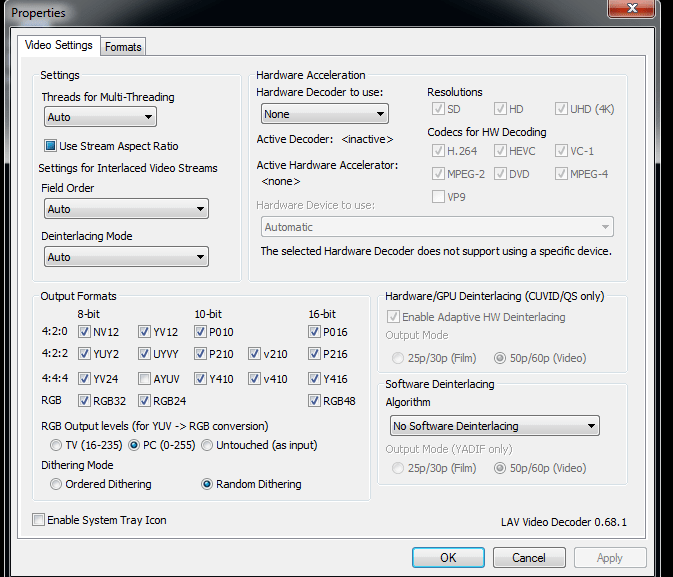
I tracked down this issue on this one. I had hardware acceleration set to Nvidia since I have a gtx 980Ti. Apparently this caused issues with backglass videos loading slow and randomily crashing PBX. Enclosed is a screenshot of what it supposed to look like.
-
Thanks to all for contributing to this wonderful thread. I noticed I had a bunch of Future pinball tables on my cab that are missing from your list. Would someone be willing to make mp3's for the following Future Pinball tables: Mega Man The Jetsons Lunch Take out Speed Devils World Tour Spy vs Spy Wild Weat Frogster Billion Dollar game show wipe out Tutenkham Reel it in Wizard of Oz Jungle boy Scifi Classic
-
I made a bunch of wheels that were missing for VP and FP. There are some wheel images that are very narrow and tall making for a squished images when converting to 128x32. Here is a list of tables that could use help with creating a image that's more horizontal. Can someone help? Once I finalize I will release the set. Double Up Dominio Gigi Golden Wings Sir Lancelot Ryan's Pumpkin Spanish Eye.
-
It looks like when I first boot up the computer pbx automatically startup via the startup folder in win 7. I noticed that when browsing my wheel's the color dmd 12x32 images I made don't show up. If I alt tab PBX I can then see them fine when browseing. Also, if I exit out of PBX and restart it works fine without having to alt-tab It looks like its a focus issu. Is there anything that can be done to focus the dmd image when PBX is first launched to avoid another app stealing it on startup ( script or PBX adjustment) ? Is there a script or something that can be programmed into PBX to gain focus for the dmd? [Display] Monitor=0 rotate=270 Windowed=False WindowWidth=480 WindowHeight=720 WindowX=0 WindowY=65 PlayFieldBrightness=230 WheelTextColor=ffffffff WheelTextOutlineColor=ff000000 InfoTextColor=ffffffff InfoTextOutlineColor=ff000000 FilterTextColor=ffffffff FilterTextOutlineColor=ff000000 MenuColor=ff0f7af0 [BackGlass] monitor=1 x=0 y=0 width=1366 height=768 UseB2S=False [DMD] Enabled=False monitor=2 x=0 y=0 width=900 height=300 AutoPositionPinMAME=True [FileSystem] EnableFileMatching=True [Interface] DesktopModeEnabled=False EnableAdditionalDetail=False ShowSystem=False ShowRatings=False EnableDefaultFilters=False [Audio] StreamVolume=90 SampleVolume=90 PlaySoundInVideos=True [Startup] playsound=False playvideo=False StartWithWindows=Yes [KeyCodes] quit=27 left=160 right=161 select=13 rotate=221 pageleft=162 pageright=163 exitemulator=27 ingame=80 screenshot=75 screenshotbackglass=72 instructions=73 volumedown=189 volumeup=107 credit=50 plunger=13 [JoyCodes] quit=10 left=0 right=1 select=2 rotate=3 pageleft=4 pageright=5 exitemulator=6 ingame=13 instructions=14 [Text] Line1=Free Play Line2=Press Start Featuring=Featuring Tables=Games PlayGame=Play Game Instructions=Instructions Information=Information Flyer=Flyer Gameplay=Gameplay Tutorial=Tutorial ExitGame=Exit Game ReturnToGame=Return to Game Return=Resume Browsing Exit=Exit Shutdown=Shutdown All=Return to Main Menu [FuturePinball] Enabled=True WorkingPath=C:\Games\Future Pinball TablePath=C:\Games\Future Pinball\Tables Executable=Future Pinball.exe Parameters=/open "[TABLEPATH]\[TABLEFILE]" /play /exit /arcaderender LaunchBeforeEnabled=false LaunchBeforeWorkingPath= LaunchBeforeExecutable=notepad.exe LaunchBeforeHideWindow=False LaunchBeforeWaitForExit=True LaunchAfterEnabled=False LaunchAfterWorkingPath= LaunchAfterExecutable=notepad.exe LaunchAfterHideWindow=False LaunchAfterWaitForExit=True MouseClickFocus=True FPRAMPath=C:\Games\Future Pinball\fpRAM [VisualPinball] Enabled=True WorkingPath=C:\Visual Pinball TablePath=C:\Visual Pinball\tables Executable=vpinballx.exe Parameters=/play -"[TABLEPATH]\[TABLEFILE]" LaunchBeforeEnabled=False LaunchBeforeWorkingPath=C:\PinballX LaunchBeforeExecutable=click.exe LaunchBeforeHideWindow=False LaunchBeforeWaitForExit=True LaunchAfterEnabled=False LaunchAfterWorkingPath=C:\PinballX LaunchAfterExecutable=killbackglass.exe LaunchAfterHideWindow=False LaunchAfterWaitForExit=True [ExitScreen] Enabled=True EnableExit=True EnableShutdown=True [StartupProgram] Enabled=false WorkingPath= Executable=notepad.exe Paramaters= HideWindow=true WaitForExit=false [ExitProgram] Enabled=false WorkingPath= Executable=notepad.exe Paramaters= HideWindow=False WaitForExit= [AttractMode] Enabled=True Timer=1 ShowFor=15 MuteAudio=False [System_1] Name=MAME Enabled=False WorkingPath=C:\PinballX\emulator\mame TablePath=C:\PinballX\emulator\mame\roms Executable=mame64.exe Parameters=[TABLEFILE] SystemType=0 LaunchAfterWorkingPath= LaunchAfterExecutable= WaitForProcess= [AutoExit] Enabled=False Minutes=10 [Login] Enabled=False UseLiteMedia=False [PinballFX2] Enabled=True WorkingPath=C:\Program Files (x86)\Steam Executable=steam.exe Parameters=-applaunch 226980 [TABLEFILE] Process=Pinball FX2.exe Rotate=False WaitFor=20 LaunchBeforeEnabled=True LaunchBeforeWorkingPath=C:\PinballX\dmdext LaunchBeforeExecutable=dmdext.exe LaunchBeforeParameters=mirror --source=pinballfx2 --no-virtual -q LaunchBeforeWaitForExit=False [Internal] lastwheelcachematchsize=-1123 lastselected=World TourWorldTour101FuturePinball filter_year= filter_company= filter_custom= filtername=Games [PinballArcade] WorkingPath=C:\PinballX\emulator\PBAFreeCamMod Executable=PBAFreeCamMod.exe Parameters=-applaunch 238260 skipwhatsnew Process=PinballArcade11.exe WaitForSelect=200 Enabled=False WaitFor=12 [GameListManager] onlinemode=true [RealDMD] EnableColor=True Color=ff0000ff [SetupWizard] EmuPath1=C:\Emulators AssetPath1=C:\Assets RomPath1=C:\Roms DefaultPathPrompt=True DownloadDatabasePrompt=True DownloadEmulatorPrompt=True WizardMode=1 CustomArray= SearchArray= SavePosition=False SectionIndex=8 SearchText= EmulatorIndex=0 EmulatorGroupIndex=0 DaphneIndex=0 HTMLAppsIndex=0 ExternalAppsIndex=0 RadioStationsIndex=0 NewsFeedsIndex=0 MappedDrivesIndex=0 SystemIndex=5 ShowPanel=True FontSize=1 WindowState=2 WindowSize=650,479 WindowLocation=1080,69 [System_3] Name=Jukebox Enabled=False WorkingPath=C:\PinballX\jukebox TablePath=C:\PinballX\jukebox\tables Executable=Jukebox.exe Parameters= LaunchAfterWorkingPath=C:\PinballX LaunchAfterExecutable=killbackglass.exe LaunchAfterEnabled=True LaunchAfterWaitForExit=True LaunchAfterHideWindow=False SystemType=1 LaunchBeforeWorkingPath= LaunchBeforeExecutable= LaunchBeforeWaitForExit=False LaunchBeforeHideWindow=False [System_2] Name=Pinball Arcade Enabled=False SystemType=0 WorkingPath=C:\PinballX\emulator\PBA_Starter TablePath=PinballArcade11.exe Executable=PBA_Starter.exe LaunchAfterWorkingPath= LaunchAfterExecutable= Parameters=skipwhatsnew WaitForProcess=PinballArcade11.exe [System_4] Name=Future Pinball DOFL Enabled=True SystemType=2 WorkingPath=C:\Games\Future Pinball\BAM TablePath=C:\Games\Future Pinball\Tables Executable=FPLoader.exe LaunchAfterWorkingPath= LaunchAfterExecutable= Parameters=/open "[TABLEPATH]\[TABLEFILE]" /play /exit /STAYINRAM [System_5] Name=Kodi Enabled=True SystemType=1 WorkingPath=C:\PinballX\kodi\ TablePath=C:\PinballX\kodi\tables Executable=kodi.exe Parameters= LaunchBeforeEnabled=True LaunchBeforeWorkingPath=C:\PinballX\DC2 LaunchBeforeExecutable=launchKodi.ahk LaunchBeforeWaitForExit=False LaunchBeforeHideWindow=False LaunchAfterEnabled=False LaunchAfterWorkingPath=C:\PinballX\DC2 LaunchAfterExecutable=end.bat LaunchAfterWaitForExit=False LaunchAfterHideWindow=False [Plugin_1] Enabled=False Name=LEDBlinky_PX.dll [Plugin_2] Enabled=False Name=PlugInLED.dll [Plugin_3] Enabled=False Name=PlugInSpeech.dll [Plugin_4] Enabled=False Name=QuickLaunch (PinballX Edition).dll [Plugin_5] Enabled=False Name=Xpadder Plugin.dll [System_6] Name=P-ROC Enabled=True SystemType=1 WorkingPath=C:\Visual Pinball TablePath=C:\Visual Pinball\tables Executable=vpinballx.exe Parameters=/play "[TABLEPATH]\[TABLEFILE]" LaunchBeforeEnabled=True LaunchBeforeWorkingPath=C:\PinballX LaunchBeforeExecutable=proc.exe LaunchAfterWorkingPath= LaunchAfterExecutable= LaunchBeforeWaitForExit=False LaunchBeforeHideWindow=True
-
If its a rom based table you have to go into registry and change showpindmd to 0. If its an EM then hiding it in the B2S is necessary.
-
I had the same problem. You have to disable the killbackglass option in the vpinball config. It was there for closing old school Rosve B2S backglass but the old B2s close just fine without it.
-
Marvels Woman of Power Backglas Video/Wheel Image
bent98 replied to NEWER's topic in PinballX Media Projects
No one has made one yet? -
What I do for tables like Back to the future where it has that old style numerical dmd that displays on the pindmd is go into the windows pinmame registry and find the rom name. Then I search in the specific rom name entry, look for showdmd and change it from 1 to 0.
-
thanks! I was wondering for tables that dont use a DMD like EM's is there anyway to leave the dmd image up after the table is launched?
-
I was wondering if anyone created a full color set of dmd images for FP, PBFX2, and VP? Fren made the initial set that were p[posted on Vp universe. I would also like to know if there is a util to batch create them from existing wheel images?
-
I did some more playing around and it was the samsung SSD magician software that was in the startup folder that loaded after PBX. Once I disabled it from starting up all is good. Fortunately for me I don't need that running all the time. I would recommend you troubleshoot by typing MSconfig and uncheck a bunch of startup programs to see whats the root cause.
-
yes
-
Which FP issue are you referring to?
-
Sorry for that Draco. Any ideas?
-
I traced this to an issue when I have the network cable plugged in. The nik car might be taking focus away from pinball X at startup. Is the a script or a program that can determine loading order at startup? If PBX is loaded last then we wouldn't have this issue,.
-
Ok then, is there a debugging option in PBX I can turn on to try and get to the bottom of this?
-
I just took a video to show you what occurs. It only does this with FX2 wheel browsing. crash.MOV
-
Well, I converted all the PF videos to mp4 and while browsing PBX went black. I attached my log and config but I am not sure if that's going to help. Config.zip
-
I wanted to report an issue when browsing my Pinball FX2 tables. I have both back glass and playfield videos going off at the same time while browsing. Sometimes the videos don't load but I can still browse the wheel. Sometimes the screen goes black and other times PBX can freeze. What I tracked down as the cause is that my Backglass videos are in .MP4 format and 3/4 of my playfield videos are .f4v. When I removed the .f4v videos I didn't have any issues. I will look for a program to convert my .f4v to .mp4 to confirm. Has anyone else seen this? I assume PBX and Lava Codec are having a hard time trying to play both file formats at the same time?
-
Marvels Woman of Power Backglas Video/Wheel Image
bent98 replied to NEWER's topic in PinballX Media Projects
I didn't see a link for the video. Did anyone make one? I couldn't find anything on the ftp. -
I just set this up. One thing I noticed is that it doesnt record Mp4 format even though I selected it. It only records .f4v
-
The screen grab feature in pinballx is working for future pinball backglasss but the play field is coming up black. I don't have this issue in hyperpin. I tried checking desktop composition on the pinball x shortcut but to no avail.It's a 2 screen setup. Win 7 x64. No issues with the screen setup and the pf is set to primary. Is this a bug? Is there a program like gtx joes that would capture video for future pinball?
-
KODI (XBMC) as Jukebox just got a whole lot easier...
bent98 replied to RustyCardores's topic in User Projects
do you have an updated guide on getting this to work with the new version of Kodi? Also, can you config this to work with RGB lights like dwjuke?