|



Wombat
-
Posts
50 -
Joined
-
Last visited
Content Type
Profiles
Forums
Events
Downloads
Store
Articles
Everything posted by Wombat
-
I know there's a million ways to do things but I want to ask the assembled intelligentsia how they may do something so I can assess if it too suits my needs. My config is that I have two Ultrastik 360s on my panel with 8 buttons each attached to the joystick via the harness so they function as joysticks. The emulators that I use (Mame, CCS64 etc.) responds to these nicely after initial setup inside the emulator. I also incorporate a stack of PC games on my cabinet and they play quite nicely using my panel's trackball and mouse buttons if they apply or the joysticks and buttons if the program permits such input to be mapped. But I'm sure you've all wandered across PC programs that only accept keyboard input, and probably non-changeable keys at that. So... my questions are what sofware should I use to accomplish a joystick/button remap to particular keys and how to launch it prior to a game and deactivate it afterwards. What I'd like to do is something like have the joystick U/D/L/R send the U/D/L/R keyboard arrows and have some of the fire buttons send other keys like {space} or 'S' or whatever is deemed necessary for that game and then have it "unloaded"/"killed" when the game is over. Please keep in mind that I like having all my PC games set up as ONE emulator so I cannot use the default registered GameEx feature to remap controls from something to something else since I belive that applies to the emualtor as a whole (For my PC game collection I do use an advanced script so mainly to disable the generic ESCape key functionality which is necessary in many PC games to return to a main menu or whatever. I do however use such a GameEx feature with Visual Pinball so that my joysticks can be used in the Baby Pac-Man table...needs keyboard L/R/U/D for the internal video game control). My PC games are all setup as links in one folder so it's conceivable they could be pointed elsewhere (like a compiled AutoHotKey script?) which in turn takes over the game execution and all other necessary remaps etc. when needed. But can AutoHotKey "remap" the joystick movement and fire buttons in the manner I envisage in a timely manner? I also see posts about Xpadder but it seems to me on the surface that AutoHotKey may be a one-stop-shop if it does what I need (and I'm not sure if Xpadder development is still ongoing). If anyone uses AutoHotKey to manage just one or a few games that remap controllers to keys (even better for me if you too use U360s) would you mind posting the uncompiled script/batch file/whatever else so furnish me with ideas/a solution? Or... if I'm completely off-base with how I'm thinking of doing it... please enlighten me.
-
This isn't an error per se but rather I'm wondering how other people who use Headkaze's CPWizard and also use his Ultimarc U360 plugin to navigate CPWizard. The "problem" is that if you're playing a game that doesn't have vertical joystick directions (i.e. something like my favourite, Galaga) then the U360 plugin sets joystick maps to ensure a 2-way (horizontal) joystick map is in play (the joystick is set back to 4-way when you exit back to GameEx). When in the game and you decide to pause it (which brings up CPWizard) then you can't navigate up/down the CPWizard menu (with joystick up/down) that appears. Of course, I could just not have it display the extra menu items (just the control display) or I could remap buttons for navigation (although that's counter-intuitive) or I could reach over and connect my keyboard to navigate but I'm wondering how other people with this particular setup have decided to setup the two to work together.
-
Dammit.... I was going to try that last night too just on a whim and a prayer since I (months ago) remember a mame.ini setting for some directory of something like ".;ini" which I assumed meant "check root folder first and then ini subdirectory". But it was just set to ini so I didn't follow that any further. So... if I move the mame.ini file to the root directory of mame do I similarly adjust this internally to remove the ini folder directory setting? I'll remove the -ctrlr command line setting (I was grasping at straws at that point) but I don't quite understand the last sentence. You mean in the mame.ini file I need to set the ctrlr line to wombat.cfg? I just have to set to wombat (no suffix)... the wombat.txt in my post is really my wombat.cfg file... it just the attachment setting of this board wouldn't allow me to upload a file with the suffix .cfg
-
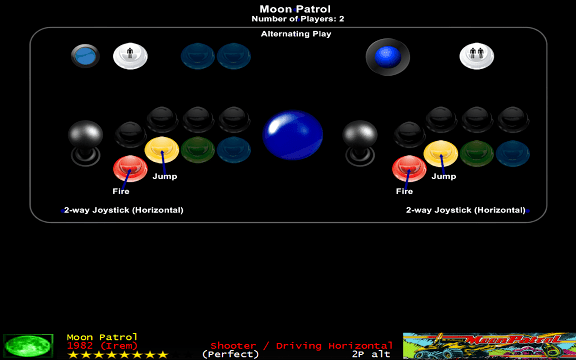
Okay...let me preface the remainder of this post by stating that I must be missing something really, really obvious. I just need someone to point out to me how thick I am. I've created an representation of my control panel within CPWizard. The cpwizard xml of it is this... (and I'll add alternate views for trackball and spinner layouts later) Wombat.xml I also have created a custom ctrlr file and I plan on adding to it from time to time with necessary maps. I have an 8 button control (yes, 8!... I wanted the "standard" 7 button layout and thought I'd throw the extra button in there for later purposes since the Ultimarc Ultrastik 360s support it... and before anyone asks I prefer the bottom (Neo Geo) buttons (feels more comfortable for me) to be the main active buttons in most layouts so I just intend on remapping certain other games (mainly 6-button fighters) away from this common arrangement for me (not the remapping for NeoGeo that most people do) Thus my default.cfg is empty and all other cfg members in the directory really only contain information about what artwork layout/cropping I prefer. I'll attach my wombat.cfg (renamed to wombat.txt for attachment upload) it as it currently stands here. wombat.txt The top of the std.ini file that comes with CPWizard looks like this: P1_JOYSTICK_UP "KEYCODE_UP|JOYCODE_1_Y_UP_SWITCH" P1_JOYSTICK_DOWN "KEYCODE_DOWN|JOYCODE_1_Y_DOWN_SWITCH" P1_JOYSTICK_LEFT "KEYCODE_LEFT|JOYCODE_1_X_LEFT_SWITCH" P1_JOYSTICK_RIGHT "KEYCODE_RIGHT|JOYCODE_1_X_RIGHT_SWITCH" P1_JOYSTICKRIGHT_UP "KEYCODE_I|JOYCODE_1_BUTTON2" P1_JOYSTICKRIGHT_DOWN "KEYCODE_K|JOYCODE_1_BUTTON3" P1_JOYSTICKRIGHT_LEFT "KEYCODE_J|JOYCODE_1_BUTTON1" P1_JOYSTICKRIGHT_RIGHT "KEYCODE_L|JOYCODE_1_BUTTON4" P1_JOYSTICKLEFT_UP "KEYCODE_E|JOYCODE_1_Y_UP_SWITCH" P1_JOYSTICKLEFT_DOWN "KEYCODE_D|JOYCODE_1_Y_DOWN_SWITCH" P1_JOYSTICKLEFT_LEFT "KEYCODE_S|JOYCODE_1_X_LEFT_SWITCH" P1_JOYSTICKLEFT_RIGHT "KEYCODE_F|JOYCODE_1_X_RIGHT_SWITCH" ... ... I assume everyone gets the same when CPWizard is installed. My INPUT section of CPWizard.ini looks like BackKeyExitMenu=True ShowKey=KEYCODE_P SelectKey=|JOYCODE_1_BUTTON1 BackKey=KEYCODE_ESC||JOYCODE_1_BUTTON5 MenuUp=JOYCODE_1_YAXIS_UP_SWITCH MenuDown=JOYCODE_1_YAXIS_DOWN_SWITCH MenuLeft=JOYCODE_1_XAXIS_LEFT_SWITCH MenuRight=JOYCODE_1_XAXIS_RIGHT_SWITCH VolumeDown=KEYCODE_MINUS VolumeUp=KEYCODE_EQUALS ShowDesktop=KEYCODE_HOME HideDesktop=KEYCODE_END EnableExitKey=False ExitKey=KEYCODE_P which shows the correct joystick codes for my U360 and they navigate CPWizard quite happily. So, my limited understanding of how CPWizard works is that it reads its std.ini then overlays this with any mame default.cfg settings (mine is "empty"), then any ctrlr settings (I set ctrlr to wombat to mame.ini and it resides in mame/ini and also, grasping at straws, in the GameEx mame command line with -ctrlr wombat) and then any game.cfg (again, mine are "empty" shells since I cut'n'paste any necessary information into the ctrlr file) The games work fine within mame... any remaps that I have done are recognised within the game itself. My problem is getting CPWizard to recognise the joystick settings or my remaps for pre-display. For the joystick you'll notice that in my CPWizard wombat.xml I have tried to use both the joystick-code from the drop-down box:- <Label Name="JOYCODE_1_RIGHT" Group="GROUP_1" X="184" Y="320" Width="165" Height="20" Sizeable="False"> <Font Name="Arial" Size="12" FontStyle="Bold" Color="255,255,255" /> <Text Align="Left" Style="Outline" /> <Codes> <Code Type="Custom Text" Value="JOYCODE_1_RIGHT" /> </Codes> </Label> and the custom-text and typing in my Mame setting <Label Name="JOYCODE_1_XAXIS_LEFT_SWITCH" Group="GROUP_1" X="-160" Y="320" Width="288" Height="20" Sizeable="False"> <Font Name="Arial" Size="12" FontStyle="Bold" Color="255,255,255" /> <Text Align="Right" Style="Outline" /> <Codes> <Code Type="Joystick Code" Value="JOYCODE_1_XAXIS_LEFT_SWITCH" /> </Codes> </Label> I think at one stage I even had joystick_code in the left drop-down box and my Ultimarc setting in the right hand box. However I have never managed to get the joystick codes to display in my preview window. For example for Moon Patrol the relevant section of controls.xml of CPWizard shows:- <game romname="mpatrol" gamename="Moon Patrol" numPlayers="2" alternating="1" mirrored="1" usesService="0" tilt="0" cocktail="1"> <miscDetails> </miscDetails> <player number="1" numButtons="2"> <controls> <control name="2-way Joystick (Horizontal)"> <constant name="joy2way"/> </control> </controls> <labels> <label name="P1_BUTTON1" value="Fire"/> <label name="P1_BUTTON2" value="Jump"/> <label name="P1_JOYSTICK_LEFT" value="Slower"/> <label name="P1_JOYSTICK_RIGHT" value="Faster"/> </labels> </player> </game> Whilst I get the buttons displayed I cannot get Slower / Faster to appear Additionally for something that I do a remap for X-Men Vs. Street Fighter (xmvsfu) I would assume the parent rom of xmvsf in controls.xml would be called into play:- <game romname="xmvsf" gamename="X-Men Vs. Street Fighter (Euro 961004)" numPlayers="2" alternating="0" mirrored="1" usesService="0" tilt="0" cocktail="0"> <miscDetails> </miscDetails> <player number="1" numButtons="6"> <controls> <control name="8-way Joystick"> <constant name="joy8way"/> </control> </controls> <labels> <label name="P1_BUTTON1" value="Punch - Light"/> <label name="P1_BUTTON2" value="Punch - Medium"/> <label name="P1_BUTTON3" value="Punch - Heavy"/> <label name="P1_BUTTON4" value="Kick - Light"/> <label name="P1_BUTTON5" value="Kick - Medium"/> <label name="P1_BUTTON6" value="Kick - Heavy"/> <label name="P1_JOYSTICK_UP" value="Up"/> <label name="P1_JOYSTICK_DOWN" value="Down"/> <label name="P1_JOYSTICK_LEFT" value="Left"/> <label name="P1_JOYSTICK_RIGHT" value="Right"/> </labels> </player> </game> In this case however, not only can I not get the joystick direction displayed but the buttons don't shift from the 1st six buttons in my layout to the 6 I prefer (buttons 2/3/4 and 6/7/8) Also, even though I have a grouping link I can't seem to get the common "Punch" and "Kick" words displayed separately which is what I understood it to be for. So where have I got the concept wrong and what do I need to do to fix it? I'm running version 1.78 of CPWizard (which I think is current but I'll check again after I post this)
-
Off the top of my head the deadzone and saturation values are those (I've tried adjusting them enough to remember what the defaults are)... the joystick_map isn't familiar... I'll have to check that setting tonight. Hmmmm...interesting on the "Clear Calibration Utility".... where did you stumble across info for that? I have downloaded and will play around with that and see if it has any effect for me. Thanks!
-
Did some more Frogger experimentation with the U360s tonight... had some weird anomaly whereby cells tagged as centre sometimes made the joystick into a mouse (did I model it on the mouse map? Who knows?...) Anyhoo, what I've done is Created a 4-Way, Centre Plus One.um file (modelled initially on the 4-Way map and adjusted as specified by Tempest... I had initially went further than that but it was a little ridiculuous) Copied the 4-Way, Centre Plus One.um file from the UltraMap/Maps directory to the GameEx/Plugins/UltrastikMaps directory (rookie mistake on my part I know but HeadKaze's plugin doesn't seem to indicate in the log if it can't find a map file) Edited GameEx/Plugins/PlugInUltraStik.ini to specify a line that says frogger= 4-Way, Centre Plus One.um (as per the comments must have the .um suffix) I've now fired up Frogger under GameEx using HeadKaze's plugin and it seems to play far better... there's still a little bit of left->right bias if I hold the joystick left for a second and let go, but if I keep to stacatto movements it seems sound. Rather than edit the map for the left-right bias that still remains I do remember seeing another thread in another board about giving the shaft a half-twist... if I look at the magnet on the end of the shaft it does seem a little angled that way. I also remember reading another thread about changing the "scaling" of the sticks although I cannot see how in the UltraMap software (I'm running 1.0.19) I'd still be keen to hear people's thoughts about joystick performance if they have the hard spring attached. ...I'm off to escort some frogs...
-
I realised last night (based on Tom's V3 theme preview) that I hadn't unpacked the icons.zip as pulled from PD. Doing so I now have the game icons displayed next to the name of MAME games and I like the look. Of course my other emulators don't have this displayed so you get a zig-zagging effect on the Favourites list. If I were to create .ico files for each of the other emulator games (let's start with extracting the icons for Daphne or PC games for example) how do I go about/where do I place these for them to be viewable in the same fashion (I assume I'd have to name them the same as the original "rom")
-
Not really a GameEx question... insetad a targetted question at Ultimarc Ultrastik 360 owners (Headkaze?) Love the joysticks for the most part... using Headkaze's U360 plugin which the logging says is switching maps as I desire. However in Frogger I suffer far too many deaths (on the very first level!!!!) from joystick "bounce back.... i.e. you move to the left and when you let the joystick go (that's how I remember playing it in the arcades... you jumped in 'steps") the snapback to the centre position seems to overcompensate and a "right" direction is sent and poor old Froggy gets flattened by the very car that was chasing him. Seems to happen more left/right than right/left and more up/down than down/up. I've done the obvious things like calibrating the joysticks in Windows and I've also gone to the point of creating a custom map (based on the 4-way) to make all but the outer rim of direction arrows on the 9x9 grid "central" and have adjusted the UltrastikPlugin.ini to use this. I believe I also have the "no restrictor fitted" setting on the sticks checked so no scaling issues should arise. I've even tried adjusting the Mame "dead zone" parameter although I believe this'll only come into play in analog games (certainly doesn't seem to have any effect for me in the game and I can't find documentation to say what the applicable range of values are anyway). Now I should say that I ordered the U360s as they were.... I didn't avail myself of any restrictor options (which I don't think would help me in this case since I don't need/desire to physically restrict the throw or directions of the joystick) or the spring options (I assume it came fitted with the softest version therefore). Could U360 owners tell me of their experiences with Frogger and what hardware/software settings they have. Would a stiffer spring help damp this "bouncing" effect? Any other possible ideas? I have a suspicion therefore that Q-Bert (I'll try it tonight) would also suffer from this "bouncing" effect albeit on the rotated angles.
-
Rechecked this last night. As far as I can see my problem has to do with the Advanced Config I had previously set up for PC Games (since for them I wish the ESC key, normally used to exit emulators, to actually not exit the PC programs... most PC programs use the ESC key in-game and I can always shut these down properly using my trackbull/mouse button) Anyhoo.... I cloned an Advanced Config and attempt to manually set some items and tested it okay. I then compared it to the one I had previously used (Exit Pc Games with gamepad.ini) The differences seem to be that the original had MapBack=True and MapGamePadExit=True as well as mine now having some extra sections down the bottom. Now that I have joystick buttons I suspect that somehow the MapGamePadExit is coming into play even though, at first glance, I didn't appear to be using the combination that that specified. So... my PC Games are now accessible through GameEx again. Whilst I'm here though I noticed, since I am a registered user, the existence of MOUSEMAPPING, KEYBOARDREMAP and JOYMAPPING sections. JOYMAPPING intrigues me... every seems to go on about Joy2Key and Xpadder. Is JOYMAPPING relatively new... does it do some of the things I'd be after now I've gone to using joystick buttons?... i.e. in certain games/emulators could I remap joystick button one to send the letter "A" for example. I've searched the forums and the documentation but I haven't as yet identified how this is to be used.
-
Hey... I didn't know that both shifts together did that... I'll try that tonight. Although, for ease of design and communicating to other people who use my machine, is there any techincal reason why "home" couldn't be incorporated for joysticks? Each of my joysticks now have 8 buttons attached to them (and could conceivably have 15 if I use the Ultimarc 360's joystick's "shift" button feature) so it seems a shame to have some sitting there idle.
-
Well... having ordered an extra U360 joystick harness last night I finally caved in and rewired my main player action buttons to be attached to the Ultimarc 360s instead of running as keys through the IPAC. (I guess I'll have to investigate Xappder and the like now for when I DO need keys) So, I decided to swicth my GameEx navigation away from a custom keyset and instead just use the joystick/button combos so I can finally use the page/alpha shift button in combination with the joystick. This works okay. I did notice however theat there was no HOME= assignment in the joystick section (unlike the keyboard section) of the file I had. Fair enough... I coded an assignment in and set it to an appropriate button number assignment. However, whilst select, prev, shift, etc. al work fine the home key (previously working fine when navigation was solely by IPAC) refuses to be recognised. Que? Is home=2 not recognised in this section?... Pressing "prev" repeatedly when used to quickly getting back to the base page with the home key is slightly annoying.
-
Did this get broken again in the latest version? I just tried launching some PC titles last night through GameEx and noticed that they fired up but then GameEx almost immediately came back to the fore. Quitting GameEx I see my PC game minimised to the taskbar and I can click on it and play it. If it helps, for the most part I have *.lnk as my rom filter and links to the actual executables... I'm yet to mess around with links to bats in case I need to fire up additional xpadder or IPAC remaps.
-
Apologies in advance for what amounts to a double-post (I had the following as a reply to another topic when by rights it really should be its own question). So, that said, let's try this again:- I like Headkaze's CPWizard in that I can construct my own lookalike control panel and have it dynamically read the Mame controller info so that controls as I've remapped them on my system (I have a 7-button setup where I'd like to use the bottom row for the main fire buttons and as a Neo Geo layout i.e. - 5 6 7 1 2 3 4 but I'd like a 3 on 3 remapped layout to use with fighters i.e. - 1 2 3 x 4 5 6 and I'm familiar enough with MAME controller setups in order to do so. What I'm UNCLEAR about is how to get it (HeadKaze's app) to replace the default control panel viewer in GameEx. The built-in one isn't aware of my remappings and runs off a different system and I think Tom admitted it was embryonic in some doco I once read. At the moment I use the GameEx configuration to turn this VIEW CONTROL option off. Then, since CPwizard is running in the background I can within the game have P both Pause the game and bring up the overlay. Is there anyway I can get CPwizard to display through GameEx BEFORE a game is launched however (i.e. where the original GameEx display of the panel is)? Will Tom & Headkaze ever consent to incorporating this into the main GameEx program or Tom to allow some flag to use this is preference?
-
I like Headkaze's CPWizard in that I can construct my own lookalike control panel and have it dynamically read the Mame controller info to so that controls as I've remapped them on my system (I have a 7-button setup where I'd like to use the bottom row for the main fire buttons and as a Neo Geo layout i.e. - 5 6 7 1 2 3 4 but I'd like a 3 on 3 remapped layout to use with fighters i.e. - 1 2 3 x 4 5 6 and I'm familiar enough with MAME controller setups in order to do so. What I'm UNCLEAR about is how to get it (HeadKaze's app) to replace the default control panel viewer in GameEx. The built-in one isn't aware of my remappings and runs off a different system and I think Tom admitted it was embryonic in some doco I once read. At the moment I use the GameEx configuration to turn this VIEW CONTROL option off. Then, since CPwizard is running in the background I can within the game have P both Pause the game and bring up the overlay. Is there anyway I can get CPwizard to display through GameEx BEFORE a game is launched however (i.e. where the original GameEx display of the panel is)? Will Tom & Headkaze ever consent to incorporating this into the main GameEx program or Tom to allow some flag to use this is preference? *N.B.* Will make this its own post which it probably should have been from the get go.
-
Hate to be pedantic but doesn't that link have "ShowDesktop=True" which is what I was questioning in the first place? Don't get me wrong... if that's the way it has to be then so be it... I have Visual Pinball working but ONLY if this is on (and thus looks ever-so-slightly "unclean"). I also have VisualPinball 8.1.1 set to run fullscreen in its video settings. If ShowDeskTop=False then it never "shows" (it's hidden behind what I assume is the black hideos screen). Even with these settings on I still have the problem where if a popup window is requested to appear (i.e. you press "R" to read rules on some tables) then that window is not kept as the foreground window until you close it. So you can't read it and when you close the table down that window is still there in the background. If you're telling me you run VisualPinball 8.1.1 , PinMame 1.59 using vpauto loader with SHowDeskTop=False and you have no problems whatsoever then fine... I'll go crawl back into my box and see what else I have wrong or at least see if it's just localised to just a few particular tables.
-
Yep... I know how to do it (believe me if you can get Mamewah to work, GameEx for the most part is comparitively simple to setup). Initially that's what I was going to do (and may go back to doing since I still have all the batch files). I'd just thought I'd try the inbuilt one to see if it offered anything extra (it doesn't appear to) although I wonder (without justifiable reason I admit) if GameEx will successfully track the completion of the batch file's execution (I'll have to check this to satisfy my own curiousity if nothing else) Taking my Daphne question for what it actually was then (i.e. played Daphne games do NOT appear in the LAST PLAYED section) I just want to point this out to Tom to include a flag sometime to control if they appear there or not (or direct me to where the current one is buried)
-
Yep... I understand that but I have ticked the fullscreen option from within the Visual Pinball video options and I assume from the threads I've read that I'm using vpauto correctly (as per my original post extract). I'll await the link you post but I want to compare apples with apples... some one got this working the way they want with latest GameEx/VisualPinball (version 8.1.1)/Pinmame? Most (if not all) examples I remember seeing had Show Desktop = True and I assumed this was why. For 2, vpauto is the one as delivered with GameEx right? (which I understand to be a compiled AutoIT script... I don't have AutoIt installed (yet... I probably will but don't have the need just now) so I can't attempt a decompile to see what it's doing and I assume I don't need it to run a compiled script). What, if anything, is the vpinball_loader.exe for or is it just old stuff that hasn't been cleared out? It does do it job otherwise (passing the "are you allowed" to screen etc.) I think you missed the question I asked (my fault for being too wordy). I know it takes a lot to configure Daphne. I did it for Mamewah using batch files for each game and I know I could do the same for GameEx. My question is... when using the explicit Daphne item (as opposed to an emulator slot), where's the option to have the game just played appear in the "Last Played" section (and possibly "Most Played" if I play it often enough)... if I play a MAME, PC or Visual Pinball game (all I've bothered to setup so far) I can see a configuration option to choose to have it appear or not... not so (not that I can find) for Daphne. Understand.... And I used to contructs my own lists in Mamewah and exclude them from there too. I'm just not sure I saw all of them there in the GameEx lists and wondered if Tom automatically filtered some but not all and (if he does) whether he wants to know the ones missed. I'll check closer on the weekend what does/doesn't appear. To be honest, I probably won't either. I use WinCab as my preferred jukebox player (which I have under the PC Games section although I may yet make it its own entity to stand out more) as I've collated personal "Best Of's" of each artist and they're just stored in Artist folders and not "Albums" per se. None of the genres are right either (in fact, I've set them all to Wombat)... I just wanted to see what GameEx offered. Back to GameEx.... Ah... I'm not seeing things... Tom's chipped in with a reply saying it's on the cards to be rectified. Yay! Hmm... Intel Duo Core 3.0GHz.... you'd think that'd be up to the task. More important than the speed for now though is the way it displays so it was configuration options I was looking for (mainly fit to page/height/width). Yep... heard that reply before and I have downloaded (although not played yet) with Xpadder.... I'm just hoping to tweak Tom's ears to see if he can "open" the code a bit to check (notice how I'm just about to repeat myself again to press the claim ) for alpha page keyboard button AND (joystick direction or keyboard button left/right)... I'm still stubbornly refusing to wire my UltraStiks to the IPAC or my buttons to the joystick harness. Plus I'm still wondering how to load Xpadder JUST to navigate GameEx, unload it before launching a game and then reload it (or load it with desired/empty "maps" at these points) when returning to GameEx. Seems a lot of overkill and another program running in the background As Tom has replied, the TAB key! Ah hah... not surprising then as I have this for MAME configuration (although it's a shifted key on my IPAC) mapped but I can't figure out how I activated it at the time (my IPAC shift button is a fair way away from the other buttons. Or maybe I put my foot on the keyboard that was laying on the floor (connected by USB for setup purposes only when I need a full keyboard layout to type stuff). Anyhoo, good to know Tom's thinking about changing it to stop me fat-fingering (fat-footing?) it in the future.
-
Having (nearly) completed the physical build of my cabinet I'm now turning my attention to software. Playing around with setting up a few more options/emulators in GameEx (registered... previous experienced user of Mamewah) and I just have a few, hopefully simple, questions to be answered or a confirmation of my understandings of how things work is correct and that's just the best way there is for now. 1) Visual Pinball - Method Of Loading Using the supplied setup (either it was internal or came from the "101 Reasons" thread) I altered it to my pathways. Seemed to use vpinball_loader.exe as a GameEx control shell. Never could get it to work (mainly AutoIt errors)... eventually shifted to the method that uses vpauto i.e. AlsoLaunch=[apppath]\vpauto.exe Command=VPinball.exe -play -"[ROMPATH]\[ROMFILE]" Now, this only appears to work when I have ShowDesktop=True otherwise VisualPinball doesn't appear as the program "on top" (it's hidden behind the black GameEx screen) I realise this probably has more to do with the way Visual Pinball (I'm using the latest 8.1 version with Pinmame 1.59 and latest scripts etc.) is coded rather than GameEx but is there a better way/loader? Currently I've set my desktop background to black and devoid of icons but I'm trying to hide even the "writing/reading animations to/from cache" for a more seamless look. 2) Visual Pinball - Focus On tables that use pinmame you can right-click on the DMD to change certain things (mainly I just sometimes double-size it before moving it). Quite a few other tables also may include additional key press features (like 'R' to display a popup window of rules). When I do these solely in Visual Pinball they work fine but when I do them when governed by GameEX (or perhaps more correctly vpauto) the resulting popup window "disappears" into the background. Is vpauto trying to keep focus on the table? Using my "quit" key (my universal ESC key which I've just purely mapped to ENTER so quit Vpinball via the dialog box that pops up) in these cases returns me to GameEx but still leaves the table running in the background. If I never attempt to use these features (and I now usually adjust the DMD outside of GameEx first) then things work fine. 3) Daphne - Why a separate section? I haven't "grown up" with GameEx so I can only assume that Daphne gets its own "different" section to the other emulators purely for historical reasons. I certainly can't see why I can't setup Daphne under "Emulated Games" using batch files to drive the emulator list and pass parameters to daphne.exe (in fact this is the setup I used to run under Mamewah). But I did use the existing Daphne section of GameEx and, after manually editing all the slots to get things in alphabetical order and putting my desired control arguments (for dipswitch and latency etc. settings) in the framefile lines, I have things working fine. The only problem/missing feature that I see in this section, and correct me if I'm wrong, is that there appears to be no flag to set so that Daphne games, unlike MAME, PC Games, Visual Pinball etc. appear in the MOST PLAYED and LAST PLAYED lists. Did I miss it? 4) MAME listing of BIOS Noticed that some BIOS entities (can't remember which ones at the moment) seem to appear in the full MAME lists. I assumed that GameEx might have filtered these out automatically.... maybe it does but maybe not all of them? I know I could add these to the filter list under MAME but is this the way to go? 5) SEARCH FEATURE includes folder name? The new search feature I quickly played around with and noticed that when searching media (for 'Dire' say) not only are all of the songs by Dire Straits displayed but also the "folder" line (folder.jpg) which presumably only gets in because it's stored in the Dire Straits folder. IMHO that looks ugly and is perhaps unnecessary... could folder/folder images not be reported? 6) SEARCH FEATURE - Distortion? Is it my imagination or are the album covers displayed next to the songs after a search "squished"? When displaying in the normal jukebox section they appear square (and most of them are) but not so in the search results (I'm using the Default - New theme if it matters) 7) EBOOK READER I threw a "How To Win At Donkey Kong" PDF into a folder and enabled the ebook reader to set how it works. After waiting for a fair while (IMHO on a 3.0 GHZ machine) it did display... I've since read the rendering threads to see why this is so. However I was a little stymied by the apparent lack of options (or my lack of knowledge) in that each page was done so that only a portion of it was visible on my 1920x1200 widescreen monitor and I had to use the up/down buttons to "read" the whole page. Couldn't figure out if there was any "fit to screen" button (maybe like the video section) that could be used. Having used Comic Book Reader (CDisplay) before I then added a bunch of comics into the same folder and tried to display one. After a longer "rendering" time (files are bigger I guess) the exact same style of output appeared. Of course, having used CDisplay before I was supremely hopeful that each (double) page would be rendered beautifully and displayed perfectly on my widescreen monitor. Did I miss something here in the setup? Of course I know I can install setup CDisplay 1.8 and configure it to my needs and then just setup CDisplay under GameEx as another "emulator" with rom filters of *.cbr/cbz but I kinda just assumed from the registration blurb that it would already be there. 8) GAMEEX VERSION Really thick question... Version 9.19 came out very soon after 9.18 and I duly updated (I was hoping Tom listened to my plaintive cries to permit GameEx alpha-page navigation using a keyboard button with an Ultimarc 360 joystick handling the directional movement (you can only have custom joystick OR keys - not both)) but I still don't see on the main page (http://www.gameex.net/) what happened in this version (info for 9.18 is still displayed). Being a curious fellow I'm intrigued. 9) WHAT THE? I swear this happened to me last night... I was navigating through the GameEx menu when the system paused for a coupla seconds and suddenly the screen rotated -90 degrees. Quit GameEx and when into the Advanced Configuration and sure 'nuff, the -90 degrees was set. Is there some form of "hot key" combination that could have possibly turned this on? I don't know how/why it happened so I can't replicate it. 10) UltraStik Plugin One for Oggalz I guess. I installed PlugInUltraStik.zip from the plugins thread and am mostly impressed. However I did not that sometimes the joysticks were left/set to mouse mode when exiting Mame so that when I entered my PC Game section I could no longer have it function as a joystick... no harm, no foul... I can see I have some my setup work to do. My question is more that this version appears to 1.0. If I follow another forum thread you appear to be on a 1.3 version primarly for use under Windows Vista(?) On the assumption that this still would work for Windows XP and not knowing where to find versions 1.1 and 1.2 I downloaded the 320.79kb package on page 2 and a later SetControls.zip I thought I needed but that never worked for me so I reverted to version 1.0 I'm not on Vista but I'm still interested in using the latest applicable version, testing and identifying bugs and improvements if I can work out what package I should have. Okay, that's enough questions for now... myself and my son will thrash it some more on the weekend.
-
Although he mentions joypad, perhaps he, like me, has a joystick that has no buttons connected. Hence, alpha-paging is not possible. At this stage I'm still stubbornly determined not to hook the Ultimarc 360 button harness to my buttons (for one, I can't find where I've bloody put them!) since they're already hooked to the IPAC4 (and I find this preferable for my own reasons) Since Tom already has code to handle custom joystick and key input I'm just hoping he opens it up a bit/combines the two so that I can have joystick movement through the list as well as using IPAC4 buttons for select/back/alpha-paging etc. It's really the only thing stopping me from fully committing to GameEx in preference to Mamewah.
-
Any update on this Night? .... this looks like an uber-theme I could definitely use.
-
So... how do I start Xpadder to remap my joystick to keys so that I can use it in GameEx navigation yet, once I start to load a game have it either completely unload itself so that it doesn't continue doing its thing whilst in the game OR load in a different mapping depending on the emulator/game/program? Of course, once I exit the program I need the GameEx mapping to "resurrect" itself and again be in control of navigation.
-
I thought a little more about this overnight. Another reason for not connecting the joystick to the buttons/encoder is that in that case the Ultimarc 360 shifts into "output" mode... this means it can no longer function as an analog stick. The whole idea of connecting the buttons to the IPAC was so that, if for any reason the emulator or program will not allow remapping inside the program then I could get around that by dynamically changing the IPAC key assignments before loading the program (and then changing them back on exit). Buttons wired up to the joystick (before knowing the existence of Xpadder) could not similar be changed if the program doesn't acknowledge a joystick at all (and there are keyboard only "button" programs out there). I'm also wary of joystick to keyboard programs just in case they fall by the wayside... I think I read somewhere that a change in input direction made Joy2Key inoperable and now the future development of Xpadder may be under scrutiny given the coder is contemplating selling everything lock, stock and barrel (or is having a "why the hell am I doing this?" moment which I can sympathise with) and may not release the source code for other people to pick up.
-
So...is there a mininum number of times a game must be played before it appears here? I'm a completely new user to GameEx and the Statistics section lists both the number of times certain games have been played as well as how long. The MOST PLAYED menu item however, when I enter it, still stubbornly refuses to show anything.
-
It appears I have a very similar setup to Yesod... two Ultimarc 360's USB connected so that they could be software configurable on the fly and a trackball/spinner attached to an Optipac further joined to an IPAC to send keypresses. I stayed away from hooking the joystick harness up as I was wary (from forum reading before the event) of possibly bad joystick support in certain emulators/other programs. Also, my beautiful wiring job with quick-connects and daisy chaining had me flummoxed as to how I'd readily join the harness and IPAC buttons together (I need to go and find where the heck I've put them to revisit what it actually looks like) without soldering or twisted wires. So, for now, I'll go the suggested Xpadder route (I'm assuming I can just load/remap the joystick for GameEx use and unload whilst playing the game yet have it active again on exit) but I'd like to put in a plaintive vote for Tom to consider a future edition permitted a combination of joystick input (for navigation and possibly analog-accelerated for fast scrolling) with the keyboard presses to enable the paging/alpha paging, back, home, select etc. Until then I'll use a combination of keyboard and mouse and disable the joysticks. And whilst I'll eventually probably remap ("permanently" as well as dynamically based on emulator/game) the IPAC to all alpha keys and change MAME etc. to suit that instead, it probably wouldn't hurt to allow the entering of the "standard" Left CTRL, Left Alt etc. to accomodate the new user (although I'd love to know why it technically can't be done...at least I couldn't get them to work) And, to finish with a dumber question, if the two were wired together and the first "fire" button pressed, wouldn't both a joystick button 1 (via USB) and a keypress (via IPAC PS/2) be returned to the program? Whilst MAME could probably handle/ignore it I'd bet some programs wouldn't be so readily acceptable of extraneous input...
-
Relatively new (but Registered) to Gameex having shifted from Mamewah. Bringing across my video snaps (Circo's emumovies) which work fine in Mamewah I'm horrified to see GameEx FREEZE! (necessitating, on my system, a reboot) I've done the searches, installed and uninstalled various combinations of official DivX, KLite, CCCP and the FFDShow from this website all with no success. I use (and have only downloaded and don't wish to convert) the HiQ set (I have a 1920 by 1200 display and by God I'm gonna use it!) from Circo. Then, randomly trying out setup options, I noticed something that may be interesting and relevant to the debate. If you enter the configuration and go to the AUDIO section and tun "Audio in SNAP AVIs" to NO then the video previews will play perfectly fine (although obviously without sound). It doesn't matter whether the background sounds (I have an Arcade Ambience track running) on or off, if this flag is YES you freeze and if NO, it displays. As an aside I enter my multimedia section to play a divx music video avi (preview for this turned on as well...used to just rely on the created png Snapshot images previously) and in this case the audio started but the video did not play (and it didn't seem to hang). Playing the music video did both video and audio okay although the previous audio from the preview was also still running (and still contined playing after exiting GameEx). Needless to say both Music Videos and Circo's video snaps run flawlessly outside of GameEx (tried using both WMP11 and Winamp) So, is the culprit somehow localised to either the audio codec instead of the video codec (as seems to be identified as a potential candidate by every other thread) or something that Tom's doing for playback that ONLY affects the preview window?