



|



FCAL
-
Posts
39 -
Joined
-
Last visited
Recent Profile Visitors
1006 profile views

FCAL's Achievements

Super Member! (3/5)
0
Reputation
-
Tthurman, I LOVE GameEx! Before upgrading to this current release, I was on version 4 or 7 (can't remember)! My arcade ran well and there was no need to change until now... complete redesign with new hardware. I'm sure there were artifacts. Thanks for chiming in. -FCAL
-
I have an update. I believe it is fixed. I deleted ALL the video snaps and NOT FOUND directory. I used 'Download Artwork and Videos' from the Windows Start menu, GameEx folder. It took some time, but GameEx downloaded all new video snaps and apparently updated its DB. At this point All MAME games (with snaps) are displaying videos with sound in 1024x768 res. Is it safe to say when installing / upgrading GameEx: 1. Uninstall GameEx 2. Leave all directories in tact 3. Install new version of GameEX 4. Run 'Download Artwork and Videos' ???? 5. Anything else?
-
Tom, 1. System Info: This is from the GameEx log (left pertinent info).... 10:42:16.82 24-Aug-21: GameEx x64: Version 16.92: Starting Log 10:42:16.86 24-Aug-21: Windows 10 Pro 64-bit 10:42:16.86 24-Aug-21: Aero running 10:42:16.87 24-Aug-21: AMD Ryzen 5 1600 Six-Core Processor, 16329MB 10:42:16.87 24-Aug-21: 3.19Ghz - 12 Cores or CPU's 10:42:17.34 24-Aug-21: Using 3D Alpha Blended Animations. 10:42:17.35 24-Aug-21: GameEx will try to reduce CPU usage 10:42:17.42 24-Aug-21: Initialising Direct3D 10:42:17.59 24-Aug-21: Setting Resolution to 1024x768 32 bit color 10:42:17.80 24-Aug-21: Creating Back Buffer 10:42:17.81 24-Aug-21: Version 2 Theme being used. Loading. --> Not sure why Version 2 Theme is loaded. I saved it as Version 4. My Theme.ini shows: Version=4 10:42:17.82 24-Aug-21: Display is running at: 1024x768 32bit color, 60hz 10:42:17.83 24-Aug-21: Adapter: AMD Radeon HD 5450 10:42:17.83 24-Aug-21: Max texture size: 16384x16384 10:42:17.83 24-Aug-21: Available texture memory: 4084MB 10:42:17.85 24-Aug-21: Available video memory: 2048MB --> I am using this graphics card to output to a 1024x768 CRT display. At this time, I am using the HDMI interface to output to a LED Monitor at 1920x1080 until I get all the configurations completed and move the system into my cabinet. --> I did install the LAV Filters (Codecs) 0.68.1 --> I also tried K-Lite Codecs without success. 2. My apologies... I have worked with all the files in the GameEx dir and overlooked the Win Start icons! ...Thank you. I noticed something interesting... if I select 1941 (for example), it displays a black box and I hear sound. When I ran the GameEx Video Creator, I told it to record 1941 and over-wrote the existing mp4 file. When I started GameEx, 1941 played the video snap along with a few other games, but not ALL. The video recorded from GameEx did not have sound though.
-
Tom, Thank you for replying. I am missing a little context. 1. No MAME snap videos: I have scanlines disabled, and I have tried a number of resolutions and arcademode, with no luck. Can you recommend a course of action for me? Settings, version, wait for update, etc. 2. Use GameEx to create video snaps: I am using custom menus and do not see an option. Is there a command line option to run manually? If not, how would I get to this option? Thank you sir! -FCAL
-
Tthurman, If I change the Theme back to 'Default', it shows exactly the same thing. I have been really picking at this and individual settings for about 3+ weeks to no avail. I do NOT want to create extra work. I am helping with theme documentation, but I am finding some gaps in general. Note: I did load the LAV Filters (codecs) v0.68.1. I even tried K-Lite codec mega pack. I could see and play the snaps, but GameEx could not. Enclosed are my log files, gameex.ini, and theme.ini (still documenting to post in another thread). Stupid Questions: 1. My video snaps are .mp4 files and the documentation does note .AVI. Is this an issue? I believe all these files did work with an old config (a LOT was broken, so abandoned). 2. Can I run GameEx from a command line with an arg to make it create all the video snaps? Since I used custom menus, there is no item to enable this, but I do see in the Config Wizard. Thank you! --FCAL log.txt ThemeEditor.txt GameEx.ini Theme.ini
-
I used my old configuration and installed GameEx 16.92 and MAME video snaps were working. I ran into a number of issues and reloaded GameEx, configuring from scratch as I worked out my Theme. I have never been able to get the MAME video snaps to work again. I tried to upgrade to the latest version of GameEx, but there were a number of issues, so I uninstalled and went back to 16.92. I am seeing black boxes sized to the video snap that should play. Every few seconds, the box changes shape but there is no video, or sound. What files can I provide to troubleshoot? Thank you, - FCAL
-
I am fully documenting the theme.ini version 4 parameters in the theme.ini using the setup wizard help options and digging a little deeper under the covers. If the moderators could leave this open, I'll post questions and notify when I am finished. I will provide the full theme.ini with comments and descriptions to all when done. Maybe this could be integrated into the install after my information is vetted. Q. How is 'Width' and 'Height' different from 'XResolution' and 'YResolution'?
-
Tom, I read through the help items. Do you have any more elaboration on all parameters? I'll offer to help document all the v4 theme parameters as long as someone can verify my information. Or does it already exist?
-
Draco1962, I understand about the menu object. How can I edit those items for use on sub-menus? I can navigate to it, but I can't change the selection. Ex. For All MAME Games, it would be nice to use the filter for year, category, etc. I didn't see documentation on it... maybe you could point me in the right direction? I would be happy to share my theme when finished! ...the least I could do.
-
Draco1962, I use 1024 x 768 (hi-res CRT). I set Menu=1025,769,0,0... IT WORKED! This was the only permeation I did not try. Thank you for your assistance.
-
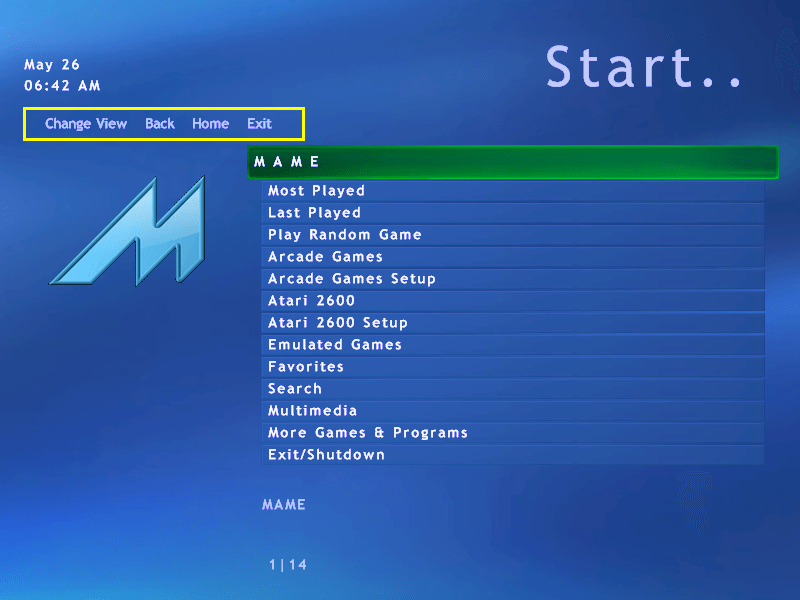
Draco1962, This is the default snap for a v3 theme. I highlighted the item in yellow. I am sure there is a way to configure it, but I might not have dug deep enough to understand it. What I did figure out is that any theme I create and save, only v3 and v4 themes have this. I could go back to v2, but I might want some of the goodies in v4. Any thoughts or guidance you could provide would help. Thank you.
-
Looking for a way to disable the 'Menu' object in the theme. When I create a new theme, I import one and save it as v4 to get as many options as possible. I found a checkbox to disable Weather (will be running offline in my arcade). I see the "Menu=" parameter in the theme.ini file, but have tried "0", "0,0,0,0", "-1", "False" to no avail. What is the proper way of removing / disabling the 'Menu' object? AFTER NOTE: I disable ESC to exit GameEx and have buttons for Exit and Back on my control panel for easy navigation so I do not use these. Thank you.
-
Thurman, Evo... yes it is a bit. I found the directory structure rather confusing. I tried to build the structure in my head and on paper, but kept finding a cyclic pattern to it. A GREAT feature would be to point Evo to ALL the locations, then click a button and it builds its own path and moves ALL the roms, chds, artwork, images, etc. to its structure. That probably would have sealed it for me. I liked the "fanciness" of GameEx Arcade, but was always drawn back to simple animation, and derivatives of the default theme. I am using a 27" Billabls CRT, so the widescreen, high res doesn't work, but games look great! I am searching now, but ANY information or documentation on the theme.ini file in version 4 would be GREAT! I want to disable the 'Menu' object and it seems to only appear in v4 (maybe v3) as well. When I import a theme in the editor, it keeps throwing it on there, but I have not been successful disabling it. Any guidance would be MUCH appreciated!
-
Tom, Thanks for following up. I have had GameEx in my arcade from the beginning. I never touched it, just ran it. I am refreshing everything and figured I'd go with GamEx Revolution. It does do things very differently including directories for assets, roms, etc. After your couple notes and my errors / missing info in verify, I have loaded up the latest GameEx and all is working as expected with MANY new options. I think I am going to stay with this platform. I am trying to dig into the theme editor and will probably scour the forum for info. I am trying to understand options for the themes.ini file and may come back to this forum for additional assistance. Thank you Tom! A couple rough edges, but an amazing platform!
-
I can start GameEx Evolution, select MAME, navigate to a game, view all artwork, etc. When I try to play the game, GameEx Evolution freezes and I have to use Task Manager to kill it. This happens with all games I try. The log files reports the below issue(s)... 26-Jun-21 9:54:08 AM: ERROR @ InvokeMethod (Extension) 26-Jun-21 9:54:08 AM: Parameter count mismatch. 26-Jun-21 9:54:08 AM: at System.Reflection.RuntimeMethodInfo.Invoke(Object obj, BindingFlags invokeAttr, Binder binder, Object[] parameters, CultureInfo culture, Boolean skipVisibilityChecks) at System.Reflection.RuntimeMethodInfo.Invoke(Object obj, BindingFlags invokeAttr, Binder binder, Object[] parameters, CultureInfo culture) at Headsoft.Tools.Extension.InvokeMethod[T](String methodName, Object[] parameters) Another quick point, when I try to "Verify" the configuration, it shows no output... just lines with "....". This looked the same as below output when I did not have paths or mame.exe name set correctly. I would have expected to see some issues pop up. Verifying Download Themes... Verifying Theme Selection... Verifying Input Settings... Verifying Default Paths... Verifying Asset Paths... Verifying Asset Paths (MAME)... Verifying Asset Paths (MAME_SL)... Verifying GameEx Online... Verifying Automatic Asset Download... Verifying HTPC / Multimedia Settings... Verifying Download Emulators... Verifying Emulator Selection... Verifying MAME Selection... Verifying Emulator Setup... Verifying MAME Filters... Verifying Repository Updates... Verifying ROM Tools... Verifying Debug Tools... Finished! [GAMEEX].ini [GAMEEX_EVOLUTION].log