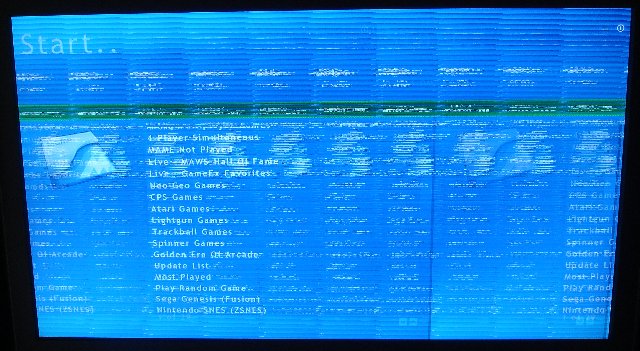
Here's a screenshot, and log contents pasted below. I have tried lowering the resolution, and it makes the image smaller and equally scrambled:-( Thanks again for the help! 19:02:08.2 7/31/2007: GameEx: Version 8.66: Starting Log 19:02:08.2 7/31/2007: Operating System Platform: Win32NT 19:02:08.2 7/31/2007: Operating System Name: Windows XP 19:02:08.2 7/31/2007: Operating System Version: 5.1.2600 19:02:08.2 7/31/2007: Checking for versions of .net Framework installed 19:02:08.2 7/31/2007: .net Framework 1.0 Installed 19:02:08.2 7/31/2007: .net Framework 1.1 Installed 19:02:08.2 7/31/2007: .net Framework 2.0 Installed 19:02:08.2 7/31/2007: AMD Athlon 64 Processor 3800+, 767MB 19:02:08.2 7/31/2007: 2.4Ghz 19:02:08.2 7/31/2007: Running Randomize() 19:02:08.2 7/31/2007: Loading PlugIns 19:02:08.3 7/31/2007: Checking for applications to Launch On Startup 19:02:08.3 7/31/2007: Running Misc startup tasks 19:02:08.3 7/31/2007: Setting Menu types 19:02:08.3 7/31/2007: Opening Configuration File 19:02:08.3 7/31/2007: Getting Configuration Values 19:02:08.3 7/31/2007: Using Theme: Default - MCE Glossy 19:02:08.3 7/31/2007: Checking for alternate Image Directory for Theme: Default - MCE Glossy 19:02:08.3 7/31/2007: Launching HideOS.exe 19:02:08.3 7/31/2007: Initialising Video/MNG DLL's 19:02:08.3 7/31/2007: Hiding Taskbar 19:02:08.3 7/31/2007: Is Media Center running? 19:02:08.3 7/31/2007: Checking/Creating LCD Registry values 19:02:08.3 7/31/2007: Check Media Center Exit/Start Mode 19:02:08.3 7/31/2007: Media Center Mode 2 19:02:08.3 7/31/2007: Video previews on. Warning: Only recommended on modern systems 19:02:08.3 7/31/2007: Snap Delay set to: 2 19:02:08.3 7/31/2007: Get other settings 19:02:08.3 7/31/2007: Set: Find emulator artwork on best match basis 19:02:08.4 7/31/2007: Start work for Form 19:02:08.4 7/31/2007: Getting Original Screen Size 19:02:08.4 7/31/2007: Opening Database Connection 19:02:08.4 7/31/2007: Initializing Component 19:02:08.5 7/31/2007: Retrieving resolution setting 19:02:08.5 7/31/2007: MAME Path is: E:\emulation\arcade\Mame32 19:02:08.5 7/31/2007: MAME EXE file is: Mame32.exe 19:02:08.5 7/31/2007: ROM Paths are: E:\emulation\arcade\Mame32\roms;E:\emulation\arcade\mamerom 19:02:08.5 7/31/2007: Catver.ini is located at: C:\Program Files\GameEx\DATA\catver.ini 19:02:08.5 7/31/2007: controls.ini is located at: C:\Program Files\GameEx\data\controls.ini 19:02:08.5 7/31/2007: History.dat is located at: C:\Program Files\GameEx\DATA\history.dat 19:02:08.5 7/31/2007: nplayers.ini is located at: C:\Program Files\GameEx\DATA\nplayers.ini 19:02:08.5 7/31/2007: MAMEinfo.dat is located at: C:\Program Files\GameEx\DATA\mameinfo.dat 19:02:08.5 7/31/2007: Loading Controls.ini map file 19:02:08.5 7/31/2007: Snap Path is: E:\emulation\arcade\Mame32\snap 19:02:08.5 7/31/2007: AVI Snap Path is: E:\emulation\arcade\Mame32\snap 19:02:08.5 7/31/2007: Flyer Path is: E:\emulation\arcade\Mame32\flyers 19:02:08.5 7/31/2007: Cabinet Path is: E:\emulation\arcade\Mame32\cabinets 19:02:08.5 7/31/2007: Title Path is: E:\emulation\arcade\Mame32\titles 19:02:08.5 7/31/2007: Panel Path is: E:\emulation\arcade\Mame32\cpanel 19:02:08.5 7/31/2007: Manual Path is: E:\emulation\arcade\Mame32\docs 19:02:08.5 7/31/2007: Icon Path is: E:\emulation\arcade\Mame32\icons 19:02:08.5 7/31/2007: Marquee Path is: E:\emulation\arcade\Mame32\marquees 19:02:08.5 7/31/2007: Loading Custom Emulators 19:02:08.5 7/31/2007: Loading Emulator 1: Sega Genesis (Fusion) 19:02:08.5 7/31/2007: Loading Emulator 2: Nintendo SNES (ZSNES) 19:02:08.5 7/31/2007: Loading Emulator 4: Nintendo NES (NEStopia) 19:02:08.6 7/31/2007: Loading Emulator 9: Sega Master System (Fusion) 19:02:08.7 7/31/2007: Using 2D Animations 19:02:08.7 7/31/2007: Using General Font: Trebuchet MS 19:02:08.7 7/31/2007: Using Title Font: Trebuchet MS 19:02:08.7 7/31/2007: MAME CMD options: -triplebuffer -nowindow -joy 19:02:08.7 7/31/2007: Attempting to load game list 19:02:08.8 7/31/2007: Initialising DirectDraw 19:02:08.9 7/31/2007: Creating DirectDraw Device 19:02:08.9 7/31/2007: Using Device: Primary Display Driver 19:02:08.9 7/31/2007: 246mb video memory available 19:02:09.0 7/31/2007: Setting Resolution to 1920x1080 16 bit color 19:02:09.0 7/31/2007: Creating DirectDraw Surfaces 19:02:09.0 7/31/2007: Creating Primary Surface - Full Screen Mode 19:02:09.0 7/31/2007: Creating Back Buffer 19:02:09.0 7/31/2007: Loading graphic Surfaces 19:02:09.0 7/31/2007: Display is running at: 1920x1080 32bit color, 60hz 19:02:09.0 7/31/2007: Creating Surfaces Misc and Dialogs 19:02:09.0 7/31/2007: Creating Surfaces Volume 19:02:09.1 7/31/2007: Creating Surfaces Arrows 19:02:09.1 7/31/2007: Creating Surfaces GameEXlogo Text 19:02:09.1 7/31/2007: Creating Surfaces Toolbar 19:02:09.1 7/31/2007: Creating Surfaces Backgrounds 19:02:09.4 7/31/2007: Creating Surfaces Toolbar Controls 19:02:09.4 7/31/2007: Creating Surfaces GameEx Logo 19:02:09.4 7/31/2007: Creating Surfaces Home & Exit 19:02:09.4 7/31/2007: Creating Surfaces Snaps 19:02:09.4 7/31/2007: Creating Surfaces Menu and List Bars 19:02:09.5 7/31/2007: Creating Fonts 19:02:09.5 7/31/2007: Creating Menu Font 19:02:09.5 7/31/2007: Restoring Menu Font From Cache 19:02:09.5 7/31/2007: Creating Game Font 19:02:09.5 7/31/2007: Creating Font Black 19:02:09.7 7/31/2007: Creating Font Black Small 19:02:09.7 7/31/2007: Creating Game Font Faded 19:02:09.8 7/31/2007: Creating Title Font 19:02:09.8 7/31/2007: Restoring Title Font From Cache 19:02:09.9 7/31/2007: Fonts Created Succesfully 19:02:09.9 7/31/2007: 138mb video memory left available 19:02:09.9 7/31/2007: Creating instance of global keyboard hook 19:02:33.3 7/31/2007: Text/Language: English 19:02:33.3 7/31/2007: Applying Language/Text 19:02:33.3 7/31/2007: Initialising Bass Audio Library 19:02:33.5 7/31/2007: Loading last used Game List 19:02:33.5 7/31/2007: Setting Music Volume 19:02:33.5 7/31/2007: Cannot Load Play List. Check Path and filename 19:02:33.5 7/31/2007: Creating DirectSound Device 19:02:33.5 7/31/2007: Trying: Primary Sound Driver 19:02:33.5 7/31/2007: Loading Sound Files 19:02:33.5 7/31/2007: DirectSound Device Created Successfully 19:02:33.5 7/31/2007: Creating ICONS 19:02:33.5 7/31/2007: Recreating ICONS 19:02:33.7 7/31/2007: Initialising DirectInput for Gamepad support 19:02:33.7 7/31/2007: Unable to create a joystick device 19:02:33.7 7/31/2007: Playing intro sound file 19:02:33.8 7/31/2007: Initializing MCE Remote 19:02:33.8 7/31/2007: Initialization OK! Starting GameEx! 19:02:33.8 7/31/2007: Testing Main Loop Once: Processing Frame 19:02:34.1 7/31/2007: Testing Main Loop Once: Main Loop ran successfully 19:04:55.2 7/31/2007: Exiting GameEx! 19:04:55.2 7/31/2007: Saving Settings 19:04:57.2 7/31/2007: Disposing Plugins 19:04:57.2 7/31/2007: Closing database connection 19:04:57.2 7/31/2007: Checking for applications to Launch On Exit 19:04:57.2 7/31/2007: Media Center was not open when starting GameEx, so not launching