|



jmine
-
Posts
23 -
Joined
-
Last visited
Content Type
Profiles
Forums
Events
Downloads
Store
Articles
Everything posted by jmine
-
So, more testing and I see where any table with a date of 20* (20xx) is automatically added to a what must be hard coded category of "Modern Tables". I can see this in the PinballX config file after selecting Modern tables in PinballX : filter_year=20*filter_company=filter_custom=filtername=Modern Tables So now I know the category is automatically created if you have tables newer than 2000 in your .xml file. So for my custom category I will need to call it something other than modern. I guess I can mark this RESOLVED unless anyone has more to add. Thanks...
-
I worked on this a little more and discovered that the Modern Tables menu choice will follow the Default Filters = Yes. If I change to NO the Modern Tables choice no longer appears. So Pinball X is getting this information to tag these tables as Modern, but from where? Anyone have any ideas on where I can look? Thanks...
-
Thanks Draco1962 for the SS EM definitions. I have looked in both the Game list manager and the Databases path and can find no modern.xml. I just also searched the system registry in case something was written there but no "modern" except for the font? I also changed my browse options to include hidden files just in case something was hidden but nothing. One clue I did notice is that all the tables listed in the "Modern Tables" selection are Stern except for one that is not a listed manufacturer. I took a screen copy of all the database folders to show there is no Modern in any of them. Where else could pinballX be getting this menu item "Modern Tables" with 6 tables listed if not in the \pinballx\databases path? Appreciate any ideas anyone might have on where I might look.
-
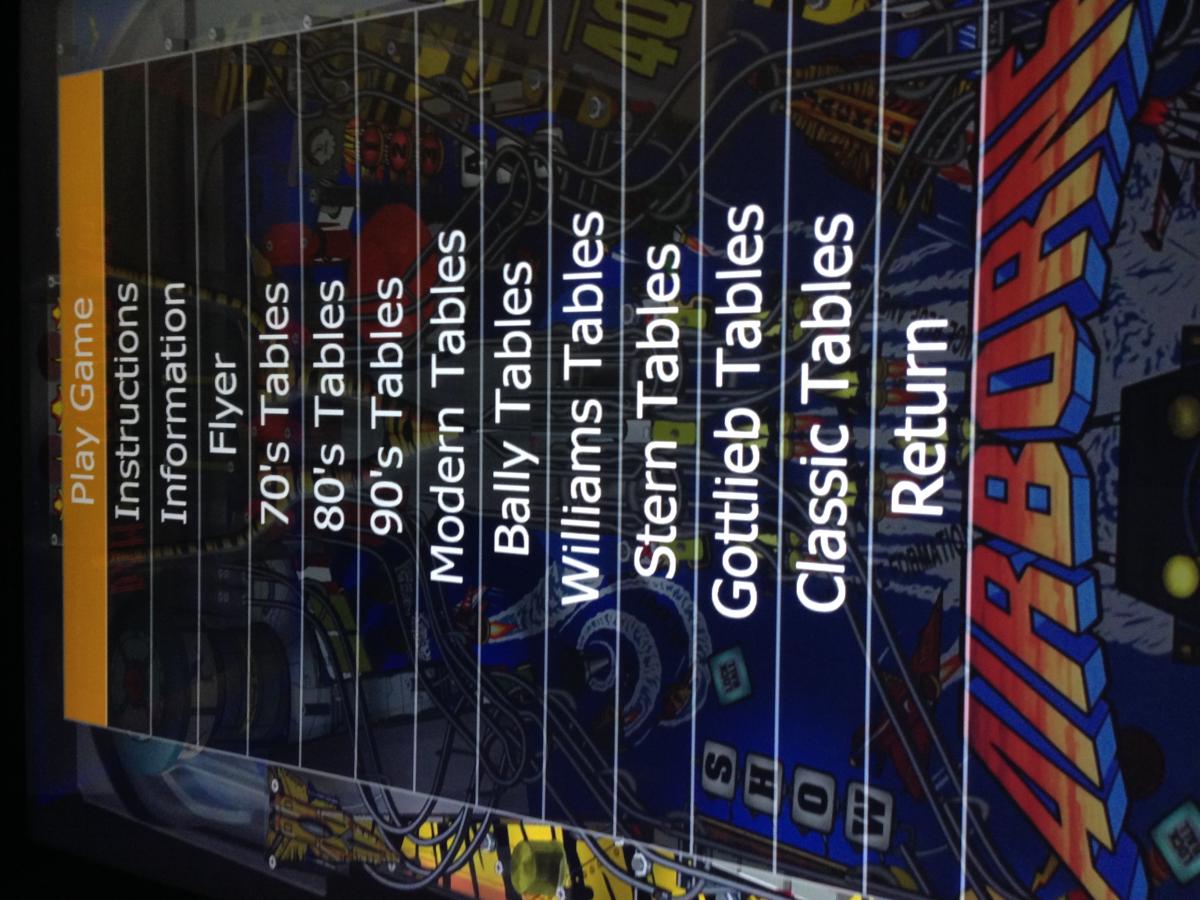
When I open the PinballX menu I have a choice for Modern Tables (See attached pic), and in that menu are 6 tables. I don't understand where that choice is coming from, or how those tables got in there. I have checked under PinballX Databases and see no Modern.XML file in any folder, I have searched the SSD for modern and find no modern.xml file on the drive. I have checked in the game list manager and there is no Modern group and none of the tables have Modern as a manufacturer. Any ideas where this is may be coming from? Early on I had planned to have two groups Classic and Modern, I do see the Classic.XML under Visual Pinball, so I may have created the Modern at some point, but it is not visible in the Game list manager, or in any .XML I can find in the system. Also what does the type mean SS or EM mean? Thanks in advance for any assistance figuring this out.

-
I have a work around, but do not consider the issue resolved, but I also am not going to spend any more time on it so will mark the thread resolved. I have found that I can have video backglass or video tables in the menu, just not both for the same table. The only time the system seems to through the error is if both table and backglass videos run at the same time. So I will pick one, and simply avoid having both. Sorry to anyone else who might have this issue but I just cant spend any more time on it and will live with the work around. Thanks.
-
Carny_Priest, The backgless videos come from the PinballX FTP service. I was running the Shark codec pack, but had the same issue so uninstalled it. I eliminated half of the videos today and only tried running with eight of them in place, and it still was causing the error, I took them all out and all was fine!! Next step is to try adding them back one at a time to see what happens with one or two or three etc...
-
Well it ran all night with only the table videos. So this morning I took the backglass monitor and moved it to the GTX760 and turned off the internal Intel Graphics, thinking the internal graphics may be the problem. But not so, as soon as I put the backglass videos back in the system it through the error again, even with the backglass monitor on the GTX and with the internal graphics set to off in the bios. So that eliminates that as the suspect! One other odd thing, the last time it through the error, it was leaving "Line Drive" and bringing up "Abra Ca Dabra" nether has a backglass video! Grrrr....
-
So I tried running attract mode with only the backglass videos in place and no Table videos and it through the error in about 10 minutes. I then reversed the process and had only the table videos and no backglass videos and it ran for over 45 min with no error! So I'm going to let it run this way all night and see if it stay's stable, if it does that points to the backgless videos as the cause. That would be good at least it narrows down the search. I will follow-up tomorrow.
-
tthurman, thanks for the tips, First time I have tried CCleaner, it looks like a quality utility to have in the tool pouch I did an over the top install of PBX and I ran the registry cleaner, it sure found a lot of issues, I re-installed the .Net Framework 4.5.2, Sadly, I am still having the same problem.... None of the stress test software I have run (Intel, or EVGA) have shown any problems, and I can play all the Pinball tables for hours with no problems. It just seems to be the table and back glass videos in PBX that trigger the error.
-
Troubleshooting continues: I updated the bios, made sure all Windows updates were installed, changed the main monitor from 3840X1080 HDMI to 1920X1080 VGA, to see it that would make a difference; but still throwing the same "Not Enough Storage to Process this Command" error after about 10-15 min in attract mode with the table and back glass videos in place. I also tested with any other programs such as anti-virus, UltraMon, dual screen management, and VirtuMVP 2.0, disabled, but still the same. I'm running out of ideas!!
-
Actually it was doing this before I turned on the function logger. I turned it on hoping it would provide a clue to the problem. As far as being caused by a specific table or back glass video, I do not think so. I just put all the videos back in the folders and ran some more tests. I discovered I can create the error by manually cycling between games, (so system need not be in attract mode). I started cycling from game to game every three or four seconds and after five or ten minutes the first indication of a problem was the system started showing the wrong playfield video, or not changing the playfield video, it would start to stall (not react to right left commands), then start working again (like the system was catching up) and after a few more cycles the error appears, and things stop! I did this three times and each time the error appeared it was a different table.
-
As a test I removed all back glass and table videos leaving only the images for each of the 30 games in the cabinet. The system ran all night in attract mode with no problems. So now I know the "Not enough Space to Process this Command" error is being caused by PBX playing the videos. In addition to increasing the IRPStackSize in the registry to 49 I have also doubled the available swap file space, but doing this had no effect on the problem. If anyone has any ideas on what else I might try to fix this please let me know. Thanks.
-
 A new issue has developed in my build. While in Attract Mode I keep getting the following error "Not Enough Storage is Available to Process this command". I have seen this error on the back glass with the error box header "PinballX Back Glass" and on the playfield with the same error with the error box titled simply PinballX. I was able to capture the full error code from the back glass attached as Not Enough Storage Error. I have also attached my config, log, and plugin logger file. I found a recommendation on Microsoft TechWeb to add and increase IRPStackSize in the registry, I did this, it is now set at decimal 45 (Max is 50). I do not see where this helped. It seems to take place after attract mode has been running 10 to 20 min. I know it is not a HDD issue, I have a 500GB SSD with 400GB free. I have 16GM RAM in the system, so should not be an issue there. The GTX-760 GPU should have plenty, and the Intel Internal GPU is set at the maximum so it should be OK. Any one ever experienced this before? Any ideas I can try to fix it? log.txt Not Enough Storage Error.txt PinballX.ini Logger.txt
 -
nullPointer, no not overclocked. it is a EVGA LGA1150 Intel Z97 MB with a Core i7 4790K 4Ghz processor with 16GB of DDR3 1866 memory with all settings set to default or auto in the BIOS. I thought it was odd how it passed ALL the stress tests I applied, but only failed running f4v files in PBX! I have not noticed any performance issues with turbo turned off. Game play is smooth, and as this is a dedicated PC for the Pinball Cabinet it should be fine.
-
tthurman, So this is what I did today so far attempting to fix this issue: I remapped my monitors in the BIOS so the GTX760 is the primary "Display 0" and the Intel 4600 is Display 1. So now in PBX Display 1 is the playfield and Display 2 is the backglass. I tested the system with the playfield HDMI at 1080p, but still locks up. I downloaded and installed the latest Intel graphics drivers as well as the EVGA Geforce drivers, I also updated the chipset drivers while I was at it. Also made a backup and re-installed PBX. But it continued to lock up! Well, I got lucky... the last time it locked up it through a BSOD... I did a Blue Screen Dump and was able to determine the CPU cache may be the problem. One suggested fix I found was to turn off the CPU turbo mode. I did this and lo and behold, it seems to be stable with the f4v files running. At least it was OK the last four times I tested it! I'm going to change this to solved unless something changes, Thank you to all who jumped in with advice, it is appreciated.
-
Draco & tthurman, thanks for the support. I removed the Codecs and re-installed only the 32bit version, however the problem is still there. If I sit on a table (Example I am using is Time Machine) in the PinballX menu with the f4v files loaded, the system will lock up in less than two minutes! In fact even with the codec pack totally removed the f4v files still run in PBX, but the machine locks up as it is doing with the Shark Codecs installed, so I'm thinking the problem is not the codecs. In fact the f4v files play fine in Windows media player (full screen) with no lock ups. Can you think of anything else I can try?
-
Draco, I just uninstalled the Shark Codecs again, this time 64 bit first than 32 bit. After reboot (before reinstalling Shark) I ran Pinball X and went to the game with the f4v videos installed. They still display just fine even without the codec pack installed, but as before the system locks solid after a few minutes. I reinstalled the Shark Codecs again selected the suggested settings tic box on both and rebooted the system. Ran Pinball X and went to the table with the f4v videos and it again locks up solid! I tried double clicking on a few of the f4v files and they run in windows media player full screen and never lock up the system, just when they run from Pinball X. I think it may have something to do with when the end of the video is reached and it goes to start the loop, but just guessing. It is now very predictable and recreate-able every time. Any thoughts? Thanks. John
-
Tom, Thanks. I uninstalled Shark 32 and 64 bit versions. Downloaded the latest version and reinstalled both. Selected the Suggested settings tic box on both and rebooted the system. Loaded up Pinball X with one of the 23 installed tables using a f4v playfield and backbox, after just a few minutes sitting on that table in the menu the system locked up tight, requiring a power off restart! Any ideas what else I can try?
-
Thanks. I will adjust. I left the system on in the attract mode for five hours changing every 15 seconds, and all was fine. I think I may have something else going on with the system playing these f4v videos. I just loaded a new game Apollo 13, and thought I would try the f4v playfield, started Pinball X and after two minutes sitting on the game in the menu the machine locked up tight!! After more testing I am now finding any f4v in the backglass or playfield will lock up the system after a few minutes?? The backglass is on an Intel 4600 Graphics (Built into Motherboard) and the Playfield is on a EVGA Nvidia GTX760. Has anyone else seen anything like this before? Thanks, John
-
The more I look at this the more confused I get. Is Monitor 1 Display 1? I see where I can adjust the DMD and Backglass display settings in Pinball X at the bottom of Display Settings. But I do not see where to adjust the settings for the playfield Monitor. I have Main Display selected as Display 2 (I assume this is the playfield)... Also how can I tell what displays PinballX is considering Display 1, 2, 3, etc? Is it getting the playfield settings from the Visual Pinball properties setting, as that is set for 3840X2160 (Windowed Full Screen)? Thanks
-
Well I think I know why PinballX is locking up the machine, but not sure how to fix it. I went and created two temp directories, Backglass Videos Temp and Playfield Videos Temp. I moved all of the f4v videos out of the video folders and into the temp folders, forcing PinballX to only use the png images. The system now appears to be stable! So it would appear that one or more of the f4v videos is the problem. I sure would hate to not have the videos, they added so much to the cabinet. Has anyone else found this issue, and if so what was the fix? I'll let it run for the day cycling the 16 games every 15 seconds and update this tonight with the results, but so far looking good!
-
Yes, .Net is installed. The B2S server is installed and all 16 games I have installed run perfectly from the editor with active back glass. Today I also ran the Intel Stress Test on the CPU and Memory for 120 min with no errors, I then loaded the EVGA Stress test for the GPU and ran that for an hour with no problems. I then load PinballX and within a few minutes the system is locked up and needs to be restarted... I'm at a loss for what to try next.
-
All, I am looking for some help solving a problem with PinballX locking up in my cabinet. I have 16 tables loaded all are Visual Pinball. All others are set to Enabled=NO. I can load any game and play it with no problems from the editor directly. I can even let the system sit in a game for an hour with no problems. This is a new build, I have not seen the PC show any issues except in PinballX. I have tried turning off attract mode, (it is on now) as this is where I first noticed the issue, ( it would lock up cycling between games) but even with it off if I leave the system sitting on a selection (any selection) it will lock up solid after a few minutes requiring a hard boot. I am starting the application as administrator and have tested in compatibility XP Service Pack 3, and NT 4.0 Service Pack 5, I even tried Windows 7,but no change in the problem. A 1920X1080 Monitor is connected by HDMI to the HD Graphcs 4600, and a 3840X2160 42" 4K HDTV is connected to the GTX 760 via HDMI. As a note the operating system sees the GTX 760 as Monitor 2, and the HD Graphics as Monitor 1. My log file is below: I have made all the Windows updates, and Nvidia driver updates to the system. I have printed and read PinballX_S2F_Documentation rev 1.3, and have spent hours scanning and reading the forums, but so far I am finding nothing that will help solve this. I did install Shark Codecs as recommended hoping it would help, but system still locks up every time after 5 or 10 minutes. I have even been in a game playing and on exit found Pinball X unresponsive. Any help would be appreciated. My ini file: