|



Joppnl
-
Posts
46 -
Joined
-
Last visited
-
Days Won
1
Content Type
Profiles
Forums
Events
Downloads
Store
Articles
Everything posted by Joppnl
-
--- UPDATE --- problem solved..... but so far my conclusion goes that PBX (in my case) has a different monitor numbering then Windows has. When doing it right : telling PBX what monitor is what according to the Windows monitor assignment it does not work. By try/error I could find the monitor numbers PBX is working perfectly although there is no relation with the monitor numbering in W7 (and yes, from left to right playfield, BG, topper) See this config but although strange, it's the only way to get everything working: as you can see: playfield Win7 says #2 but PBX need 1, BG: Win says 3 but PBX need 2 and Topper: Win says 1, PBX needs 3 (PF is vertically here because when I work on it I rotate it : PBX has a command line to rotate it back) ------------ Hello, I'm having a very strange problem with PinballX (latest, 2.36) and 3 monitor setup (PF, BG and Topper) First: 2 screen setup: PF = mon 1, BG = mon 2. Everything ok, all fine in PBX, no problem. 3 screen setup: windows assigns : Topper = mon 1, PF = 2 BG = 3. Changed PBX setup with these values but did not (yet) enable topper display in the setup. Now..... when PBX needs to display a movie on the BG it doesn't. Static BG pictures are ok. Playfield movies are ok. Enabeling the topper gives the same results to the topper as to the BG: no video's but static pictures, both for topper and BG are ok. When reverting back to 2 screen setup everything ok. When I think of movie problems within PBX I think of the LAV filters.... I did re-install them but no effect. Couldn't be because with 2 screen setup it's fine and PF is always fine. In the log file there is an error: 19:17:11.6 12-5-2017: Fout in de toepassing. Which means : error in application Any suggestion for this problem? Thank you! ---------- Even stranger ----- So: after some fooling around PBX came up with this: Windows says: topper = mon1, PF = mon 2 BG =mon3 When assigning wrong in PBX: PF= mon1 BG = mon2 Topper = mon 3 it actually works although the BG is on the topper and the topper on the BG. Swapping the BG and topper number in PBX doesn't work, BG is on the BG (=ok) but no topper visable. log.txt PinballX.ini

-
Thanks Tom for your reply. When running VP9 with PBX I had no issues at all. With VPX I have on some tables but yes, it might be a memory shortage. I will upgrade to win7/64 bits and add 4G so it will make up 8Gb and hope it will work,
-
Hello, strange again: Batman DE (VPX Javier V1.1) direct start from VPX starts perfect. Start from PinballX: I see "loading", the backglass is comping up, DOF is working (I can see by the change of color in the flipperbuttons) but the LOADING disappears and the screen remains all black and I hear a windows error-sound. With alt-tab I can see the error (and I captured my mem-diagram as well: My system has 4Gb, runs win7/32 bit and the graphic card has 3Gb. And it runs fine directly in VPX. The log file does not see any errors: And this is the config file: Running the latest PinballX, latest Win7 updates etc..... what can cause it that it won't run withing PBX but does run directly from VPX? Thanks for your support!

-
Hello Sigma, are you still making these dmd video's? I hope so, I like them very much.... so....if so...I couldn't find Nascar on the ftp...if it isn't there, could you please make it? Thank you!
-
Well, thank you for your thoughts...but no, I haven't. But tonight..very sometimes it works fine even after direct quitting and restarting it restarts perfect but other times, even just after rebooting the PC it just won't start, rom error. So....if there are some thoughts about this.....thanks in advance
-
I'm running the latest device.dll I got from Lucky1's topic on VPU (Pin2Dmd Colorprism V2.0 Firmware). And running table from Hanibal (4K asteroid mod V1.7) When I disable dB2s (in the script change the server to "1" (line 8: cController = Vpinmame when it's 1) it looks like the table is running fine! (but no BG off course). I must say...things are getting weird now....with the BG enabled: very sometimes even starting directly in VPX I have this rom-error and very sometimes when starting in PinballX it does work......... So...with BG enabled I guess 1 or 2 out-of-10 a direct start in VPX won't work and a indirect start from PBX WILL work..... But: disabeling the dB2S will start the table without any doubt when started indirectly by PBX, does that give you a clue? Thank you for your support! PS: my system is a Win7/32bit 4Gb with a HD7950 3Gb videocard. Could it have anything to do with a memory shortage?
-
Running a Pin2DMD As you ask: I disabled in the F1 menu "use external display" and tried it again but same results (although the device.dll driver for the display remains the same, didn't change that) Thanks for your answer
-
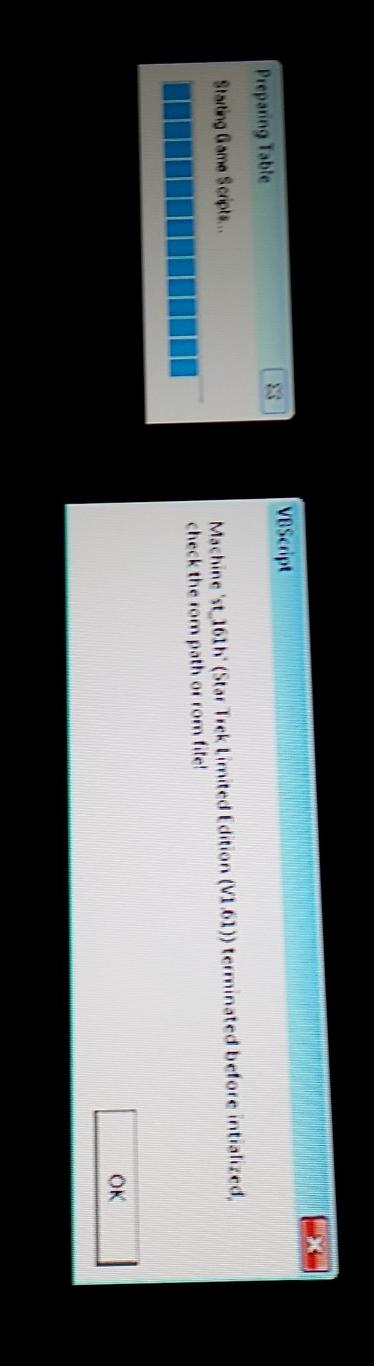
Hello, can I ask for your support ? When selecting and loading VPX Star Trek LE (Hanibal V1.7) I got the error message Machine "st_161h'() terminated before initialized, check the rom path or rom file" It's the kind of error you get when you don't have the correct rom in the rom subdir. But, of course, when starting this table directly within VPX everything is ok so the correct ROM is there and it's working fine so it seems that PinballX is doing 'something'. This is the only table so far giving this problem, other VPX tables start right with PinballX. Here are my ini and log files: I do see a fail in the log file: what I did I deleted the game with the game manager, deleted also all the media-files connected to it and I did add it again to the game manager and added all the media again: same result. Any clue what this could cause? Thank you!
-
Hello, I'm using PinballX for a long time already..before these options where there. I'm messing around with them but they do nothing for me so...what's the purpose of these options? - Import table I tried this one: copied an existing VP9 table file to a test one ((attack from mars.vpt -> test.vpt) ) and added it into the game manager. Pressed this button and pointed to the test.vpt table and runned Pinball X: no changes -Import dB2S I think this one works: I enabled it in the setup 'use dB2s' and with my test table I do see a backglass so...think this works Import rom: ok...pointed it to a rom (in this case a afm rom but I see nothing happening in PinballX. I did found a manual with some guidelines from PBX but I think it was before these options came in , they are not mentioned. Can you explain how to use them? Thanks!
-
Aaah... well: I was looking for Dracula but in fact it was Bram Stokers Dracula...found it as well as Black Rose (overlooked it). Installed Batman Forever: looks great, Thank You!
-
Thank you a lot for making these video's! Great stuff! If possible,m could you do : - Dracula - Batman Forever (Sega) - Black Rose Couldn't find them before so if you can manage to do them, great! Thanks in advance!
-
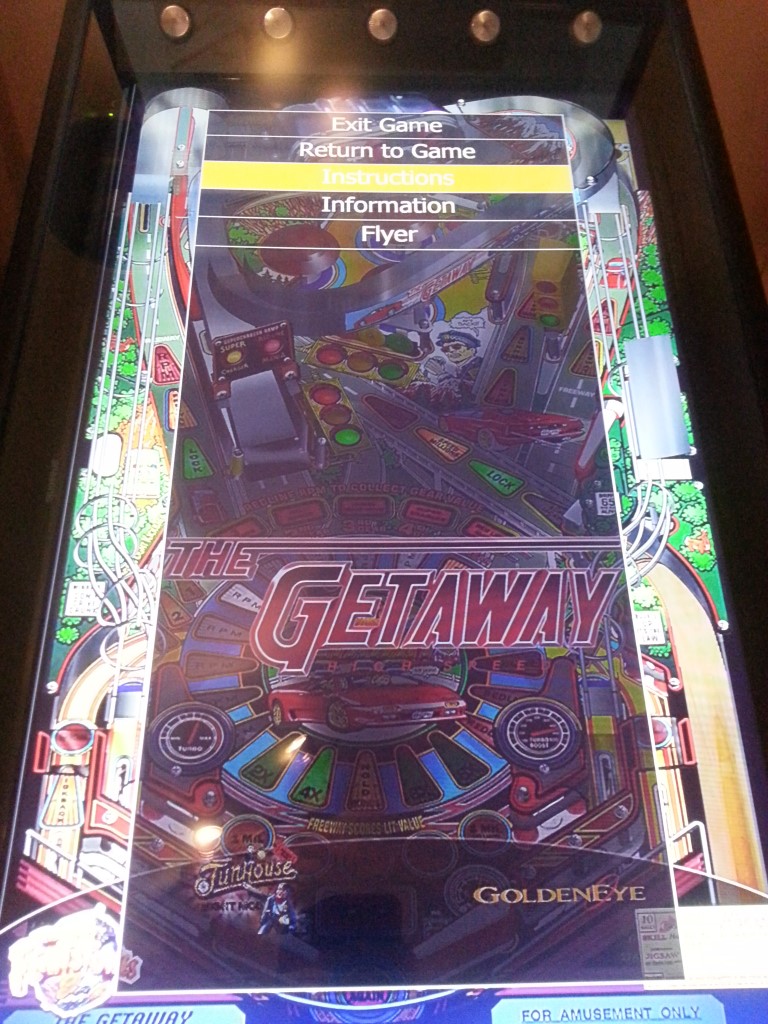
Hello, after re-installing my VP everything works great except the instruction cards when the table started in PinballX is paused. I do see the menu where you can choose exit game, return to game, flyer, some statistics and also instruction cards. When I select it i hear the "boing" and normally i would see the instruction card but now nothing happens. how are instruction cards and tables 'connected' ? Normally with the game-manager the data like playfield video, backglass, flyer and so on appears as a copy in the Visual Pinball group (...\PinballX\Media\Visual Pinball\ .... ) but not the instruction cards. So...how are they linked together, I looked at a lot of XML files but zouldn't find it. Besides that: is it normal that IF it works that when you view the instruction card the dot matrix display (on a 2 screen VP install) will stay in front of the instruction card and therefore blocking it sometimes? thank you!
-
Hello, what can i do with this smll problem: when I'm in a game and want to see the instructions I press the PinballX Pause button and go to instructions. The instructions are being showed but the DMD is always in fornt of that, blocking the view and reading of the instructions. When I press <alt><tab> <tab>.....<tab> and I come to te instructions it will show but when I release the als the DMD will show up again. See attachments, runneing PBX1.92 and VP9.9.1 Thanks[ attachment=17761:2014-12-19 20.29.05 (Medium).jpg]

-
Well, I like the Pause button: of course...you have your best-ball-ever -> phone rings, friends come in, desperate need of a drink....--> PAUSE!! :-) I did put this button on the outside of my cabinet so I can put the table on pause but also watch the flyer etc. As the menu's look very much like the XBMC/Kodi menu's where it is possible to change the menu's by changing the .xml files I hoped it was possible in PinballX as well but couldn't find it. Anyway, thanks for your answer and may-be if someone else knows and wants to share.....
-
Hello, I'd like to edit the pause menu: I'd like to remove the option 'Exit game' from here so the player can't accidentaly exit the game other then in the game itself by pressing the exit button on the cabinet. I tried to find a .xML file where the menu might be but had no luck finding it. is the menu in a XML file and if so, which one and where? Or an other way to modify the menu? Thanks,
-
thank you for the information.
-
thank you for your reply and sharing what you have :-) I don't know but Draco must have made the logo with something? If not PSD then something else I guess?? May-be Draco knows?? /thank you in advance,
-
Hello, when i have a look at the gameex downloadsection i see a lot of logo's in hi-res available for download. However, I'm looking for the PinballX logo in hi-res (the one with or without the ball and the 2 flippers crossed forming an X) so I can make a sticker for my cabinet. is this logo available (pref. in PSD format?) Thank you!


-
[RESOLVED] DirectB2S hidden behind static backglass image
Joppnl replied to retrogamer01's topic in General
Is it with every table? I had also a in-between-backglass when starting a table in pbX, it was that at first i chose a static backglass in the gamemanager and later i found a video of the BG so with help of the gamemanager i changed the backglass to the video. however, when starting the table the static backglass popped up for a short period. Deleting the static backglass in the pbX directory (it makes a copy of the file you point to at the gamemanager and saves it in it's own location) helped me solving this problem (pbX 1.85) different then you have but it might be helping you...... -
Thank you for the EM-sounds!
-
gStAv, thank you very much!! Was only looking for Bad Cats sound and then I found all these other sounds as well, so cool, thank you!! What i do miss however is a couple of EM-sounds which can be used for general EM-machines. is it possible to add them? Thnx in advance!