



|



mekishiko916
-
Posts
9 -
Joined
-
Last visited
Recent Profile Visitors
255 profile views

mekishiko916's Achievements

Member (1/5)
1
Reputation
-
I think you mean "Delete" it from the folder? It worked! thank you so much!!!!
-
I have a 2 screen setup with a PinDMD3 Randomly the default PinballX video stopped working while browsing the wheel All games are VPX, and the PinDMD3 works fine in games (When launching from PinballX or VPX directly) I am on PinballX 6.46 I just want the default pinballX video back on my Pindmd3. now sure what to do. I already re-installed making sure to NOT CHECK the Pin2DMD box, no change. PinballX.ini log.txt SetupWizard.log XDMDlog.txt
-
updated to pinballX 5.54 just now, still the plugins don't show up when I run the plugin manager :/ log.txt PinballX.ini
-
log.txt attached log.txt
-
So weird.... I tried to put PBXmediaplayer.dll in my C:\PinballX\Plugins folder and run the plugin manager and it also doesn't show up. :/
-
Thank you! I am stuck on installing the DOF plugin. When following the instructions on the download page, I copy "DirectOutput PinballX Plugin.dll" to the plugins folder, then run plugin manager, however it doesn't show up. only these 4 show up:
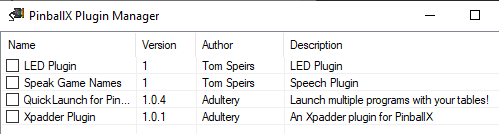
-
Is there a feature to have an LED flash for the START button so my users know that's the button to push to pick a game in PinballX? (Apologies if there is a way to do this or it's been posted, i have been searching for a while and can't find any mention of it)
-
[RESOLVED] No Backglass Video or B2S in pinballX
mekishiko916 replied to mekishiko916's topic in General
Perfect that worked! I didn't know I had to install that codec, I assumed it was working because the playfield videos played. After installing the LAV codec everything worked, including the DMDs in pinballX. Thank you! -
Hi there! Re-vamping my Virtual pin that I built 10 years ago. In PinballX I am unable to get any backglass videos to play. I only have 4 VPX 10.7 tables set up, In the PinballX browser-wheel the Playfield videos show up fine. (The DMD doesn't show up from VPX but I am not worried about that) When I alt-Tab it shows a gigantic-properly-sized black box on my backglass screen....but there is no video playing anywhere (Behind it etc) All of the tables play fine with all 3 screens if I launch them through PinballX or VPX directly. It's just not showing backglass videos when browsing in pinballX. Attached are my config files: PinballX.ini SetupWizard.log
