|



Jdurg
-
Posts
12 -
Joined
-
Last visited
Jdurg's Achievements

Advanced Member (2/5)
0
Reputation
-
Thanks. Will do.
-
Exactly! The router I flashed was also a Linksys WRT54GS model too. Mine was the version 7.0 so I couldn't flash the entire, huge WW-DRT firmware on there, but their "Lite" version which is designed to run on routers with 2MB flash memory or less, still can do a whole ton of things for you. Really gives life to the old router, and the features that it is physically capable of, but which were blocked out by Linksys in order to get you to pay for their other hardware pieces, are 100% functional. On another note, I did make the purchase of the lifetime license about an hour ago. Do you happen to know what the e-mail address/domain is for the key that is supposed to be sent? I'm a little worried because the webpage said an e-mail with the key would follow within a few minutes, but I'm now about an hour post-purchase and haven't gotten anything yet. Concerned that perhaps my ISP had blocked the e-mail as spam, so I want to set the e-mail address/domain up as a safe message so it can get through. Would hate to never get the key simply because my ISP is ornery. Lol.
-
Thanks Draco! Regarding the WiFi, it is no longer an issue now. I had a spare Linksys router lying around that had been used as my main wireless router for the house. When I upgraded my internet package to the highest speed package offered (I work from home for my employment, so my employer pays for my ISP bill), I was required to get a new router as the Linksys I had was quite outdated. When I got all the parts for my cab PC, I didn't want to eat up a slot for a wireless card, nor get an Ethernet card when I had the network connection built into the motherboard. I looked around online and saw something called WW-DRT which is customized firmware that can be flashed on virtually any kind of router. Since it was free, and since I had the old Linksys wireless router standing around, I gave it a try. I flashed the firmware, went and set everything up and made an Ethernet cable to use. (When I bought my house 7 years ago, I had plans to wire an Ethernet outlet in all rooms in the house. I bought a bunch of Cat-5 Ethernet Cable, as well as a bunch of headers and receptacles before realizing how much of a huge pain it would be to fish wire throughout the house. Heh.) So I plugged in the newly flashed Linksys, connected it to my laptop, and then turned off the wireless card in my laptop. Fiddled with the router settings and BAM! I was connected online. I was then able to access both the newly flashed router's access page as well as the main household router's access page at the same time, proving that the setup worked. So right now, I have the flashed router connected to the cab PC via an Ethernet cable, and when I need to transfer files to the cab PC I am able to simply share a folder on my laptop and while upstairs working on the cab PC I'm able to grab any files I need. Made file transfers really easy. Plus, I'm able to access the web from the PC upstairs when I allow access, but at the same time I can cut-off internet access on the PC Cab by just blocking it from my main router. While I have heard the electrical line option for networking, the wiring in my house is pretty old and since I had a completely free option available to me, I went that route. I couldn't be happier. About to go and purchase the lifetime license for GameEX now.
-
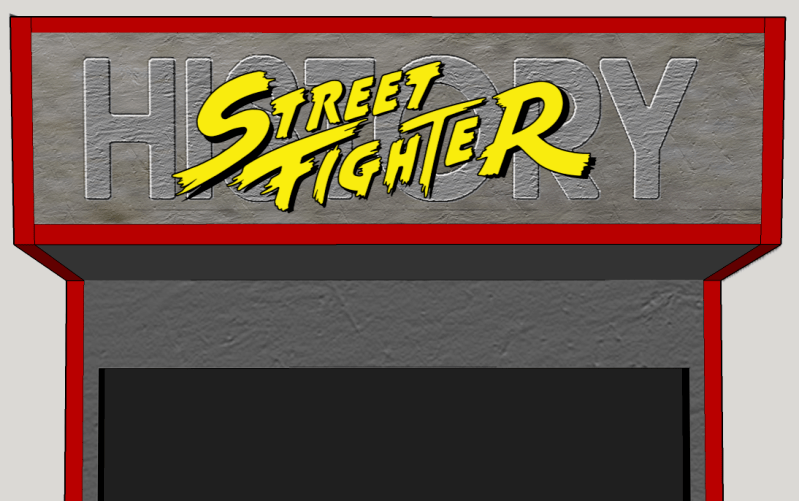
I've got to say, this front end is completely awesome and exactly what I was looking for. As a result of my shoulder surgery and the lengthy recovery process, I am not yet able to start the actual build of the cabinet, but am instead working on the artwork that I'll be using. (I've attached what my P1 side artwork will look like, as well as my Marquee, at the bottom of this post. Still fiddling around with the artwork itself so this isn't the "final" version, but it's pretty close to what it will look like. It was a BEAR trying to vectorize the individual images, but it was worth it as I am able to scale them to the full size, then convert to a raster image for final effects and printing.) So right now I'm beginning to work on the theme that I'll custom create for my cab, but as you can imagine the nag screen in the "free" version of the software makes this a bit tedious. I am definitely going to be getting the full version for use in my cab, but one small question that I haven't found an answer to yet. I am currently testing out how I want GameEX to be set up using my personal laptop. The computer that will run in the cab is a beast that is built upstairs. I was able to flash custom firmware on an old Linksys router that I am using to act as a wireless bridge of sorts, so my computer upstairs, when I've got it turned on, is accessible from my laptop via that wireless router. (The comp upstairs doesn't have a wifi card. Just the standard wired connection on the motherboard to the wireless router. In the final cab, I'll be able to keep the wireless router in the back of the cab where it won't be visible, but where I'll be able to access the cab from my laptop and update things from there if needed. Nice little benefit). If I were to go and purchase the lifetime version of the software, would I be able to use that on both computers? E.g. can I download that full membership on the system on my laptop, then also transfer this to my cab PC upstairs so that I can work on the bulk of the setup and theme design on my laptop, then just tweak things on the computer upstairs? Or, will I need to purchase TWO lifetime subscriptions so that I can run it on my laptop and my cab PC? Hopefully one purchase will be able to be used on my laptop and my cab PC so that I can get the bulk of this configured down here. This software is fantastic, and the ease of configuring everything once you really get to know the processes is incredible.


-
Yup, already got it working but thanks anyway. I realized when I was having all the issues I had, that while having another's files can be a good start, there's still some fiddling to do.
-
Thanks. I've been running the Type X SF4 and SSF4:AE (1p & 2p) for quite a long time on my laptop now and have had zero issues once I got the proper .dll files located in the right directories. Took me a long time to get it all up and running as SF4, in particular, would always freeze when the opening video played. But taking the time to get it all going has been worth it as I've not really had any problems since then. The only issue is with mapping controls in SF4. For some reason, the weak punch and down arrow seem to be "stuck" depending on how I map the keys. I'll have to do some funky work when I wire up the cab and see if there's a way to have the encoder map the buttons/joystick differently just for the one particular game. I'm pretty sure that can be done. What was kind of neat was when I first got SF4 up and running on my computer upstairs (where the cab PC is built and tested out/setup), I also had SF4 running on my laptop downstairs and it was neat seeing them recognize each other while going and being able to play two player.
-
Okay, likely a very stupid question, but I've spent a few hours trying to find an answer using the search function and have come up empty. The only thing I have found is people mentioning using the .lnk method, but this method is not described anywhere. Before I sink money into this front end, I'm using the nag-screen version and trying to get games running here on my laptop. Thus far, I've had no issues with MAME and get all of those games running just fine. It's with my Taito Type X SF4, and Super Street Fighter 4:Arcade Edition games that I just simply can't get to run. These games use a launcher.bat file which is used to get the game running, but no matter what I do, when I get it set up within GameEx and select the game, GameEx minimizes for a bit, then after the screen goes black (which it does when I double click on launcher.bat in Windows Explorer), the GameEX application comes right back to the foreground. If I alt-tab to try and choose the game which should be running, it does not appear anywhere. So it doesn't even look like the game is running. I've done a search here to try and see if there are any answers, but the only things I have found are folks describing that mysterious .lnk method but not explaining what that is. Heh. Would anybody have any assistance on how to get this working, or some tips on using the search function here on the forums to get better results? I'd really like to use GameEX in my actual cab when it's built, but want to test everything out here on my laptop so when I pay for the full version and start getting things setup on the cab's computer, I'll be fully familiar with the software. Many thanks. Edit: Okay, after a few hours of trying just about everything, I finally was able to get it working. Not exactly sure what it was that I did which got it to work, (I was fiddling with multiple different things after looking at a bunch of different posts I found via Google and not the forum search option) but it is working now. I definitely see myself purchasing the full version of the emulator a little later once I get set to put the final touches on my cab's PC. Great work guys.
-
Yeah, I'm using an optimized version of MAME compiled as a 64 bit program. It's simply a matter of MK4 needs a 4.0 or so GHz CPU to run without stutter. The Midway Zeus emulation isn't 100% complete, and it does require a pretty beastly CPU to emulate it without stutter.
-
Well MK4 still stutters a little bit, and I'd like to see if that can be eliminated with a modest overclock. Cooling is not an issue. The sealed liquid cooling system wasn't chosen in order to get a silent system. I chose it because liquid cools incredibly more efficiently than air does, and by using the sealed liquid system the dissipation of heat is performed by very large fans through the radiator as opposed to a small fan on top of the CPU. The larger the fan, the quieter the sound level is at the same volume of air being moved. The PC is not going to be inside a tight case with no airflow. There are still fans on the radiator for the water cooler, and plenty of open air even when the PC is in the cabinet. Cooling is 100% NOT an issue with this PC. (As it is, when running stock, the CPU and GPU temperatures are in the low 20's when fully loaded and running processor intensive tasks for hours at a time). Having additional power with the CPU in no way is a bad thing. Additional heat is only a concern if the computer is sheltered in a small case inside an area with no airflow. With my cab design, that is not the case. I am certainly not going to be going after 4.8-4.9 GHz final speed. Heh. I am looking to get the 4.1-4.2 GHz speeds that my CPU has readily achieved across the web. Not overclocking the processor would be akin to pulling out the 16 GB RAM stick present in the computer and replacing it with a 4 GB RAM stick that's lying around. If the capability is there, why not?
-
Oh definitely. It's not my first rodeo with overclocking. Aside from my home laptop and my work laptop, I don't think I've run a processor at stock speeds in a good 15-20 years. Just amazingly easier to overclock processors these days. Especially with the motherboards out there giving so many more options to overclock specific components instead of like the old days where if you OC'd the CPU, you were also OCing the RAM, the video card, etc. This just happens to be my first processor coming unlocked from the factory.
-
Thanks guys. I definitely think I will be moving forward with GameEX as the front end. Hopefully my job's work requirements will lighten up soon so I can spend more time fiddling with the new computer. Want to get it overclocked as much as I can before I start fiddling with software installation, etc.
-
Hey guys. I'm obviously new here, and I'm hoping to get some questions answered. I am currently in the process of designing an arcade cabinet that will be a two player Street Fighter cabinet, titled "Street Fighter History". I've been working on the art for the cab and am almost done with that. (I've got a long post in the BYOAC forums). I've got the PC I'll be using for this already built. (It's a pretty hefty system with an i7 processor at 3.9 GHz, a 760 series graphics card, etc. etc. running Windows 7-64 bit Professional). The cab will host all of the arcade Street Fighter games from SF1 up through SF4:AE which are the hacked actual arcade games made to run on Windows platforms. They use the loader.exe files to play the game. Anyway, I am now looking into the front end for this system and am trying to decide between Hyperspin and GameEX. Hyperspin just seems a bit too complex for my needs, and the folder style setup in GameEX seems to be what I am looking for. Especially since you can use multiple "icons" for different games. I'll have the first icon be for my Street Fighter Games, then possibly a second one for Mortal Kombat Games, and other icons for vertical games, beat-em ups, etc. What I'm really wondering is the following: 1): For the Street Fighter Games, in many cases there are multiple revisions for each game. I was wondering if it would be possible under the main "Street Fighter" section, to have each game in the series listed, then also have the opportunity to pick what revision of the game you want to play in there. Basically, would I be able to have it so that if I simply clicked on "Street Fighter II" it will load up the newest revision of the game, but if I did something else it would open up a list of different revisions I could choose from? 2): Most of the SF games will be run in MAME with the game settings and HLSL settings and everything else set up in the game/driver .ini files. When I run the games in MAME, will GameEX be making any modifications to the .ini files or will it simply move to the background and let MAME run the game? 3): With SF4, I have three versions all running using a loader.exe file. Can I have these all in the same "List" as the other SF games that run in MAME? Are there any issues I should be aware of with running these games? I know that some have had problems with GameEX restoring to full screen after the game is launched, and vaguely recall hearing something that the actual .exe that is loading the game needs to be identified as the active process so GameEX knows when to return to full screen. 4): I would like to be able to shutdown my computer from within the front end. Would it be possible to have an "emulator" simply point to a batch file that's created which when run shuts down the system? Will this cause any issues in GameEX if I have Windows setup to close any open software when this batch file runs? If this is safe to do, I think it would be great as I'd create a custom icon for this "Shutdown Emulator" which can be chosen to turn off the cab. 5): Can I have multiple copies of the same emulator within GameEX? E.g. if I put all my SF games in one MAME folder, then in a separate folder in the hard-drive put the MK games, etc. etc. I'm pretty sure I can, but I just want to be sure. I'm still tweaking the new PC I put together for this cab, and haven't yet started to tinker with the overclocking. (Have a liquid cooled, fully sealed system from Corsair as my cooling system, and the CPU stays super cool when I've hard tested it by running SF4, MK4, and all of my SF games with HLSL on for an extended period of time. I use HLSL on my laptop which I'm currently posting from, but after five or ten minutes it stutters a lot because the GPU gets overheated and throttles. Or it runs out of RAM. Regardless, I saw none of this on the pretty beefy videocard I have in the new PC). Looking forward to working with GameEX if I decide to use this as my front-end. Just kind of wish there were more pictures showing what options there are for setups instead of all the videos out there. Would be nice if the wiki for this software had detailed photographs for each of the pages and gave a good description of what is possible. Many Thanks.