



|



Lieutenant Dan
-
Posts
4 -
Joined
-
Last visited
Lieutenant Dan's Achievements

Member (1/5)
0
Reputation
-
Looks great! I really like the colors and minimalism. Nice and clean. I would consider using this theme if you removed the light blue box lines around the artwork/vids/snaps. Just my $0.02
-
[RESOLVED] Choosing Which Artwork Displays in Each Location
Lieutenant Dan replied to Lieutenant Dan's topic in General
Thanks for the response. I did the following to achieve what I described above: Image Snap Path: [box Art Path] Backgrond Snap Path: [blank] Video Snap Path: [Video Path] Title Snap Path: [blank] Box Art Path: [box Art Path] Cart Path: [Cart Path] Manual Path: [Manual Path] It's working just how I want it to now! -
[RESOLVED] Choosing Which Artwork Displays in Each Location
Lieutenant Dan posted a topic in General
Could someone please explain to me how I can tell GameEx to display specific artwork in certain locations? I am not trying to accomplish anything too fancy - I just want GameEx to display the game box below the video snap like so (see attachment).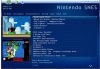
-
Hi guys! Loving the software, Tom. Question: Why are my recently played emulator games showing at the top of my rom list? For example, I have a list of 725 games, sorted alphabetically. Everything looks great until I play a game. After I play a game, there is a new entry at the top of that list. If I have played only Super Mario and Earthworm Jim, my game list would look like this... Super Mario Earthworm Jim [blank space] 2020 Baseball 3 Ninjas etc etc The played games retain their original entry in the main list, so my game count will show a total of 727 games using the above example. Is there a way to disable this? Is this expected behavior?
